iPhone 11 LCD Display Replacement in Al Khobar
iPhone 11 LCD Display Replacement in Al Khobar for cracked glass, lines, a black screen or touch that stops working. We check your phone free and tell you what it needs. You decide before any work starts, and your photos and chats stay on the phone.
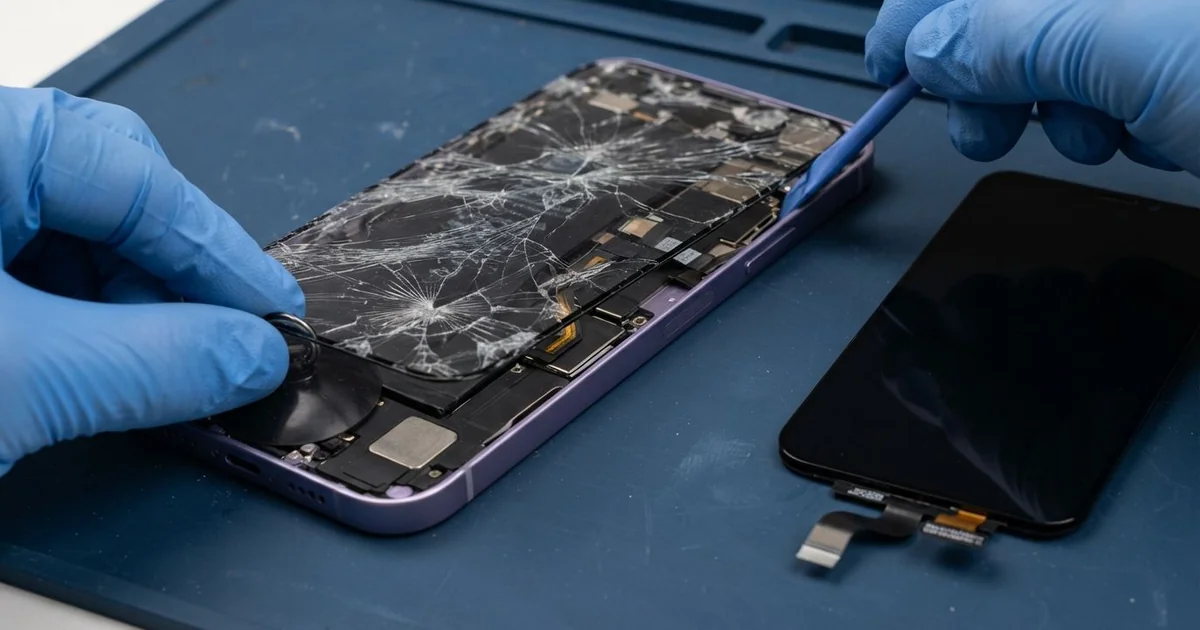
iPhone 11 LCD Display Replacement in Al Khobar fixes a cracked, dark or unresponsive screen. We check it free, then fit a complete new screen, with the glass and display as one part. We move the small sensor parts across, test Face ID and touch, and most jobs are done the same day.
An iPhone 11 broken screen shows up in a few ways. The glass cracks into a web from one corner, or lines run down the display. Other phones look fine but ignore your finger in one area.
It's better not to wait. Small glass splinters cut fingers, and cracks let dust, sweat and water inside. A dark screen also makes it much harder to back up your photos before anything else goes wrong.
Not every fault needs a new part. A thick or badly fitted screen protector can block touch near the edges. After a drop, the screen cable can also come loose, and we fix that by refitting it.
Cracked glass, lines and black patches are different. On this model the glass and the display are joined as one part, so the glass can't be swapped alone. An iPhone 11 LCD display replacement puts in the whole new screen, and that fixes all three.
How Kabayan Center Replaces an iPhone 11 LCD Display
We fix these screen faults on this phone.
- Cracked or shattered front glass
- Lines, a pink tint or a flickering picture
- A black screen while calls and sound still work
- Touch that doesn't respond in one area, or ghost taps that open apps
- A dark patch or bright spot that grows from the edge
- A screen lifting from the frame after a drop or a swollen battery
Here is how an iPhone 11 screen replacement works with us, step by step:
- We check the phone free and test what still works: sound, cameras, charging and Face ID.
- We tell you what it needs, and you decide before any work starts.
- We take out the two tiny screws beside the charging port and warm the edges to soften the seal.
- We lift the screen slowly with a suction cup and a thin pick, then disconnect the battery first.
- We move the earpiece and its small sensor cable to the new screen, so Face ID and calls keep working.
- We connect the new screen and test touch, brightness, colour and the front camera before closing.
- We fit a fresh seal, press the screen evenly and let you check the phone yourself.
Have a different phone? Our phone screen replacement service covers other models, with much the same steps. Customers come to our shop on King Fahd Road from Dammam and Dhahran too.
How an iPhone 11 Screen Breaks: 3 Real Cases
Dropped face down in a car park
A customer came to us after the phone slipped from a lap while getting out of a car. It landed face down on rough concrete. "It rings, but the screen is just black," they told us.
They had searched for iPhone Screen Replacement in Al Khobar while still in the car park. A face-down drop puts all the force on the glass. That's why the display behind it often breaks too.
When we opened it, the display had a dark patch and two bright lines. The cable was firmly in place, so the screen itself was broken. We did the iPhone 11 LCD display replacement and moved the earpiece and sensor cable across.
During the final test we turned the phone over.
The back glass had cracked in the same fall, with a sharp edge near the camera. So we also did an iPhone back glass replacement before handing it back. Broken back glass cuts hands and lets dust reach the camera.
The phone went home with a clear screen and a smooth back. We suggested a case with a raised edge, so the next fall lands on rubber, not glass.
A swollen battery lifted the screen
We often see this with phones that charge all night under a pillow. A nurse on night shifts noticed a gap along one side of the screen. "It's coming open like a book," the nurse said.
The nurse had looked up mobile repair in Al Khobar and asked for a new screen. On this phone, the battery sits right behind the display. Heat and long charging make an old battery swell, and it pushes the screen up from inside.
We found the battery puffed up and a faint pressure mark on the display. The screen itself still lit up and responded to touch.
A swollen battery is not safe to use, even when it still works. So we did a phone battery replacement first.
The display had a pressure mark but no crack. The nurse chose to keep the old screen for now, and we sealed it back into the frame. The faint mark stayed, but the screen now sits flat and the phone is safe again.
We noted that an iPhone 11 LCD display replacement can still be done later. The nurse now charges the phone on a table, not under a pillow.
A small crack, then a wet gym bag
This one starts with a tiny crack in a corner. A student had used the phone like that for months, because it still worked. Then a water bottle leaked inside a gym bag.
Water got in through the crack. By the next morning, the phone was tapping and typing by itself.
The student had put it in rice overnight, but the ghost taps did not stop. Rice only dries the outside, while the water stays on the board.
We opened it and found water marks under the display and white crust near the screen cable. The water had gone further than the screen. So we did a water damage repair on the board before anything else.
We also explained that a wet phone should never go on charge. Charging while wet is what turns a small leak into rust on the board.
Once the board was clean and dry, we did the iPhone 11 LCD display replacement. Every tap landed in the right place again.
Now the student fixes small cracks early, before water finds a way in. A simple screen protector would have kept that corner sealed.
How to Keep Your iPhone 11 Screen Safe
- Use a case with a raised edge, so the glass doesn't hit the floor first.
- Choose a thin screen protector that fits the curved corners, so touch still works at the edges.
- Keep the phone off the car dashboard in summer. Heat harms the battery and the screen seal.
- Fix small cracks early, before sweat, dust or water get inside.
- Stop using the phone if the screen starts lifting. That usually means the battery is swelling.
- Back up your photos while the screen still works, so a dark screen never costs you your files.
- Take it for phone repair in Al Khobar at the first line or dark patch, since both spread quickly.
Related services
- Charging port repair for a phone that charges loosely or not at all
Questions about this repair
Ask us anything else on WhatsApp
we answer during shop hours.