iPhone 12 Battery Replacement in Al Khobar
iPhone 12 Battery Replacement in Al Khobar for a phone that is empty by the afternoon or switches off early. We test your battery free and tell you what it needs. You decide before any work starts, and nothing on the phone is wiped.
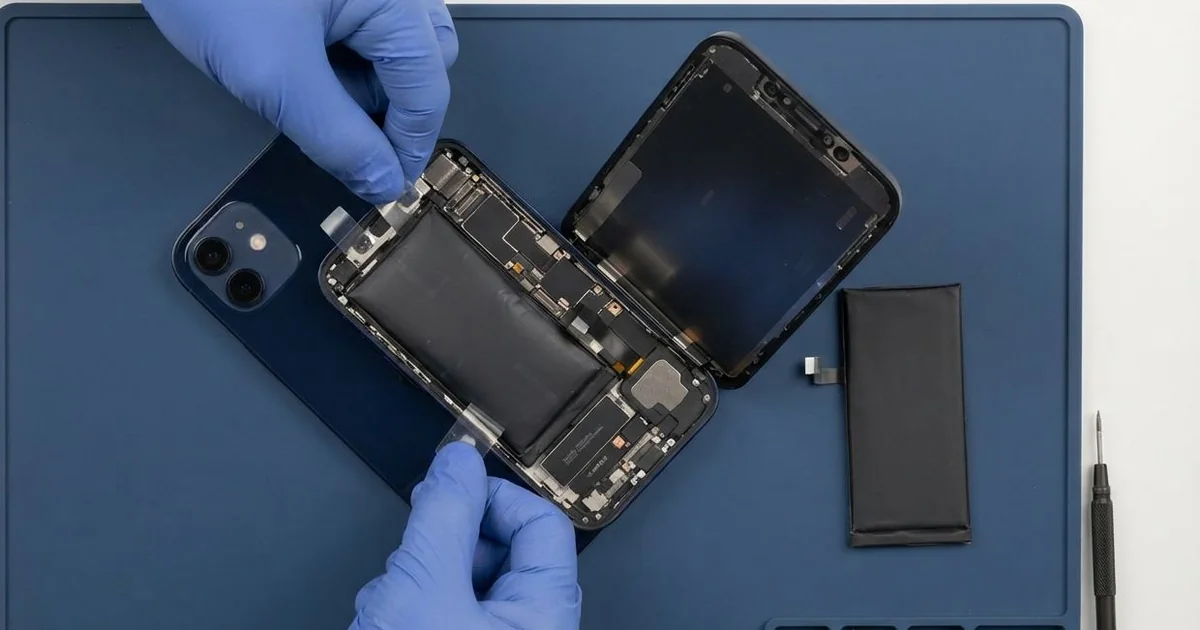
iPhone 12 Battery Replacement in Al Khobar fixes a phone that drains fast, runs hot or shuts down early. We test the battery health free, then fit a new battery inside. We reseal the screen, test cable and wireless charging, and most jobs are done the same day.
An iPhone 12 battery draining fast is the sign most people notice first. The phone leaves home full in the morning and needs a charger by mid-afternoon. Other phones open the camera slowly, reload apps all the time or feel warm in a pocket.
It's better not to wait. A worn battery can't give the power the phone asks for, so the phone slows itself down to stay on. An old battery can also swell, and then it pushes the screen up and out of the frame.
Not every drain comes from the battery itself. An app stuck in the background or a poor cable can look the same, so we check those first.
When the battery itself is tired, an iPhone 12 battery replacement is the real fix. The phone opens from the front, and the battery sits under the screen. Stretch tabs hold it in place, so it comes out without bending.
How Kabayan Center Replaces an iPhone 12 Battery
We fix these battery faults on this phone.
- Fast drain, even on a quiet day with few apps
- Sudden shutdowns while the screen still shows charge
- A slow camera, or apps that freeze and reload
- A phone that runs hot on the charger or the wireless pad
- A swollen battery lifting the screen at one edge
- A low battery health reading, or a message asking for service
Here is how an iPhone 12 battery replacement works with us, step by step:
- We read the battery health free and test charging with our own cable.
- We tell you what it needs, and you decide before any work starts.
- We take out the two tiny screws beside the Lightning port and warm the screen edges.
- We open the screen sideways and disconnect the battery before anything else.
- We pull the stretch tabs out slowly, so the old battery comes free with no prying.
- We fit the new battery, connect it and test cable charging, wireless charging and power.
- We fit a fresh seal, press the screen down evenly and let you check the phone yourself.
Have a different phone? Our phone battery replacement service covers other models with the same care. Customers come to our shop on King Fahd Road from Dammam and Dhahran too.
Why an iPhone 12 Battery Wears Out: 3 Real Cases
Wireless charging every night in a thick case
We often see this with phones charged on a magnetic pad in bed. A teacher charged the phone every night through a thick leather case. "By lunch I'm already at half," the teacher told us.
The teacher had searched for iPhone Battery Replacement in Al Khobar, sure the phone was faulty. Wireless charging makes more heat than a cable. A thick case and a soft pillow trap that heat for hours, night after night.
We read the battery health and found it well below normal. The battery wasn't swollen, but it was simply worn out from the heat. We did the iPhone 12 battery replacement and ran a long drain test on the bench.
The new battery held its charge through the test. The phone stayed cool on the wireless pad too, once the case came off.
We suggested charging on a table, not a pillow, and taking off the thick case at night. The pad itself was fine.
The teacher also turned on the setting that slows charging overnight. That keeps the battery from sitting at full charge for hours. Now the phone gets through a full school day again.
A hotspot for the laptop, plugged in on the dashboard
This one starts in a hot car. A field engineer used the phone as a hotspot for a laptop, plugged in all day on the dashboard. The phone grew hot enough to show a temperature warning.
One morning the screen had lifted at one side. "It looks like it's opening by itself," the engineer said. They had looked up mobile repair in Al Khobar on the way to a site.
Heat, charging and a hotspot together are hard on any battery. We opened the phone and found the battery swollen like a small pillow. A swollen battery is not safe to use, even when it still works.
We took it out at once and fitted a new one. The screen now sat flat again, but a faint pale mark stayed on the display where the battery had pressed.
The engineer chose to keep that screen for now and plan a phone screen replacement later. The mark only shows on white pages.
We suggested a small travel router for the laptop instead of the phone hotspot. A vent mount also keeps the phone in the cool air from the AC.
A dip in the pool, then drain that wouldn't stop
A customer came to us after a child dropped the phone into a pool. It came out working, so the family dried it and carried on. Days later, the battery was draining fast and the phone felt warm while switched off.
This phone is water-resistant when new. But the seal weakens with age, heat and drops, and this one had let water in. A small leak can reach the board and cause a tiny short.
That short was pulling power all the time, even with the screen off. We opened it and found white crust near the battery connector. We did a water damage repair first, cleaning that area under the microscope.
Then we tested the old battery. It had been drained and heated so often that its health had fallen. We did the iPhone 12 battery replacement, and the drain dropped back to normal.
The phone now lasts the day again.
We reminded the family that pool chlorine eats into metal fast. A quick check soon after a dip is better than waiting for signs. Rice and a hair dryer only dry the outside, not the board.
How to Keep Your iPhone 12 Battery Healthy
- Keep the phone out of the sun and off the car dashboard. Heat wears the battery fastest.
- Take off a thick case when you use a wireless pad, and charge on a hard surface.
- Charge between 20% and 80% when you can, and avoid running it to zero.
- Turn on the setting that slows charging overnight, so the battery doesn't sit at full.
- Use a good cable and charger, since a poor one can heat the battery.
- Get phone repair in Al Khobar at once if the screen starts to lift.
Related services
- Charging port repair for a cable that is loose or only charges at an angle
- Motherboard repair for a phone that won't power on even with a new battery
Questions about this repair
Ask us anything else on WhatsApp
we answer during shop hours.