iPhone 12 Charging Port Repair in Al Khobar
iPhone 12 Charging Port Repair in Al Khobar for a cable that wobbles, falls out or does nothing. We look inside the port free and tell you what it needs. You decide before any work starts, and your photos and chats stay on the phone.
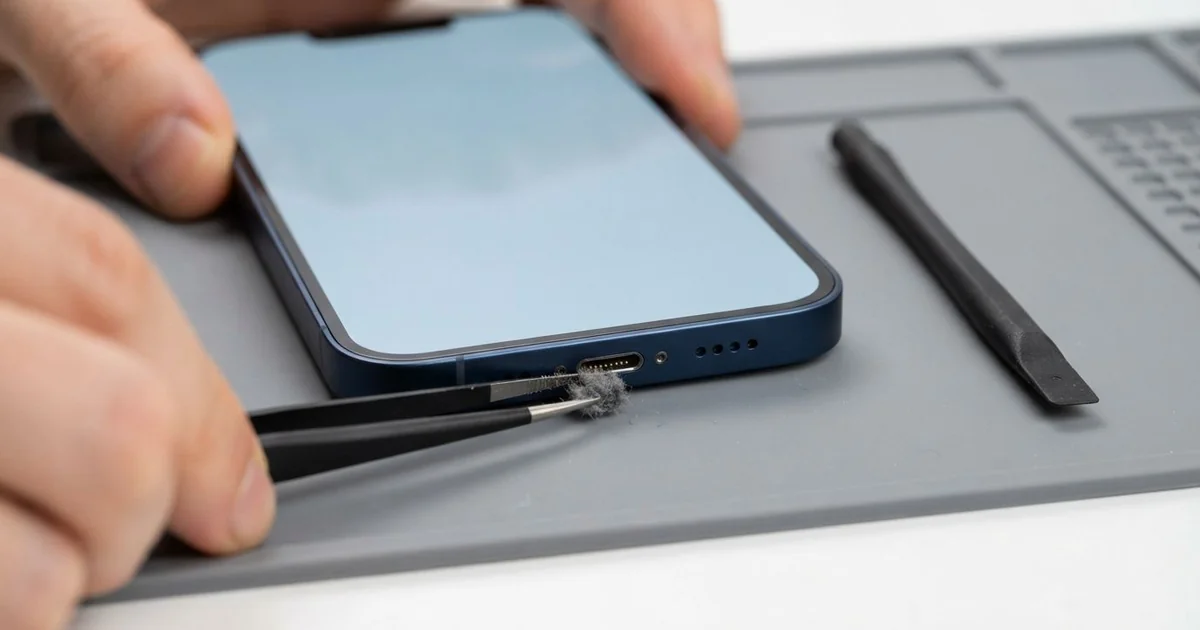
iPhone 12 Charging Port Repair in Al Khobar fixes a phone that charges loosely, slowly or not at all. We check the Lightning port free, then clean it or fit a new port part. We test charging, the cable fit and the bottom mics, and most jobs are done the same day.
An iPhone 12 not charging by cable often still charges on a wireless pad. That tells us the battery is alive and the problem sits in the port. Other signs are a cable that only works at one angle, or a charging sign that flickers.
Many owners simply switch to the wireless pad and forget about the port. That works for a while, but it's slower and makes more heat. And when you need a quick charge before a trip, the cable still won't help.
It's better not to wait. A loose plug makes tiny sparks that slowly burn the pins. Dirt and damp inside the port can also turn into green rust over time.
Many ports need no new part at all. Lint and dust pack into the bottom, and we pick them out with fine plastic tools. Bent, burnt or rusted pins mean we replace the whole port part, which also holds the bottom mics.
How Kabayan Center Repairs an iPhone 12 Charging Port
We fix these charging faults on this phone.
- A cable that wobbles, falls out or only charges at one angle
- No cable charging, while the wireless pad still works
- Charging that keeps stopping and starting
- A message that the accessory is not supported
- A liquid warning that stays after the phone is dry
- Callers who can't hear you, because the bottom mics share the same part
Here is how an iPhone 12 charging port repair works with us, step by step:
- We look into the port under a bright lamp and test charging with our own cable.
- We tell you what it needs, and you decide before any work starts.
- We clean out lint and dust with fine plastic tools, never with metal pins.
- If the pins are damaged, we open the screen from the front and disconnect the battery.
- We lift out the loudspeaker and the parts that sit over the port cable.
- We fit the new port cable, then test charging, the cable fit and both bottom mics.
- We close the phone with a fresh seal and let you check it yourself.
Have a different phone? Our charging port repair service covers other models with much the same steps. Customers come to our shop on King Fahd Road from Dammam and Dhahran too.
Why an iPhone 12 Stops Charging: 3 Real Cases
Charging on the wireless pad, ignoring the port
A customer came to us after months of charging only on a magnetic pad. "The cable stopped working, so I just stopped using it," they said. Then they needed a fast charge before a long flight, and the pad was too slow.
They had searched for iPhone Charging Port Repair in Al Khobar, sure the port was broken. A phone carried in a jeans pocket collects lint every day. Each time a cable goes in, it presses that lint deeper into the port.
Under our lamp, the bottom of the port held a hard, flat layer of grey fluff. The cable could only reach halfway in, so its pins never touched. We picked the layer out slowly with plastic tools.
After the cleaning, the cable clicked in with a firm sound. The phone charged at full speed on the first try. That iPhone 12 charging port repair needed no part.
We showed the customer how to look into the port with a torch. A quick look every few weeks stops the lint from building up again.
The wireless pad still has its place at night. But a clean port means a fast charge is always there when you need it.
Cement dust from a building site
This one starts on a construction site. A site supervisor kept the phone in a shirt pocket all day. Fine cement dust settled into the port, and the damp morning air made it set hard.
"It charges for a minute, then stops," the supervisor told us. They had looked up mobile repair in Al Khobar after a new cable made no difference.
The dust had set like a thin crust on the pins. Some pins were scratched, and two had dark burn marks from the loose contact. Cleaning alone couldn't fix that, so the iPhone 12 charging port repair needed a new port cable.
During testing, we also read the battery health. The many stops and starts had worn the battery more than its age suggests. So we did a phone battery replacement as well, after the supervisor agreed.
The phone now charges cleanly and lasts a full shift. We suggested a case with a rubber flap over the port for site work.
A zip pocket also keeps out most of the dust. It's a small habit, but it saves the pins from wearing out again so soon.
Salty air in a flat by the sea
We often see this with phones that live near the water. A customer in a seaside flat near the Corniche left the window open most evenings. The phone charged on the windowsill every night.
Over many months, the salty, damp air reached the open port. A green crust grew slowly on the pins. Then one morning, the phone showed a liquid warning and refused to charge.
We opened the phone and found rust on the port cable and white salt near the board. So we did a water damage repair on that area first. Then we fitted a new port cable.
Cable charging came back, and the warning was gone. Calls were clear again through the new bottom mics.
But the salt had also reached the loudspeaker next to the port. Its sound stayed a little rough at full volume. The customer chose to keep it for now, since calls and alarms still work.
The phone now charges on a shelf away from the window. That one change keeps the salt air off the pins. We also suggested a quick port check every few months.
How to Keep Your iPhone 12 Charging Port Working
- Look into the port with a torch every few weeks, and bring it in if you see lint.
- Never clean the port with a metal pin, a needle or a toothpick.
- Use the cable now and then, even if you charge mostly on a wireless pad.
- Keep the phone in a zip pocket or a flap case on dusty work sites.
- Charge away from open windows near the sea, where salty air reaches the pins.
- Never charge a phone that shows a liquid warning. Let it dry and get it checked first.
- Get phone repair in Al Khobar as soon as the cable needs a special angle.
Related services
- Motherboard repair for a phone that still won't charge with a new port
- Phone screen replacement for a cracked or dark screen
Questions about this repair
Ask us anything else on WhatsApp
we answer during shop hours.