iPhone 12 LCD Display Replacement in Al Khobar
iPhone 12 LCD Display Replacement in Al Khobar for cracked glass, a green line or a dark screen. We look at your phone free and explain what it needs. You decide before any work starts, and your photos and chats stay on the phone.
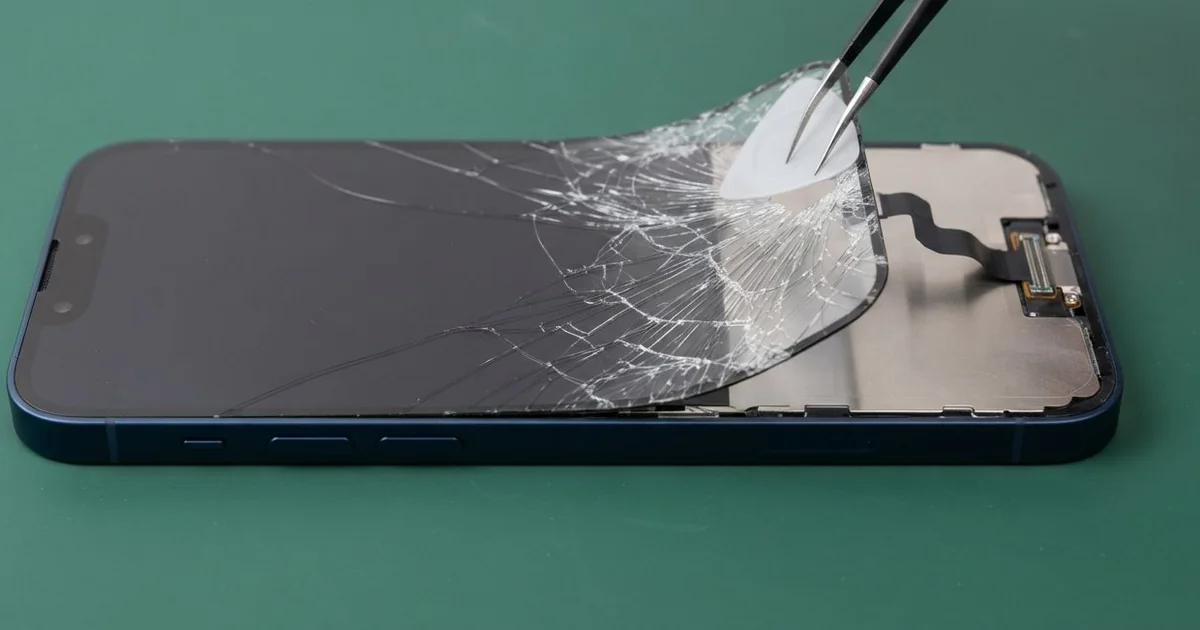
iPhone 12 LCD Display Replacement in Al Khobar fixes a cracked, dark or glitchy screen on this flat-edged phone. We check it free, then fit a complete new screen, with the glass and display joined as one part. We test touch, Face ID and brightness before you leave, and most jobs are done the same day.
An iPhone 12 broken screen does not always look smashed. Some phones show one thin green line from top to bottom, or a black spot that slowly spreads. Others look perfect but ignore your finger in one corner.
It's better not to wait. A crack lets dust and sweat inside, and the seal that keeps water out stops doing its job. Lines and dark spots also tend to grow until the whole screen goes black.
Some faults need no new part at all. After a drop, the screen cable can work loose inside the phone. A thick or badly fitted screen protector can also block touch near the edges, so we check both first.
Cracked glass, lines and dark spots are different. On this model the glass and the display are joined as one part, so the glass can't be changed alone. An iPhone 12 LCD display replacement fits the whole new screen, and that fixes all three faults together.
How Kabayan Center Replaces an iPhone 12 LCD Display
We fix these screen faults on this phone.
- Cracked or shattered front glass, even when the picture still works
- A green, white or pink line running down the screen
- A black spot or ink-like patch that spreads from a crack
- A dark screen while the phone still rings and vibrates
- Touch that misses in one area, or taps that happen by themselves
- A screen lifting from the flat frame after a drop
Here is how an iPhone 12 screen replacement works with us, step by step:
- We check the phone free and test what still works: sound, cameras, Face ID and charging.
- We tell you what it needs, and you decide before any work starts.
- We take out the two tiny screws beside the Lightning port and warm the screen edges.
- We lift the screen with a suction cup and a thin pick, then open it sideways like a book.
- We disconnect the battery first, then the screen cables under their small metal cover.
- We connect the new screen and test touch, colour, brightness and Face ID before closing.
- We fit a fresh seal, press the screen down evenly and let you check the phone yourself.
Have a different phone? Our phone screen replacement service covers other models with the same careful steps. Customers come to our shop on King Fahd Road from Dammam and Dhahran too.
How an iPhone 12 Screen Gets Broken: 3 Real Cases
A selfie stick that let go at the Corniche
This one starts with a family photo by the sea. The spring clip on an old selfie stick slipped open, and the phone fell onto paving stones. "There's a green line, and the glass feels sharp," the owner told us.
They had searched for iPhone Screen Replacement in Al Khobar on a friend's phone that same evening. A fall onto stone hits one corner hard. The shock runs across the glass and often breaks the display layer behind it.
When we opened the phone, the display had cracked from the corner inwards. The cable sat firmly in place, so refitting it would not help. We did the iPhone 12 LCD display replacement and tested touch across the whole surface.
Then we turned the phone over and saw a second problem. The back glass had a web of cracks around the camera bump.
So we also did an iPhone back glass replacement. Loose glass there cuts fingers and lets sand reach the lenses. The phone went home smooth on both sides.
We suggested a stick with a screw clamp, not a spring clip. A case with raised edges would also take the next knock instead of the glass.
Sat on in a back pocket during a long drive
A common case: a phone kept in a back trouser pocket on a long drive to work. A sales rep sat on it for an hour in the car. By the time they arrived, a black patch covered the top half of the screen.
The rep had looked up mobile repair in Al Khobar during a coffee break. The glass had no crack at all, which confused them. But steady pressure can break the thin display layer without marking the glass.
When we opened it, the display had a pressure mark under the glass. The aluminium frame was also bent a little near the side buttons. We did the iPhone 12 LCD display replacement and the picture came back clear.
The frame was harder. We eased the bend back as far as was safe, but a faint gap stayed at one corner.
Pushing a bent frame too far can crack the new screen. So we stopped there and explained the choice.
The phone works well, and the gap is thin. The rep now keeps the phone in a front pocket or on the car mount.
A small crack and the steam of a restaurant kitchen
We often see this with phones used at work in hot, wet places. A cook had used the phone with a tiny crack in one corner for weeks. Then the screen started opening apps by itself during a busy shift.
Steam from the stoves had found its way in through the crack. Grease and moisture built up under the glass, right next to the touch layer. "It types messages I never wrote," the cook said.
When we opened the phone, we found a damp film under the display and white spots near the screen cable. The moisture had reached further than the screen. So we did a water damage repair on the board first, cleaning and drying it.
Once the board was clean, we did the iPhone 12 LCD display replacement. The ghost taps stopped, and every touch landed in the right place.
We also explained that the phone's water seal is gone once the glass cracks. The cook now keeps the phone in a locker during shifts. A small crack fixed early would have kept the steam out.
The new screen is sealed, but care still matters in that heat.
How to Keep Your iPhone 12 Screen Safe
- Use a case with a raised lip, so the flat glass doesn't hit the floor first.
- Pick a thin screen protector that fits the edges well, so touch still works there.
- Keep the phone out of back pockets, where sitting down can press the display.
- Fix a small crack early, before sweat, steam or water get inside.
- Keep the phone off the car dashboard in summer, since heat weakens the screen seal.
- Back up your photos while the screen still works, so a black screen never costs you your files.
- Get phone repair in Al Khobar at the first line or dark spot, because both tend to spread.
Related services
- Phone battery replacement for a phone that drains fast or lifts its screen
- Charging port repair for a cable that is loose or only charges at an angle
Questions about this repair
Ask us anything else on WhatsApp
we answer during shop hours.