iPhone 12 mini LCD Display Replacement in Al Khobar
iPhone 12 mini LCD Display Replacement in Al Khobar for a cracked, lined or black screen. We check it free and tell you what it needs. You decide before any work starts, and your photos and chats stay on the phone.
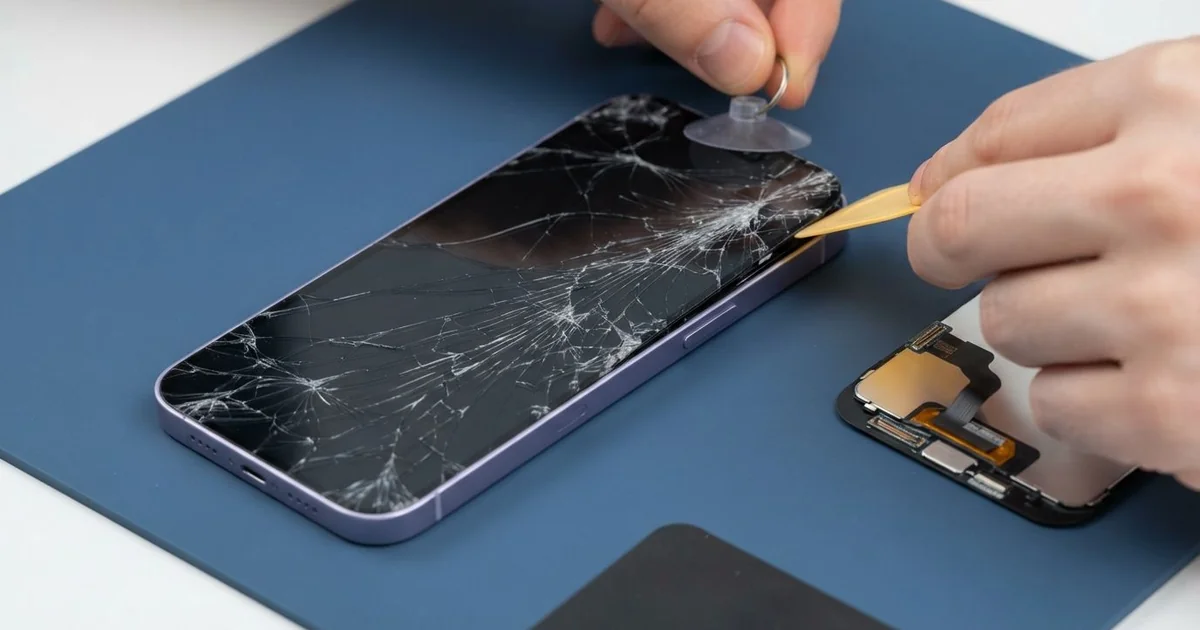
iPhone 12 mini LCD Display Replacement in Al Khobar fixes a cracked, lined or black screen. We check the phone free, then fit a complete new screen with the glass and display in one part. We test touch, colour and Face ID, and most jobs are done the same day.
The 12 mini is small and light, with flat edges all round. Its glass sits flush with the frame, so an edge or corner drop hits the glass directly. An iPhone 12 mini broken screen often starts as a crack from one of those corners.
Sometimes the glass looks whole, but the picture fails behind it. You may see green lines, a black stain that spreads, or a screen that stays dark while the phone rings.
It's better not to wait. Cracks let in sweat, dust and liquid, and the screen stops sealing the phone. A stain or line also tends to grow until the phone is hard to use or back up.
A few faults need no new part, like a screen cable knocked loose in a fall. Cracks, lines and stains need the new part, because the glass and display are bonded together. An iPhone 12 mini LCD display replacement swaps that whole part and fixes them at once.
How Kabayan Center Replaces an iPhone 12 mini LCD Display
These are the screen faults we fix on the 12 mini.
- Cracked or shattered front glass, often from a corner
- Green or white lines across the picture
- A black stain that grows from one spot
- A black screen while calls and sound still work
- Dead touch in one area, or taps that land in the wrong place
- A screen lifting at one edge after a fall
Here is how an iPhone 12 mini screen replacement goes, step by step.
- We check the phone free and test Face ID, the cameras, sound and charging.
- We explain what it needs, and you decide before any work starts.
- We remove the two tiny screws beside the charging port and warm the screen edges.
- We lift the screen with a suction cup, open it to the side like a book and disconnect the battery.
- We fit the new screen, keeping the earpiece and front sensors above it clean and safe.
- We test touch, colour, brightness, Face ID and the front camera before closing.
- We fit a fresh seal, press the screen down evenly and let you check it yourself.
Have a bigger phone or another model? Our phone screen replacement service covers it with much the same steps. Customers come to our shop on King Fahd Road from Dammam and Dhahran too.
How an iPhone 12 mini Screen Breaks: 3 Real Cases
Trodden on at a football pitch
This one starts at an evening football match. A player left the phone in a jacket on the side of the pitch. Someone stepped on the jacket in boots with studs.
"The front is cracked and the back feels rough," the player told us. The player had searched for iPhone Screen Replacement in Al Khobar on the way home.
A stud presses a lot of weight into one small point. On a small phone, that point covers a large part of the screen. The front glass cracked in a star, and the picture had a black stain beside it.
We did the iPhone 12 mini LCD display replacement, and the picture came back bright and even. Then we turned the phone over to check the back.
The glass back had cracked from the same press, with sharp edges near the camera. So we also did an iPhone back glass replacement, since cracked back glass sheds splinters and lets dust in.
Both sides went home smooth and whole. The player now keeps the phone in a zip bag in the car during matches.
A sturdy case with a raised lip also helps. It spreads the weight if someone does step on it.
A corner drop onto a tiled floor
A customer came to us after the phone slipped out of a hand in the kitchen. It hit the tiles on one corner and spun away. The glass cracked from that corner, and touch died along the bottom.
"I can't even type my passcode," they said. They had looked up mobile repair in Al Khobar on a laptop. The phone was locked, with chats they needed for work.
Flat edges look clean, but they leave the glass corners exposed. A corner hit sends the shock straight into the glass and the touch layer behind it.
We did the iPhone 12 mini LCD display replacement, and touch worked from edge to edge again. But the earpiece was now quiet on calls. Fine glass dust from the crack had been pushed into the earpiece mesh.
We cleaned the mesh carefully, and calls became clearer. Still, the earpiece stayed a little quieter than before. The customer chose to use it that way for now, with the volume up.
We noted it on the job card in case it gets worse. A case with raised corners now guards those flat edges. The phone also unlocks with Face ID again, so the passcode worry is gone.
Coffee over a cracked screen
We often see this at office desks. A designer had a small crack across one corner and kept using the phone that way. Then a full cup of coffee tipped over beside the laptop, right onto the phone.
Within minutes, the phone began opening apps by itself. "It's typing words I never pressed," the designer said. Wiping the glass with a tissue made no difference.
Coffee is hot, sweet and sticky. It ran through the crack and under the glass, onto the screen cable and board. The sugar holds moisture there and starts rust quickly.
We opened it and found sticky brown marks along the screen cable and near the board. So we did a water damage repair to clean the board first. Luckily, the coffee had not yet reached the main chips.
Once the board was clean and dry, we did the iPhone 12 mini LCD display replacement. The ghost typing stopped, and every tap landed where it should.
The designer now keeps drinks on the far side of the desk. Fixing that first small crack would have kept the coffee out. A thin protector over the new glass now adds one more layer.
How to Keep Your iPhone 12 mini Screen Safe
- Use a case with raised corners to guard the flat glass edges.
- Fit a screen protector that covers the glass right to the edge.
- Keep the phone in a bag, not a jacket on the ground, at sports.
- Fix small cracks early, before coffee, sweat or water get inside.
- Keep drinks away from the phone on your desk.
- Back up your photos while the screen still works.
- Get phone repair in Al Khobar at the first line or stain, since both spread.
Related services
- Phone battery replacement for a phone that drains fast or lifts its screen
- Charging port repair for a loose cable or a phone that won't charge
Questions about this repair
Ask us anything else on WhatsApp
we answer during shop hours.