iPhone 12 Pro Max Charging Port Repair in Al Khobar
iPhone 12 Pro Max Charging Port Repair in Al Khobar for a loose cable or no charge at all. We look into the port free and tell you what it needs. You decide before any work starts, and your photos and chats stay on the phone.
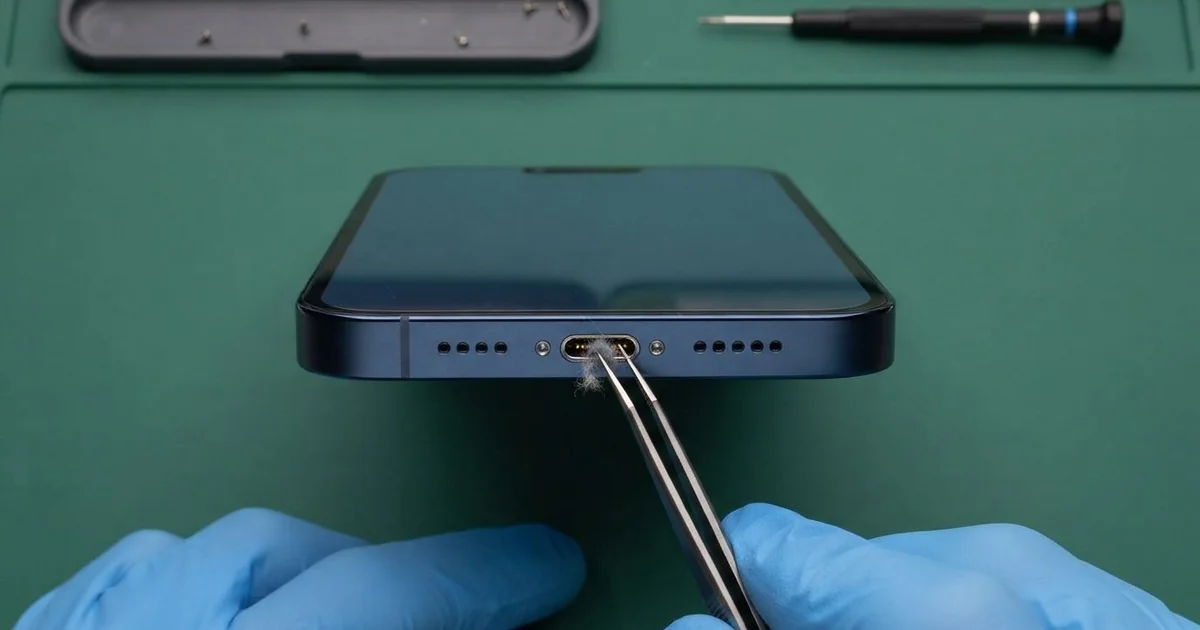
iPhone 12 Pro Max Charging Port Repair in Al Khobar fixes a loose, slow or dead charging port. We check the Lightning port free, then clean it or fit a new port part. We test charging and the bottom mics, and most jobs are done the same day.
An iPhone 12 Pro Max not charging often starts small. The cable feels loose or needs a push, and then the charging sign flickers each time the phone moves. This phone is large and heavy, so its weight pulls on the port when it hangs from a cable.
That wears the pins faster than on a small phone, so it's better not to wait. A loose plug sparks and slowly burns the pins. A battery that keeps going flat also wears out sooner, and that's a second repair later.
Many ports need only a careful clean. Pocket lint, sand and dust pack into the bottom, and we lift them out with fine plastic tools. No part is needed for that.
Bent, burnt or rusted pins need more. The iPhone 12 Pro Max charging port sits on one thin cable with the bottom mics. We replace that whole part, which brings back firm charging and clear calls.
How Kabayan Center Repairs an iPhone 12 Pro Max Charging Port
We fix these charging faults on this phone.
- A cable that is loose, or only charges at one angle
- No charging by cable, or charging that keeps stopping
- Slow charging, even with a good charger
- A message that the accessory is not supported
- A liquid warning that stays after the phone is dry
- Muffled calls, because the bottom mics share the port part
Here is how an iPhone 12 Pro Max charging port repair works with us, step by step.
- We look into the port under a bright lamp and test charging with our own cable.
- We tell you what it needs, and you decide before any work starts.
- We clean out lint and sand with fine plastic tools, never with metal pins.
- If the pins are damaged, we open the screen from the front and disconnect the battery.
- We lift out the loudspeaker and the parts that cover the port cable.
- We fit the new port cable and test charging, the cable fit and both bottom mics.
- We seal the screen with a fresh seal and let you check the phone yourself.
Have a different phone? Our charging port repair service covers other models with much the same steps. Customers come to our shop on King Fahd Road from Dammam and Dhahran too.
Why an iPhone 12 Pro Max Stops Charging: 3 Real Cases
A heavy phone hanging from a short cable
A common case: a phone used on the sofa while it charges. A customer watched long videos each night, holding the phone up with a short cable bent at the bottom. "Now the cable just falls out," they said.
They had searched for iPhone Charging Port Repair in Al Khobar after trying several new cables. The weight of this big phone had pulled on the plug, night after night. The port had worn loose from inside.
Under our lamp, the spring contacts inside the port were bent outwards. They no longer gripped the cable at all. Cleaning would not change that, so the iPhone 12 Pro Max charging port repair used a new port cable.
The new port held the cable with a firm click. We tested it with several cables, and each charged at full speed. Both bottom mics passed a test call.
We suggested a longer cable, so the phone can rest flat while it charges. A stand for videos also takes the weight off the port.
A few nights of good habits make a big difference on a heavy phone. The new port should stay tight much longer that way.
Sand from a weekend desert camp
This one starts at a winter camp outside the city. A customer spent a windy weekend in the desert, with the phone in a jacket pocket. Back home, it would only charge in short bursts, then stop again.
The customer had looked up mobile repair in Al Khobar, sure the port was broken. Fine sand had blown in and packed down at the bottom. Each cable pushed it a little deeper.
We cleaned out a surprising amount of sand and fluff with plastic tools. Under the lamp, the pins were scratched but not bent or burnt. The cable clicked in firmly again, and the iPhone 12 Pro Max charging port repair needed no new part.
Then we tested the battery. Weeks of broken, half charges had left it worn for its age. With the customer's okay, we did a phone battery replacement too.
The phone now charges smoothly and lasts the day. We suggested a small dust plug for the port on camping trips.
A zip pocket also keeps out most of the sand. A quick torch check after each trip catches the rest, before it reaches the pins.
Juice spilled in the car cup holder
We often see this with phones kept in a car's cup holder. A customer spilled a sweet juice, and the phone sat in it for the rest of the drive. It still worked, so they just wiped the outside with a tissue.
Soon the phone showed a liquid warning, and charging stopped and started. The sugar had dried into a sticky layer inside the port, and the damp had started rust.
We opened the phone and found sticky crust on the port pins and a trace of juice near the board. So we did a water damage repair, cleaning the board and the port area.
After the cleaning, the phone charged again. But two pins were already pitted, and the liquid warning still showed now and then. We said a new port cable was the full fix.
The customer chose to wait for now, since charging works most of the time. We noted it on the job card for the next visit.
So the phone works, but not perfectly yet. A quick check right after the spill would have stopped the rust much earlier.
How to Keep Your iPhone 12 Pro Max Charging Port Working
- Use a long enough cable, so the heavy phone doesn't hang from the port.
- Look into the port with a torch every few weeks, and bring it in if you see lint or sand.
- Never clean the port with a metal pin, a needle or a toothpick.
- Keep the phone out of cup holders, where drinks spill.
- Never charge a phone that shows a liquid warning. Let it dry and get it checked.
- Get phone repair in Al Khobar as soon as the cable needs a special angle.
Related services
- Motherboard repair for a phone that still won't charge with a new port
- Phone screen replacement for a cracked or dark screen
Questions about this repair
Ask us anything else on WhatsApp
we answer during shop hours.