iPhone 13 LCD Display Replacement in Al Khobar
iPhone 13 LCD Display Replacement in Al Khobar for a cracked, blank or flickering screen. We check the phone free and tell you what it needs. You decide before any work starts, and your photos and chats stay safe on the phone.
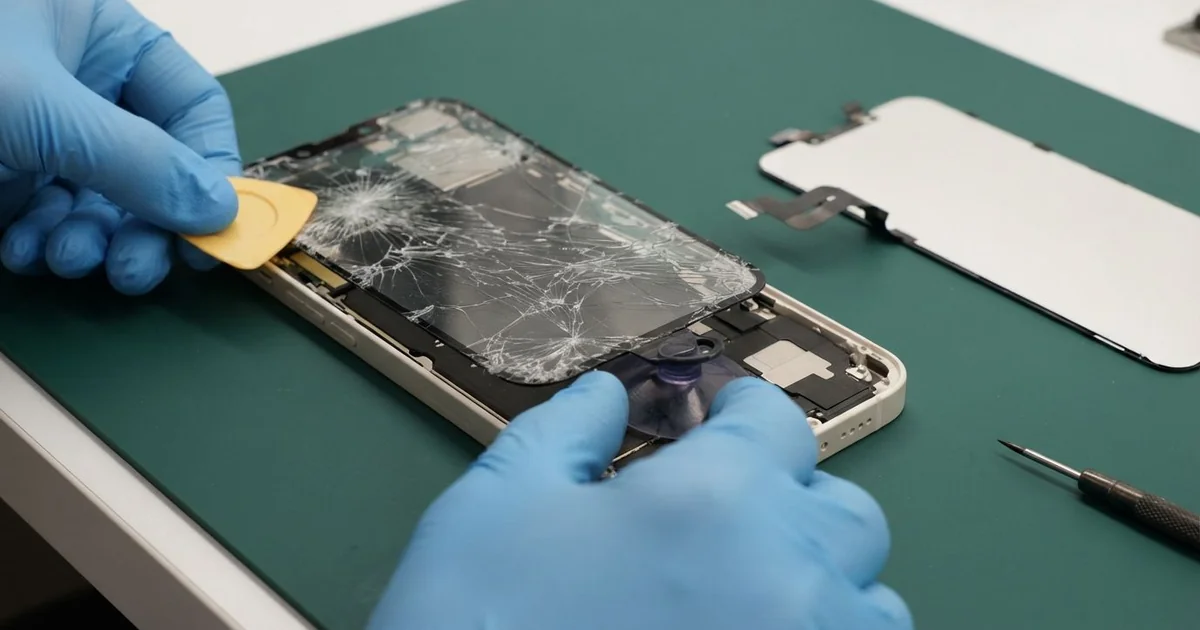
iPhone 13 LCD Display Replacement in Al Khobar fixes a cracked, black or flickering screen. We check it free, then fit a complete new screen, with the glass and display as one part. We test touch, Face ID and brightness, and most jobs are done the same day.
An iPhone 13 broken screen shows up in many different ways. The glass may crack into a web from one corner, or a black blot grows in the middle. Other phones flicker, show a green line, ignore touch in one strip, or go black while still ringing.
It's better not to wait. A crack lets dust, sweat and water inside, and the water seal no longer holds. A dark screen also makes it much harder to back up your photos.
Some faults need no new part. After a knock, the screen cable can work loose, and refitting it brings the picture back. A thick screen protector can also block touch at the edges.
Broken glass, lines and dark blots need a new screen. On this model the glass and display are joined, so the glass can't be changed alone. An iPhone 13 screen replacement fits the whole new part and fixes all three.
How Kabayan Center Replaces an iPhone 13 LCD Display
We fix these screen faults on this phone.
- Cracked or shattered front glass
- A black blot or ink-like patch that spreads
- Flicker, a green line or a strange tint
- A black screen while calls and sound still work
- Touch that misses in one area, or ghost taps
- A screen lifting from the frame after a drop
Here is how an iPhone 13 LCD display replacement works with us, step by step.
- We check the phone free and test sound, cameras, Face ID and charging.
- We tell you what it needs, and you decide before any work starts.
- We remove the two tiny screws beside the Lightning port and warm the screen edges.
- We lift the screen with a suction cup and a thin pick, then open it sideways.
- We disconnect the battery first, then the screen cables under their metal cover.
- We connect the new screen and test touch, colour, brightness and Face ID.
- We fit a fresh seal, press the screen evenly and let you check the phone yourself.
Have a different phone? Our phone screen replacement service covers other models with the same careful steps. Customers come to our shop on King Fahd Road from Dammam and Dhahran too.
How an iPhone 13 Screen Breaks: 3 Real Cases
Knocked off a gym bench onto a weight plate
This one starts at the gym. A trainer left the phone on the end of a bench between sets. A knee knocked it off, and it landed face down on a steel weight plate.
"There's no crack, but there's a black hole in the middle," the trainer told us. They had searched for iPhone Screen Replacement in Al Khobar after the gym.
A hard point hit can break the display layer without breaking the glass. The black blot grows as the damage spreads through the display. When we opened it, we found a small dent under the glass, right at the centre.
The screen cable was firmly in place, so the display itself had failed. We did the iPhone 13 LCD display replacement and tested touch and colour across the whole surface.
The blot was gone, and the picture was clear from edge to edge. Face ID and the front camera worked first time.
We suggested a small pouch or a locker for the phone during workouts. The edge of a bench is a risky shelf. One bump from a knee or a bag is all it takes.
Thrown from a dashboard mount in a sudden stop
A customer came to us after braking hard at a junction. The phone flew out of its dashboard mount and hit the gear stick. It was charging at the time, with the cable still plugged in.
The customer had looked up mobile repair in Al Khobar from the car. The glass had cracked across one corner, but touch still worked. Later, the cable started falling out of the phone.
When we opened the phone, the crack had reached the display edge, with a faint line. We fitted a new screen and tested it fully.
Then we checked the charging problem. The cable had been yanked sideways during the fall, and two pins in the port were bent. So we also did a charging port repair, fitting a new port cable.
The phone now charges firmly and has a clear screen. We suggested a mount with a strong grip on both sides. A shorter cable that doesn't pull on the port helps in a hard stop too.
The customer now checks that the mount is locked before driving. It takes a second and saves the screen.
Melting ice in a camping cooler
We often see this after weekend trips. A family took a cooler bag of drinks to a desert camp. The phone, already cracked at one corner, went into the same bag to stay cool.
By evening, the ice had melted, and the phone sat in cold water. The next morning, it flickered and showed lines across the top. Nobody had thought to check the bag overnight.
Water had run in through the crack. When we opened it, we found drops under the display and white marks near the bottom of the board. So we did a water damage repair on the board first.
Once the board was clean and dry, we did the iPhone 13 LCD display replacement. The picture came back clear, and touch was smooth.
But the water had also reached the vibration motor near the bottom. It had rusted, and it barely buzzed. The family chose to leave the motor for now, since rings and alerts still sound.
A cracked phone is no longer water-resistant. A sealed pouch in the cooler, or a fixed crack, would have kept the water out.
How to Keep Your iPhone 13 Screen Safe
- Use a case with a raised lip, so the screen doesn't land on hard edges.
- Keep the phone in a locker or pouch at the gym, not on a bench.
- Use a car mount with a strong grip, and check it's locked before you drive.
- Never put the phone in a cooler bag with ice or drinks.
- Fix a small crack early, so the iPhone 13 LCD display replacement stays simple.
- Back up your photos while the screen still works.
- Get phone repair in Al Khobar at the first black spot or line, since both spread.
Related services
- iPhone back glass replacement for a cracked back panel after the same fall
- Phone battery replacement for a phone that drains fast or lifts its screen
Questions about this repair
Ask us anything else on WhatsApp
we answer during shop hours.