iPhone 13 mini Charging Port Repair in Al Khobar
iPhone 13 mini Charging Port Repair in Al Khobar for a cable that won't sit firmly or won't charge. We look at the port free and tell you what it needs. You decide before any work starts, and nothing on the phone is wiped.
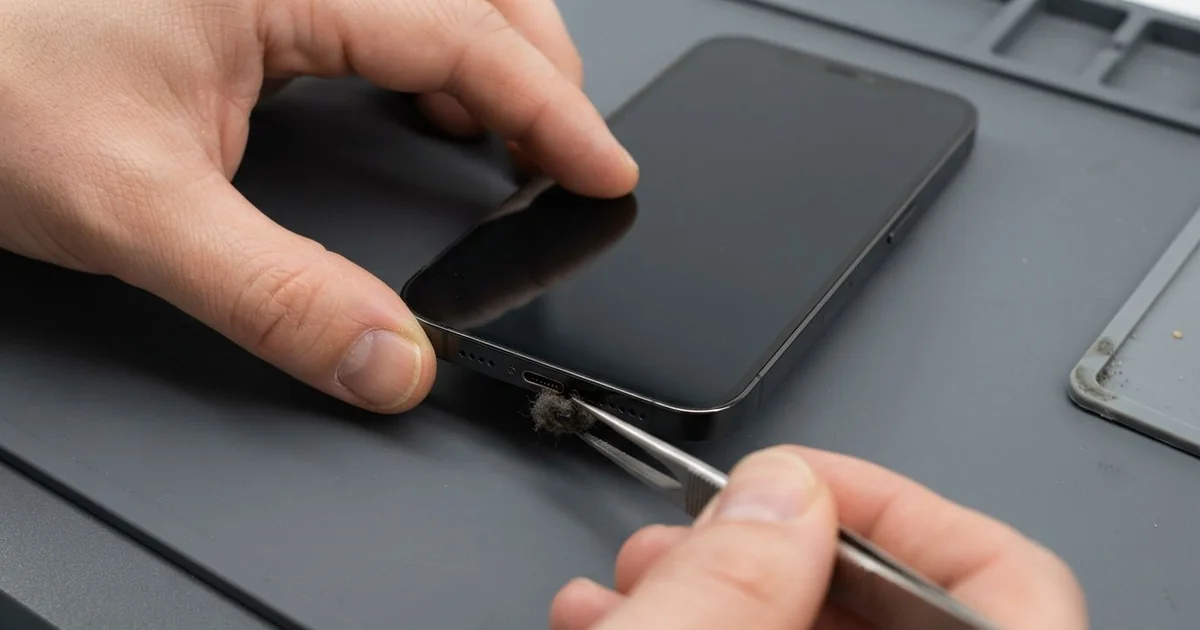
iPhone 13 mini Charging Port Repair in Al Khobar fixes a phone that charges loosely, slowly or not at all. We check the Lightning port free, then clean it or fit a new port part. We test charging and the bottom mics, and most jobs are done the same day.
An iPhone 13 mini not charging usually shows small signs first. The cable feels loose, or it only charges when the phone lies very still. Some phones even show a message that the accessory is not supported.
It's better not to wait too long. A loose plug makes tiny sparks and slowly burns the pins. A small phone also has a small battery, so a weak port soon leaves it flat.
Many ports need nothing more than a careful clean. The mini often lives in tight pockets, so lint and dust find the port very quickly. We lift it out with fine plastic tools, and the cable grips firmly again.
Bent, burnt or rusted pins need a new port part. The iPhone 13 mini charging port sits on a thin cable with the bottom mics, so we replace that part. An iPhone 13 mini charging port repair brings back firm charging and clear calls together.
How Kabayan Center Repairs an iPhone 13 mini Charging Port
We fix these charging faults on this phone.
- A cable that is loose, or only charges at one angle
- No charging by cable at all
- Charging that keeps stopping and starting
- A message that the accessory is not supported
- A liquid warning that stays after the phone is dry
- Callers who can't hear you, because the bottom mics share the port part
Here is how an iPhone 13 mini charging port repair works with us, step by step.
- We look into the port under a bright lamp and test charging with our own cable.
- We tell you what it needs, and you decide before any work starts.
- We clean out lint and dust with fine plastic tools, never with metal pins.
- If the pins are damaged, we open the screen from the front and disconnect the battery.
- We lift out the small loudspeaker and the parts that cover the port cable.
- We fit the new port cable and test charging, the cable fit and the bottom mics.
- We seal the screen with a fresh seal and let you check the phone yourself.
Have a different phone? Our charging port repair service covers other models with much the same steps. Customers come to our shop on King Fahd Road from Dammam and Dhahran too.
Why an iPhone 13 mini Stops Charging: 3 Real Cases
Cleaned with a metal hairpin
A customer came to us after trying to clean the port at home. They had scraped inside with a metal hairpin to get the fluff out. "Now it doesn't charge at all," they said.
They had searched for iPhone Charging Port Repair in Al Khobar that same night. A metal pin can bend the tiny contacts inside the port. It can also touch two pins at once and cause a small short.
Under our lamp, the fluff was still there, packed down at the bottom. Two pins were bent, and one had a dark burn mark. Cleaning alone couldn't fix that, so we fitted a new port cable.
After the iPhone 13 mini charging port repair, it charged at full speed on the first try. Both bottom mics passed a test call too.
We showed the customer the safe way to check a port. Look in with a torch, and if you see fluff, bring it to us. Never push anything metal inside.
The hairpin had pushed the lint deeper, not out. A plastic tool and a steady hand would have done the job in minutes. It's an easy mistake, and we see it often.
Lint from a jeans coin pocket
This one starts with a small phone in a very small pocket. A student kept the mini in the coin pocket of tight jeans. Lint packed into the port every day.
"I have to wiggle the cable for ages," the student told us. They had looked up mobile repair in Al Khobar between classes, expecting bad news.
We found a thick layer of blue fluff at the bottom of the port. The cable could only go halfway in. We picked it out slowly with plastic tools, and the cable clicked in firmly again.
No new part was needed. The pins were clean and straight under all that fluff.
While checking the phone, we noticed a crack across one corner of the screen. The tight pocket had pressed it against keys more than once. With the student's okay, we did a phone screen replacement too.
The phone now charges cleanly and has a clear screen again. We suggested a front pocket with room to spare, away from keys. A quick torch check every few weeks also keeps the lint from building up.
An old extension lead and power surges
We often see this in older homes with tired wiring. A family charged every phone on one old extension lead in the corner. One evening the lights flickered, and the mini stopped charging.
A parent brought it in the next day. "We tried every cable in the house," they said.
The family thought the port was finished. But under our lamp, the port looked clean, with no burnt pins.
We tested with our own cable and a power meter. The phone pulled no charge at all. So the fault sat further inside, on the board, not in the port.
The surge had damaged the small chip that controls charging. We explained that a motherboard repair could replace it.
The family chose to wait for now and took the phone home as it was. The battery still had some charge, so they backed up their photos first.
So the port was fine, but the phone still can't charge yet. We suggested a new extension lead with surge protection for the whole house. One faulty lead can harm every device plugged into it.
How to Keep Your iPhone 13 mini Charging Port Working
- Look into the port with a torch every few weeks, and bring it in if you see lint.
- Never clean the port with a hairpin, since it can lead to an iPhone 13 mini charging port repair.
- Keep the phone out of tight coin pockets, where lint builds up fast.
- Use an extension lead with surge protection at home.
- Pull the cable out by its plug, never by the wire.
- Get phone repair in Al Khobar as soon as the cable needs a wiggle to charge.
Related services
- Water damage repair for a port with green crust or a liquid warning
- Phone battery replacement for a battery worn out by months of bad charging
Questions about this repair
Ask us anything else on WhatsApp
we answer during shop hours.