iPhone 13 Pro Charging Port Repair in Al Khobar
iPhone 13 Pro Charging Port Repair in Al Khobar for a cable that wobbles, slips out or does nothing. We look at the port free and tell you what it needs. You decide before any work starts, and your files stay exactly as they are.
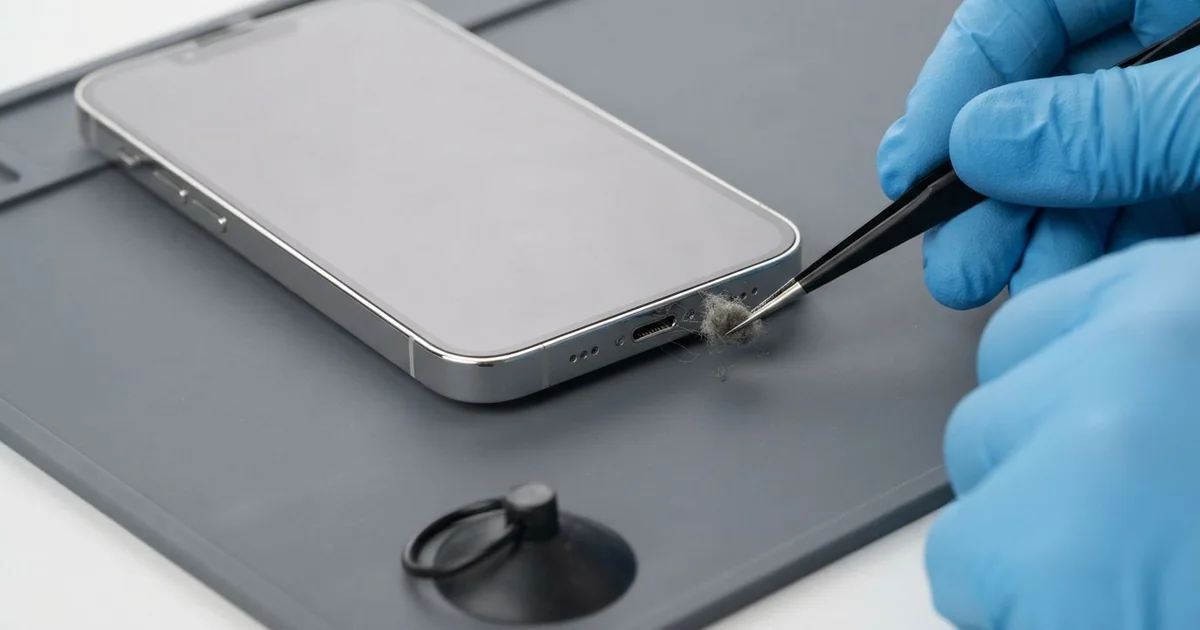
iPhone 13 Pro Charging Port Repair in Al Khobar fixes loose, slow or failed charging. We check the Lightning port free, then clean it or fit a new port part. We test charging, the cable fit and the bottom microphone, and most jobs are done the same day.
An iPhone 13 Pro not charging can look like many things. The cable may need a special angle, or it falls out with a small touch. Sometimes the phone charges on a wireless pad but not on the cable at all.
That last sign is a useful clue: the battery is usually fine, and the port is at fault. It's better not to wait, as a loose plug makes small sparks that burn the pins over time. The battery also keeps running flat, and that wears it out faster.
Many port faults need only cleaning. Lint, sand and dust pack into the bottom of the port, and we pick them out with fine tools. No new part is needed for that.
Bent, burnt or rusted pins are different. The iPhone 13 Pro charging port sits on one thin cable with the bottom microphones. So we replace that whole part, and charging and calls both come back.
How Kabayan Center Repairs an iPhone 13 Pro Charging Port
These are the charging faults we fix on this model.
- A cable that is loose, or only charges at one angle
- No charging on the cable, while wireless charging still works
- Charging that stops and starts by itself
- A message that the accessory is not supported
- A liquid warning that stays after the phone is dry
- Callers who can't hear you, since the microphone shares the port part
Here is how an iPhone 13 Pro charging port repair works with us, step by step.
- We look into the port under a bright light and test it with our own cable.
- We tell you what it needs, and you decide before any work starts.
- We clean out lint and sand with fine plastic tools, never with metal.
- If the pins are damaged, we open the phone from the front and disconnect the battery.
- We lift out the loudspeaker and the parts that sit over the port cable.
- We fit the new port part and test charging, the cable fit and the microphones.
- We reseal the screen with a fresh seal and let you test it yourself.
Need the same fix on another phone? Our charging port repair service covers other models with similar steps. Customers come to our shop on King Fahd Road from Dammam and Dhahran too.
Why an iPhone 13 Pro Stops Charging: 3 Real Cases
A badly made cable with a bent tip
A customer came to us holding a bag of unbranded cables. "Every new one works for a week, then stops," they said. They had searched for iPhone Charging Port Repair in Al Khobar after yet another cable failed.
Badly made cables often have a plug that is slightly too thick or a little bent. Each time it goes in, it presses the pins inside the port out of shape. Soon no cable can make a clean contact.
Under our light, two pins were pressed flat and one had a dark burn mark. Cleaning could not fix that. We opened the phone and did the iPhone 13 Pro charging port repair, then tested it with a good cable.
The cable clicked in firmly, and charging was steady again. But the battery health was very low after months of running flat. So we also did a phone battery replacement, with the customer's go-ahead.
The phone now charges fully and lasts the whole day. We suggested one good cable instead of a bag of weak ones. The customer threw the bent cables away before leaving the shop.
Cold office air, then humid summer heat
We often see this near the coast in summer. An engineer worked all day in a cold office, then walked out into hot, humid air. Water drops formed on the cold phone, including inside the port.
On humid days by the sea, this can happen every evening.
The phone showed a liquid warning when the cable went in. The engineer charged it anyway, every evening, for a few weeks.
"It's not wet, I never dropped it in anything," the engineer said. But the moisture had stayed in the port each time.
Under the light, we found green crust on the pins and a little more on the board nearby. Charging through moisture had burnt the pins. So we did a water damage repair to clean the board before anything else.
Then we fitted a new port part and tested charging with several cables. The warning was gone and the microphones were clear in a test call.
The engineer now lets the phone warm up in a pocket before charging it. Never charge through a liquid warning, even if the phone looks dry.
Yanked off a café table by its cable
This one starts in a busy café. A student had the phone charging on a table while studying. Someone walked past, caught the cable and pulled the phone onto the floor.
The phone landed hanging from its cable, and the plug bent hard in the port. After that, charging came and went. The student had looked up mobile repair in Al Khobar the same afternoon.
We opened the phone and found the port part cracked near the plug. After the iPhone 13 Pro charging port repair, the cable now held firmly. The bottom microphone tested clear as well.
But charging was still slow, even with a good charger. The sideways pull had also damaged a small charging part on the board. A motherboard repair could fix that, and we explained what it involves.
The student chose to wait until after exams. So the phone charges again, just more slowly than before. It works well enough for now, and the board work is noted for the next visit.
The student now charges at a wall socket away from walkways. A shorter cable also keeps the phone close to the wall.
How to Keep Your iPhone 13 Pro Charging Port Working
- Use one good cable that clicks in firmly, and throw away bent ones.
- Look into the port with a torch every few weeks for lint or sand.
- Never clean the port with a pin, since it can lead to an iPhone 13 Pro charging port repair.
- Let the phone warm up before charging after cold office air.
- Never charge while the phone shows a liquid warning.
- Keep the cable away from walkways, so nobody can pull the phone down.
- Get phone repair in Al Khobar as soon as charging needs a special angle.
Related services
- Phone screen replacement for a cracked or dark screen
Questions about this repair
Ask us anything else on WhatsApp
we answer during shop hours.