iPhone 13 Pro LCD Display Replacement in Al Khobar
iPhone 13 Pro LCD Display Replacement in Al Khobar for cracked glass, green lines or a black screen. It also fixes touch that misses your taps. We check the phone free and explain what it needs. You decide before any work starts, and we never look through your photos or chats.
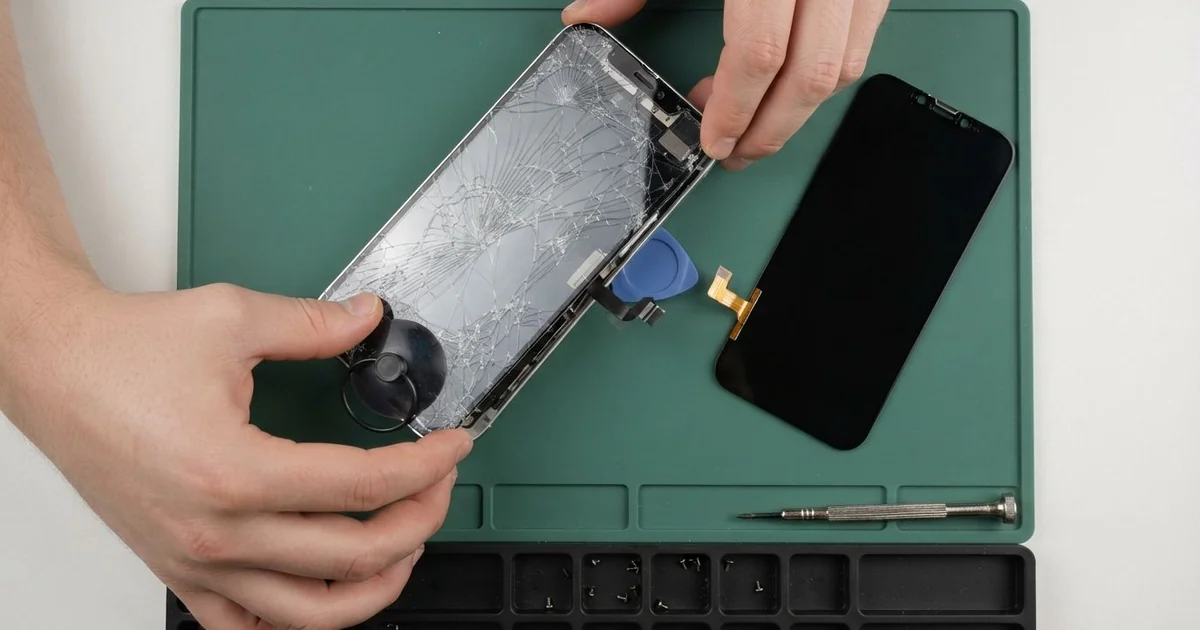
iPhone 13 Pro LCD Display Replacement in Al Khobar fixes cracked glass, lines, a dark display or dead touch. We check the phone free, then fit a complete new screen, with the glass and display joined as one part. We test Face ID, touch and smooth scrolling, and most jobs are done the same day.
An iPhone 13 Pro broken screen shows up in different ways. Sometimes the glass cracks right across the middle after a fall. Other times the glass looks fine, but a green line appears or the whole screen stays black.
It's better not to wait. Cracks let dust and sweat get under the glass, and they break the water seal around the edge. Tiny splinters can also cut your thumb while you scroll.
Some faults don't need a new part at all. Touch that stops working can be a loose screen cable after a drop, and we simply refit it. A lifted screen protector can also cause missed taps near the edges.
Cracked glass, lines and a black screen are different. On this phone the glass and the display are bonded together, so the glass can't be changed alone. An iPhone 13 Pro screen replacement fits the whole front screen as one piece, and that fixes all three faults.
How Kabayan Center Replaces an iPhone 13 Pro LCD Display
These are the screen faults we fix on this model.
- Cracked or shattered front glass
- Green, pink or white lines across the display
- A black screen while the phone still rings and vibrates
- Touch that misses taps, or apps that open by themselves
- Flicker or uneven brightness when you scroll fast
- A screen pushed up from the steel frame after a hard knock
Here is how an iPhone 13 Pro LCD display replacement works with us, step by step.
- We check the phone free and test sound, cameras, charging and Face ID first.
- We tell you what it needs, and you decide before any work starts.
- We remove the two small screws at the bottom edge and gently warm the screen seal.
- We lift the screen with a suction cup and a thin pick, then disconnect the battery.
- We connect the new screen and keep the Face ID sensors at the top clean and untouched.
- We test touch, colour, brightness, the front camera and Face ID before sealing.
- We fit a fresh seal, press the screen down evenly and let you try it yourself.
Need a screen on another phone? Our phone screen replacement covers other models with the same care. Customers also reach our shop on King Fahd Road from Dammam and Dhahran.
How an iPhone 13 Pro Screen Gets Damaged: 3 Real Cases
Knocked off a tripod by sea wind
This one starts at the Corniche at sunset. A hobby photographer had the phone on a small tripod, filming the sky over the water. A gust of sea wind tipped it over onto the stone path.
"The screen went green, then black," the photographer told us. They had searched for iPhone Screen Replacement in Al Khobar on a friend's phone that same evening.
The phone had landed on its top corner. The front glass had a web of cracks, and the display under it was broken too. We did the iPhone 13 Pro LCD display replacement and tested Face ID several times.
Then we turned the phone over. The frosted back glass had a crack running out from the camera bump. So we also did an iPhone back glass replacement, because loose glass near the lenses can scratch them.
The photographer went home with a clear screen and a smooth back. The time-lapse clips were all still on the phone. Now a wider tripod clamp holds the phone on windy evenings.
We also suggested a case with a raised edge around the camera. On this model the camera bump often takes the first hit in a fall.
A summer car mount and a swelling battery
We often see this after long summer drives. A sales rep kept the phone on a windscreen mount, in full sun, with maps running all day. One afternoon the screen began to flicker and dim along one edge.
"It looks like the screen is breathing," the rep said. The rep had looked for mobile repair in Al Khobar near the office. Heat had made the old battery swell behind the display.
When we opened the phone, the battery was clearly puffed up. It had pressed on the screen from inside, and a dark patch was spreading from the edge. A swollen battery is not safe to use, even when the phone still works.
The battery had to come out before anything else. The rep agreed to a phone battery replacement straight away. Then we fitted the new screen and tested it on bright and dark pages.
The new display works well, with no flicker. But the pressure had bent the frame very slightly at one corner. A thin gap still shows along that edge, and the rep chose to live with it for now.
We sealed the screen as well as the bent corner allowed. The phone now rides on an air vent mount, where the AC keeps it cool.
A cracked corner, then a cup of tea
A customer came to us after a small crack had been ignored for weeks. The phone still worked, so the crack seemed harmless. Then a cup of sweet tea tipped over it at a family gathering.
"It's water resistant, so I just wiped it," the customer said. By night, the screen was tapping by itself and the camera kept opening.
Water resistance only works while the glass and seals are whole. The crack had opened a path for the tea, straight under the display. We found sticky marks near the screen connector and on the edge of the board.
So we did a water damage repair first, cleaning the sugar off the board. Sugar left there turns into rust over time. Once the board was clean and dry, we did the iPhone 13 Pro LCD display replacement.
We tested every corner of the touch screen, then the speakers and Face ID. The ghost taps were gone.
The customer was surprised that a small crack could cause so much trouble. Now any crack gets fixed as soon as it appears, before liquid finds a way in. A good screen protector also helps keep a chipped corner sealed.
How to Keep Your iPhone 13 Pro Screen Safe
- Use a case with a raised lip around both the screen and the camera bump.
- Keep the phone off windscreen mounts in direct sun. Heat harms the battery and the screen seal.
- Fix small cracks early, because a cracked phone is no longer water resistant.
- Use a tripod clamp that grips firmly, especially in wind near the sea.
- Stop using the phone if the screen lifts or bulges, and bring it in.
- Back up your photos often, so a black screen never locks you out of them.
- Get phone repair in Al Khobar at the first green line, as lines often spread.
Related services
- Charging port repair for a phone that charges loosely or not at all
Questions about this repair
Ask us anything else on WhatsApp
we answer during shop hours.