iPhone 13 Pro Max LCD Display Replacement in Al Khobar
iPhone 13 Pro Max LCD Display Replacement in Al Khobar for cracked glass or a dark display. It also fixes black blots, lines and touch that stops working. We check the phone free, and you decide before any work starts.
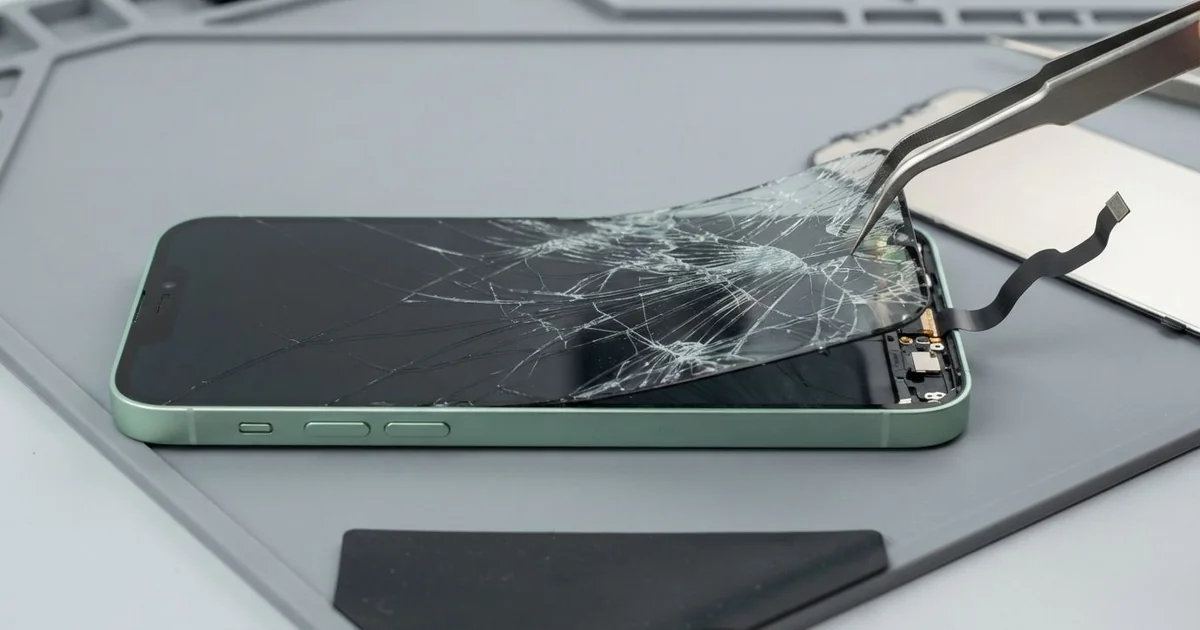
iPhone 13 Pro Max LCD Display Replacement in Al Khobar fixes cracks, lines and dead touch. We check the phone free, then fit a whole new screen, with the glass and display as one part. We test touch and Face ID across the big screen, and most jobs are done the same day.
An iPhone 13 Pro Max broken screen is hard to miss. The large glass often cracks from one corner after a slip. Sometimes the glass survives, but a black blot spreads under it, or touch stops working along one side.
It's better not to wait. A crack lets dust and sweat in and breaks the water seal. A black blot also tends to grow, and soon you can't see enough to back up your photos.
Some faults are simple, like a bubbled screen protector that blocks touch at the edge. A loose cable after a drop can also be refitted. We check those first, so you don't pay for a part you don't need.
Cracks, lines and blots need a new screen, because the glass and display are bonded together here. An iPhone 13 Pro Max screen replacement fits the complete front screen in one piece. You get clear glass, a sharp picture and full touch again.
How Kabayan Center Replaces an iPhone 13 Pro Max LCD Display
These are the screen faults we fix on this model.
- Cracked or shattered front glass
- Black blots or ink-like patches that spread
- Green or white lines down the display
- Touch that is dead along one side, or taps that land in the wrong place
- A dim or washed-out picture after an earlier repair
- A black screen while the phone still rings
Here is how an iPhone 13 Pro Max screen replacement works with us, step by step.
- We check the phone free and test the speakers, cameras, charging and Face ID.
- We tell you what it needs, and you decide before any work starts.
- We take out the two small screws by the charging port and warm the screen edges.
- We lift the large screen slowly with a suction cup and thin picks, then disconnect the battery.
- We connect the new screen and keep the Face ID sensors at the top untouched.
- We test touch in every corner, plus colour, brightness and the front camera.
- We fit a fresh seal, press the screen down evenly and let you check it.
Have a different phone? Our phone screen replacement covers other models with the same steps. Customers come to our shop on King Fahd Road from Dammam and Dhahran too.
How an iPhone 13 Pro Max Screen Breaks: 3 Real Cases
Slipped from one hand on a mall escalator
A customer came to us after a selfie went wrong on a mall escalator. The big phone slipped from one hand and hit the metal edge of a step. "It bounced twice before I caught it," they said.
This model is large and heavy, so it slips easily from one hand. They had searched for iPhone Screen Replacement in Al Khobar on the way home from the mall. The phone still rang, but half the screen ignored every tap.
The glass had cracked from the bottom corner, and touch was dead across the lower part. We did the iPhone 13 Pro Max LCD display replacement and tested every corner. Touch was smooth and even again.
During the final checks, the cable went into the phone at a slight slant. The bottom edge had taken the first hit, and the port opening was pushed out of shape. So we also did a charging port repair to fit a new port part.
The phone went home with a clear screen and firm charging. We suggested a grip ring or a strap on the case. It makes one-hand photos much safer on a phone this size.
Sat on in a back pocket
We often see this with large phones carried in back pockets. A taxi driver sat down hard on the car seat with the phone behind him. Nothing cracked, so he kept driving.
By the evening, a black blot had appeared in the middle of the screen. "It's growing like ink in water," he told us. He had looked for mobile repair in Al Khobar between rides.
Pressure like that can break the display under the glass, even when the glass looks perfect. That's what we found. After the iPhone 13 Pro Max LCD display replacement, the blot was gone.
Then we checked the back. The frosted back glass had a fine hairline crack across the middle, from the same pressure. An iPhone back glass replacement would fix that.
The driver chose to wait on the back glass for now. So the screen is new, but the hairline crack is still there.
We put a clear case on it to keep the crack from spreading and to hold any loose glass. The phone now rides in an air vent holder, never in a back pocket.
A dim screen from an earlier repair
One morning a phone came in that had already had a new screen elsewhere. An office manager had fixed a cracked screen months before. But the new display never looked right.
"Everything looks grey, and the keyboard misses letters," the manager said. Colours were washed out, and the screen was hard to read in sunlight. Touch also missed taps near the edges.
When we opened the phone, the earlier screen was thicker than the original. It didn't sit flush in the frame, and the seal had been left out. Dust had already crept in under one edge.
We removed it, cleaned the frame and did the iPhone 13 Pro Max LCD display replacement with a fresh seal. Then we tested brightness outdoors at our door, in the strong midday light.
The picture was bright and sharp again. Typing on the keyboard was accurate, edge to edge. The manager hadn't realised how dim the old screen was until the two sat side by side.
We kept the old screen in a bag for the manager to take home. Seeing the two together made the difference easy to understand.
How to Keep Your iPhone 13 Pro Max Screen Safe
- Use a grip ring or strap, since this big phone slips easily from one hand.
- Never carry it in a back pocket. Sitting on it can break the display.
- Choose a case with a raised lip around the screen and the camera bump.
- Fix small cracks early, before dust and sweat get under the glass.
- Ask for a fresh seal after any screen repair.
- Back up your photos while the screen still works.
- Get phone repair in Al Khobar at the first black blot, because blots spread fast.
Related services
- Phone battery replacement for a phone that drains fast or swells
- Water damage repair for a phone that got wet through a crack
Questions about this repair
Ask us anything else on WhatsApp
we answer during shop hours.