iPhone 14 Charging Port Repair in Al Khobar
iPhone 14 Charging Port Repair in Al Khobar for a cable that feels loose or does nothing. It also fixes charging that keeps stopping. We check the port free and tell you what it needs, and you decide before any work starts.
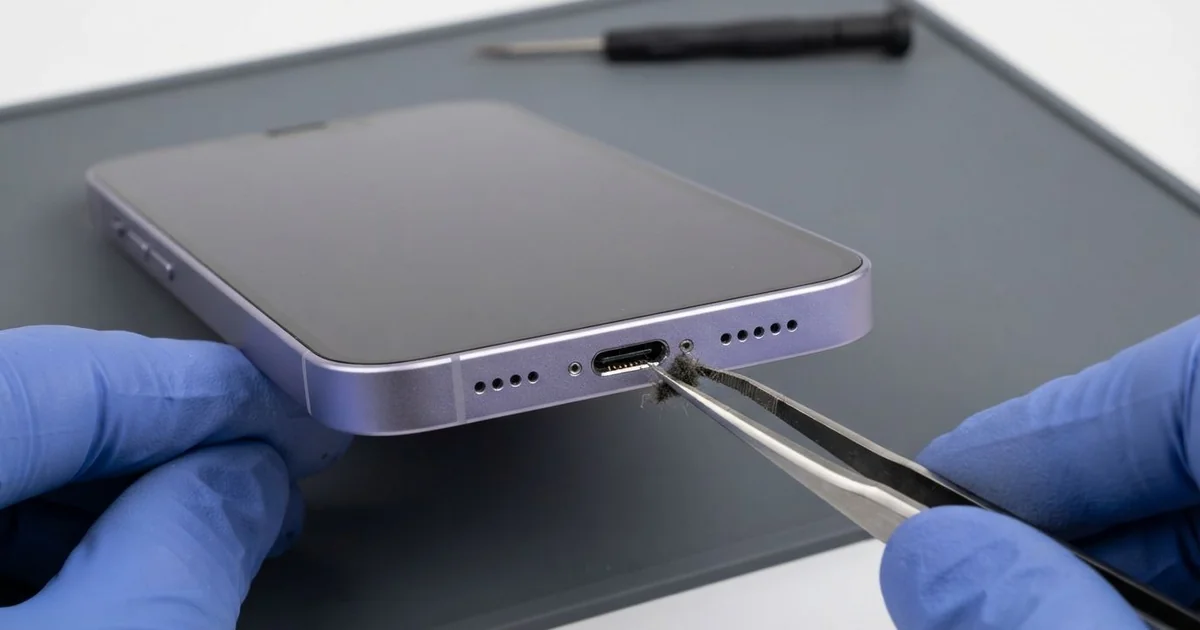
iPhone 14 Charging Port Repair in Al Khobar fixes loose, slow or failed charging. We check the Lightning port free, then clean it or fit a new port part. We test charging, the cable fit and the bottom microphones, and most jobs are done the same day.
An iPhone 14 not charging rarely fails all at once. First the cable feels loose, or charging stops the moment you pick the phone up. If a wireless pad still charges it but the cable can't, the port is the likely fault.
It's better not to wait. A loose plug makes tiny sparks that burn the pins, and the damage spreads across the port. The battery also wears out faster when it runs flat again and again, day after day.
Many port faults need only cleaning. Lint, dust and grit settle at the very bottom of the port over time. We pick them out with plastic tools while you wait.
Burnt, bent or rusted pins need an iPhone 14 charging port repair, because cleaning can't bring them back. The iPhone 14 charging port sits on a thin cable with the bottom microphones. So we replace that whole part, and charging and clear calls both come back together.
How Kabayan Center Repairs an iPhone 14 Charging Port
These are the charging faults we fix on this model.
- A cable that is loose or falls out
- Charging that stops when you move the phone
- No charging on the cable, while wireless charging works
- A message that the accessory is not supported
- A liquid warning that won't clear after drying
- A quiet voice on calls, since the microphones share the port part
Here is how an iPhone 14 charging port repair works with us, step by step.
- We look into the port under a magnifier and test it with our own cable.
- We tell you what it needs, and you decide before any work starts.
- We clean out lint, dust and grit with plastic tools, never with metal.
- If the pins are damaged, we open the phone and disconnect the battery first.
- We lift out the loudspeaker and the parts that sit over the port cable.
- We fit the new port part and test charging, the cable fit and the microphones.
- We reseal the phone with a fresh seal and let you test it yourself.
Have a different phone? Our charging port repair service covers other models with similar steps. Customers come to our shop on King Fahd Road from Dammam and Dhahran too.
Why an iPhone 14 Stops Charging: 3 Real Cases
A magnetic cable tip in a car workshop
A customer came to us from a car workshop on the industrial side of town. A mechanic used a magnetic charging cable, with a small tip that stays inside the port. "I just snap it on, it's so easy," the mechanic said.
But a magnet pulls in metal dust. In a workshop, the air is full of it. Over weeks, fine iron dust built up around the tip and bridged the pins.
The mechanic had searched for iPhone Charging Port Repair in Al Khobar after the phone stopped charging and smelled hot. We pulled out the tip and found black dust packed around it and two burnt pins.
We fitted a new port part, but the phone still would not charge. The short had also burnt a tiny protection part on the board. So we did a motherboard repair, replacing that part under the microscope.
After that, the phone charged normally with a plain cable. The mechanic now leaves the phone in a closed locker during work.
Never leave a metal or magnetic tip inside the port. It collects dust and can short the pins.
Caught in a winter rainstorm
This one starts on a rare rainy evening. A shop worker walked from the bus to home through heavy rain, phone in hand for directions. By the front door, the phone was dripping from every edge.
The worker dried the outside and plugged it in. A liquid warning appeared, but the worker tapped past it. "I needed it charged for the morning," the worker said.
Rainwater had sat in the port while power ran through it. By the time we saw it, green crust had formed on the pins, with more near the board. So we did a water damage repair first, cleaning and drying the board.
Then we did the iPhone 14 charging port repair and tested charging with several cables. The warning was gone, and the microphones were clear on a test call.
The worker now leaves a wet phone switched off, face down on a towel, and brings it in. A simple sealed bag also keeps it dry on rainy days, even on a long walk.
It was lucky the board needed only cleaning. A few more nights of charging would have done far more harm.
Fleece fluff in a winter jacket pocket
We often see this in the cooler months. A security supervisor wore a new fleece jacket every night shift, with the phone in a deep pocket. Soft fluff from the lining collected in the port.
The cable started slipping out after a few weeks, and charging stopped halfway through each night. The supervisor had looked up mobile repair in Al Khobar between rounds.
Under the magnifier, a felt-like layer of fluff filled the bottom of the port. We lifted it out with plastic tools, bit by bit, until the pins showed again. One pin, though, was worn from the cable pressing on the fluff for weeks.
The supervisor chose the cleaning only for now. Charging works again, but the cable must be pushed in firmly to start. A new port part would fix that fully.
The battery also tested weak after many flat nights. A phone battery replacement is planned for the same later visit.
Until then, the phone charges well enough with a firm push. It now goes in a zipped pocket without a fleece lining. A quick torch check each week keeps the fluff from building up again.
How to Keep Your iPhone 14 Charging Port Working
- Use a plain, good cable, not a magnetic tip that stays in the port.
- Look into the port with a torch every few weeks for lint and fluff.
- Never charge while the phone shows a liquid warning.
- Dry a wet phone switched off, and get it checked before charging.
- Keep the phone in a smooth pocket, away from fleece and dust.
- Never clean the port with metal pins, since it can lead to an iPhone 14 charging port repair.
- Get phone repair in Al Khobar as soon as the cable feels loose.
Related services
- Phone screen replacement for a cracked or dark screen
Questions about this repair
Ask us anything else on WhatsApp
we answer during shop hours.