iPhone 14 LCD Display Replacement in Al Khobar
iPhone 14 LCD Display Replacement in Al Khobar for cracked glass, lines or a black screen. It also fixes touch that ignores your finger. We check the phone free, and you decide before any work starts. We never look through your photos.
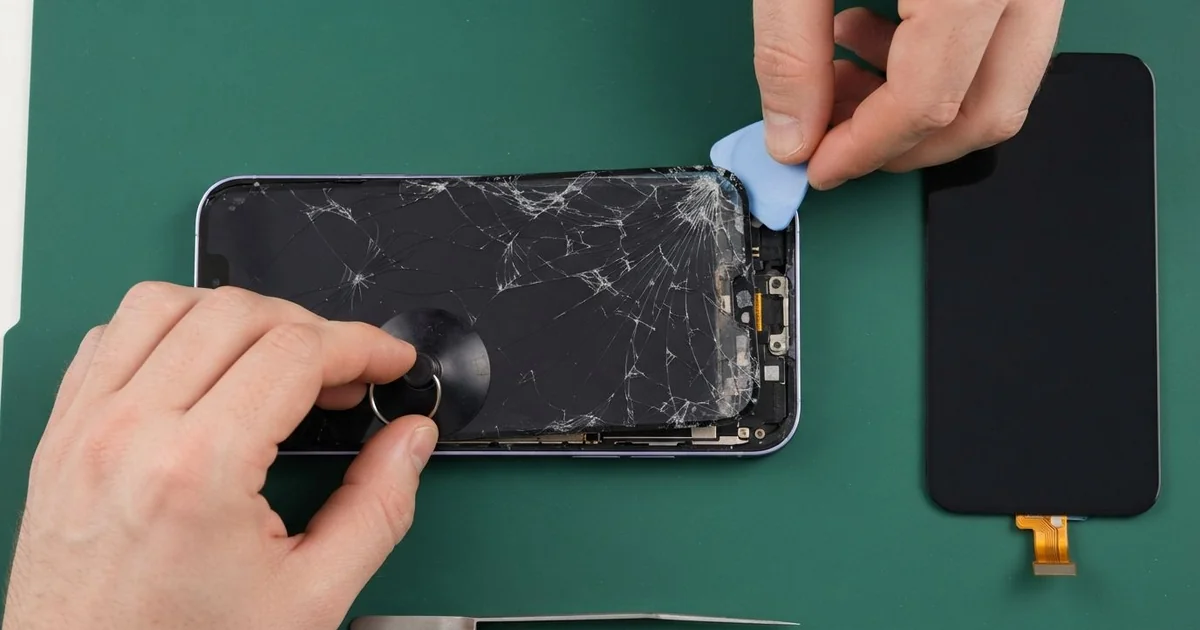
iPhone 14 LCD Display Replacement in Al Khobar fixes cracked glass, lines and dead touch. We check the phone free, then fit a complete new screen, with the glass and display joined as one part. We test Face ID, touch and the front camera, and most jobs are done the same day.
An iPhone 14 broken screen shows itself in a few ways. The glass may crack into a web after a fall. Or the glass looks fine, but coloured lines run down the display, or one part ignores your finger.
It's better not to wait. A crack opens the water seal, so sweat and dust can reach the display. Tiny glass splinters can also cut your thumb, and a dark screen makes a backup much harder.
A loose screen cable after a knock can be refitted. A badly fitted protector can also block touch at the edges. We check those first, so you only pay for what the phone needs.
Cracks, lines and black patches need a new screen, because the glass and display are bonded together. An iPhone 14 screen replacement puts in the whole front screen in one piece. The iPhone 14 also opens from the back for some jobs, but the screen always comes off from the front.
How Kabayan Center Replaces an iPhone 14 LCD Display
These are the screen faults we fix on this model.
- Cracked or shattered front glass
- Green, pink or white lines on the display
- A black screen while the phone still rings
- Touch that is dead in one area, or ghost taps
- Flicker or a dark patch that grows from the edge
- A screen lifting from the frame after a knock
Here is how an iPhone 14 screen replacement works with us, step by step.
- We check the phone free and test sound, cameras, charging and Face ID.
- We tell you what it needs, and you decide before any work starts.
- We take out the two small screws at the bottom edge and warm the screen seal.
- We lift the screen with a suction cup and a thin pick, then disconnect the battery.
- We connect the new screen and keep the Face ID sensors at the top clean and untouched.
- We test touch, colour, brightness and the front camera before sealing.
- We fit a fresh seal, press the screen evenly and let you check it yourself.
Have a different phone? Our phone screen replacement covers other models with the same care. Customers come to our shop on King Fahd Road from Dammam and Dhahran too.
How an iPhone 14 Screen Gets Broken: 3 Real Cases
Stepped on during a football match
A customer came to us straight from a youth football pitch. A coach had the phone in a jacket that fell on the grass by the line. A player chasing the ball stepped right on it.
"I heard a crunch, and the screen went stripy," the coach said. The coach had searched for iPhone Screen Replacement in Al Khobar before the match was even over.
The glass was cracked across the middle, and bright lines ran down the display. We did the iPhone 14 LCD display replacement and tested Face ID and touch in every corner.
Then we tried our cable in the port. It went in at a slight slant and wobbled. The weight of the step had pushed the bottom of the frame and the port out of line.
So we also did a charging port repair, fitting a new port part. After that, the cable clicked in straight and firm.
The coach now keeps the phone in a zipped bag on the bench, away from the line. A case with a raised edge also helps when a phone lands face down on hard ground.
A selfie stick clamp squeezed too hard
We often see this with phone holders and clamps. A travel blogger used a selfie stick every day, with the clamp screwed down very tight. One day thin lines appeared along the long edge of the screen.
"It never fell, so how did it break?" the blogger asked. A clamp that grips too hard presses on the edge of the display, again and again. In the end, the display cracks inside, even when the glass looks fine.
After the iPhone 14 LCD display replacement, the lines were gone. Then we checked the back. The glossy back glass had a small crack right where the clamp's other side pressed.
An iPhone back glass replacement would fix that crack. The blogger was about to fly abroad for a trip and chose to wait.
So the front is new, but the small crack on the back is still there. We added a clear case to keep any loose glass in place, and it holds well for now. The blogger now uses a clamp with soft rubber pads and grips it only firmly enough to hold.
A cracked protector hid a cracked screen
This one starts with a glass screen protector that shattered after a drop. A fitness trainer kept using the phone, because the screen under it still seemed fine. The protector stayed on for weeks, full of cracks.
Underneath, the real screen had a small crack too. Sweat from long gym sessions seeped in through it. Soon the phone started typing by itself and opening apps nobody had touched.
The trainer had looked up mobile repair in Al Khobar, sure it was a software problem. When we peeled off the protector, the hidden crack was easy to see.
Inside, we found white marks of dried sweat near the screen cable and on the board. Sweat is salty, and salt turns to rust fast. So we did a water damage repair first, cleaning the board.
Then we finished the iPhone 14 LCD display replacement with a fresh seal. The ghost typing stopped, and every tap landed where it should. The trainer tested it with a long message right at the counter.
The trainer now changes a cracked protector straight away, so a hidden crack can't stay hidden. A broken protector can hide a broken screen.
How to Keep Your iPhone 14 Screen Safe
- Use a case with a raised edge, so the glass doesn't land first.
- Keep the phone in a zipped bag at sports pitches and the gym.
- Use phone clamps with soft pads, and don't over-tighten them.
- Change a cracked screen protector at once and check the screen under it.
- Keep the phone off the car dashboard in summer, since heat weakens the seal.
- Back up your photos while the screen still works.
- Get phone repair in Al Khobar at the first line or dark patch.
Related services
- Phone battery replacement for a phone that drains fast or swells
Questions about this repair
Ask us anything else on WhatsApp
we answer during shop hours.