iPhone 14 Plus Charging Port Repair in Al Khobar
iPhone 14 Plus Charging Port Repair in Al Khobar for a plug that wobbles or won't charge. It also fixes charging that cuts out on bumpy roads. We check the port free, and you decide before any work starts.
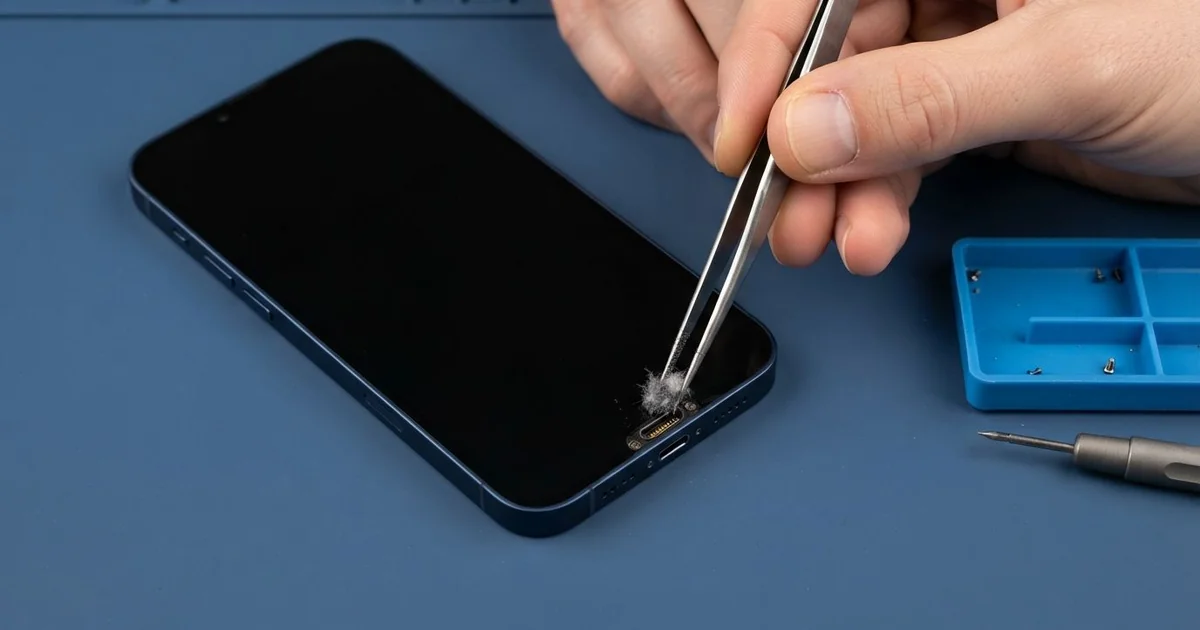
iPhone 14 Plus Charging Port Repair in Al Khobar fixes loose, slow or failed charging. We check the Lightning port free, then clean it or fit a new port part. We test charging, the plug fit and the bottom microphones, and most jobs are done the same day.
An iPhone 14 Plus not charging usually gives warnings first. The plug feels loose, or the charging sign blinks on and off. On this big, heavy phone, the plug can also tilt in the port when the phone moves.
It's better not to wait. A loose plug makes tiny sparks that slowly burn the pins. The big battery also wears faster when it keeps running flat, and it takes a long time to refill.
Many port faults need only cleaning, because lint, dust and dried sweat collect at the bottom. We lift them out with plastic tools while you wait. If a wireless pad still charges the phone, the battery is usually fine and the port is the problem.
Bent, burnt or rusted pins need an iPhone 14 Plus charging port repair. The iPhone 14 Plus charging port sits on a thin cable with the bottom microphones. So we replace that whole part, and both charging and calls come back.
How Kabayan Center Repairs an iPhone 14 Plus Charging Port
These are the charging faults we fix on this model.
- A plug that wobbles or slips out
- Charging that cuts out when the phone moves
- No charging on the cable, while wireless charging works
- Very slow charging with a good charger
- A liquid warning that stays after drying
- A quiet voice on calls, from the shared microphones
Here is how an iPhone 14 Plus charging port repair works with us, step by step.
- We look into the port under a magnifier and test it with our own cable.
- We tell you what it needs, and you decide before any work starts.
- We clean out lint, dust and dried sweat with plastic tools, never metal.
- If the pins are damaged, we open the phone and disconnect the battery first.
- We lift out the loudspeaker and the parts that sit over the port cable.
- We fit the new port part and test charging, the plug fit and the microphones.
- We reseal the phone with a fresh seal and let you test it yourself.
Have a different phone? Our charging port repair service covers other models with similar steps. Customers come to our shop on King Fahd Road from Dammam and Dhahran too.
Why an iPhone 14 Plus Stops Charging: 3 Real Cases
A car cradle that rested on the plug
A customer came to us who drives long routes every day. A van driver used a car cradle where the phone sat on its charging plug. All the weight of the big phone pressed down on that one plug.
On every bump, the phone rocked on the plug like a lever. "It charges on smooth roads, then stops," the driver said. The driver had searched for iPhone Charging Port Repair in Al Khobar after a long day with a flat phone.
Under the magnifier, the port opening was slightly widened, and the pins were worn on one side. Cleaning could not fix that. After the iPhone 14 Plus charging port repair, the plug clicked in tight.
The battery tested low as well, after many flat days on the road. The driver agreed to a phone battery replacement at the same visit.
The phone now charges on every road, bumpy or smooth. We suggested a vent holder that grips the sides, with the cable hanging free.
That way the phone's weight never rests on the plug again. It also leaves room for the AC to cool the phone on hot afternoons.
Sweat from runs on the Corniche
This one starts on the Corniche running path. A runner wore the phone in an armband for long evening runs, in hot, humid air. Sweat ran down the arm and into the bottom of the phone, run after run.
After some months, the phone showed a liquid warning every time it was plugged in. "I'm not swimming with it, it's only sweat," the runner said.
But sweat is salty water. Each run left a little more salt inside the port, and charging through it turned the pins green. We also found white salt marks near the board.
So we did a water damage repair first, cleaning the board and drying it. Then we did the iPhone 14 Plus charging port repair and tested charging and calls.
The warning was gone, and charging was steady again. The runner now wipes the phone with a dry cloth after each run and lets it air out before charging.
A sweatband above the armband also keeps most of the sweat away from the phone. Small habits like that keep the new port working for a long time.
Dropped on its bottom edge on tiles
We often see this with phones that fall straight down. An office cleaner dropped the phone from a trolley, and it landed on its bottom edge on a tiled floor. The plug would not go in properly after that.
The cleaner had looked up mobile repair in Al Khobar during a lunch break. The fall had dented the metal frame right at the port. The port inside was bent out of line too.
We gently eased the dented frame edge back into shape and fitted a new port part. The plug now went in straight and firm, and charging worked well.
But the same fall had cracked the bottom corner of the screen. The crack was small, and touch still worked. A phone screen replacement would fix it.
The cleaner chose to wait on the screen for now. So charging is fixed, but the cracked corner is still there. We put on a screen protector to keep the crack from spreading.
The phone now rides in a zipped pocket on the trolley, not on top of it. A case with a firm bottom edge also takes the next fall instead of the port.
How to Keep Your iPhone 14 Plus Charging Port Working
- Use a car holder that grips the sides, not one that rests on the plug.
- Wipe away sweat after exercise and let the phone dry before charging.
- Never charge while the phone shows a liquid warning.
- Look into the port with a torch every few weeks for lint.
- Use a case with a firm bottom edge to protect the port in a fall.
- Pull the cable out by the plug, never by the wire.
- Get phone repair in Al Khobar as soon as the plug feels loose.
Related services
- Motherboard repair for a phone that still won't charge with a new port
Questions about this repair
Ask us anything else on WhatsApp
we answer during shop hours.