iPhone 14 Plus Motherboard Repair in Al Khobar
iPhone 14 Plus Motherboard Repair in Al Khobar for a phone that won't switch on. It also covers restarts, no signal and no charging. We check the board free, and you decide before any work starts.
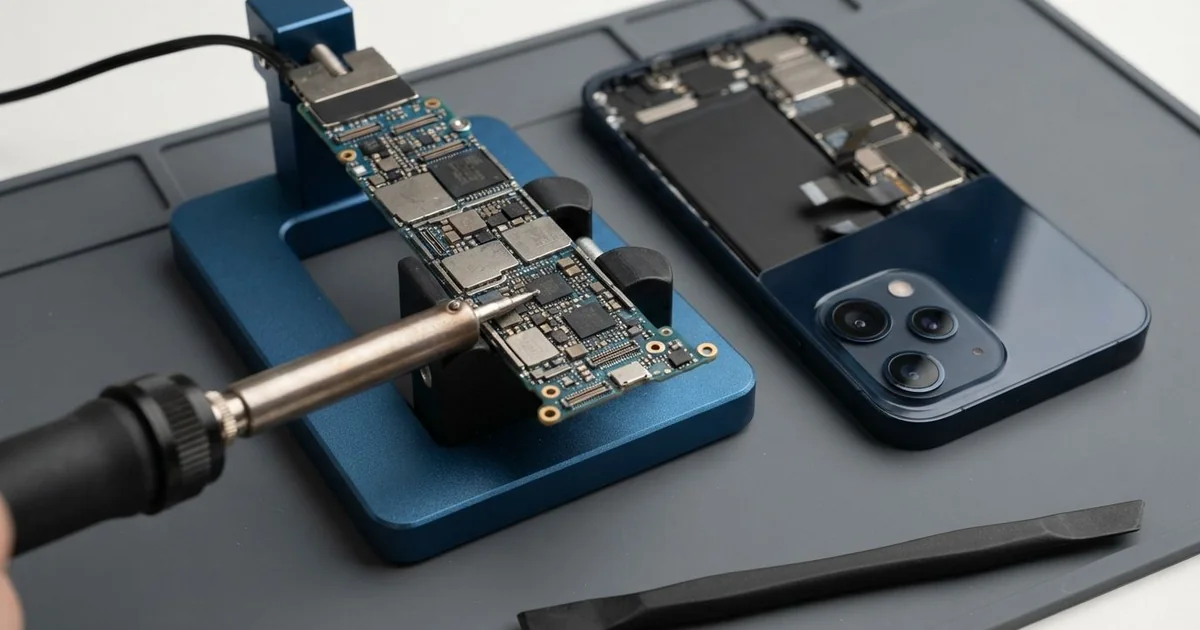
iPhone 14 Plus Motherboard Repair in Al Khobar fixes no power, restarts, lost signal and no charging. We check the board free and find the faulty part under a microscope. Then we replace that small part instead of the whole board, and we keep your data wherever we can.
An iPhone 14 Plus not turning on is what most owners bring in. The large screen stays completely black, the phone won't vibrate, and the charger does nothing. Others restart on the logo or show no signal.
Many people try a forced restart or charge it all night first. When that changes nothing, the fault is usually on the board, not in the software. Software can't bring back a part that has burnt out.
It's better not to wait. A short on the board makes heat that harms nearby parts. Water left inside keeps eating the board, so a small fault today grows bigger every day.
Not every dead phone has a board fault, so we test the battery, screen and port before anything else. The iPhone 14 Plus motherboard has two layers stacked together, both packed with tiny parts. In an iPhone 14 Plus motherboard repair, often only one small part has failed, and we replace that one.
How Kabayan Center Repairs an iPhone 14 Plus Motherboard
These are the board faults we fix on this model.
- No power, no vibration and no charging sign
- A phone that restarts on the logo again and again
- No signal, or a network that comes and goes
- No charging, even with a good port and battery
- A phone that runs hot while switched off
- Faults that start after water, heat or a swollen battery
Here is how an iPhone 14 Plus motherboard repair works with us, step by step.
- We check the phone free and test the battery, screen and port to rule them out.
- We connect a power meter that shows how much power the board pulls.
- We tell you what we found, and you decide before any work starts.
- We open the phone, disconnect the battery and take out the board.
- We find the faulty part under a microscope, using the meter and gentle heat.
- We replace that part with a fine hot-air tool and a soldering tip.
- We rebuild the phone and test power, charging, signal and cameras with you.
Have a different phone or a laptop? Our motherboard repair service covers other devices too. Customers come to our shop on King Fahd Road from Dammam and Dhahran as well.
Why an iPhone 14 Plus Board Fails: 3 Real Cases
Dropped in a basin at a wedding hall
A customer came to us the morning after a family wedding. A guest had been washing hands with the phone in a shirt pocket. It slipped out and into a full basin of soapy water.
It was out in seconds, but it went dark later that night. "I didn't charge it, I promise," the guest said. That was the right thing to do.
The guest had searched for iPhone Motherboard Repair in Al Khobar early the next morning. Soapy water carries current, so it can short the board even after a quick dip. It also leaves a film that turns into rust.
We opened the phone and found damp soap marks near the power parts. One small part had burnt where the water bridged two lines. We did a water damage repair, cleaning the board in a special bath, and replaced that part.
The iPhone 14 Plus motherboard repair worked, with every wedding photo and video in place. Coming in quickly, without charging, made all the difference.
We dried the speakers fully before the final test. Calls and music both sounded clear and loud. The guest went home with a working phone.
A swollen battery left too long
This one starts with a phone that had a lifted back for weeks. An electrician noticed the back glass bulging slightly but kept using the phone. "It still worked, so I left it," the electrician said.
Then one day it switched off and never came back. The electrician had looked up mobile repair in Al Khobar, sure it was just the battery.
The battery had swollen badly and pressed hard against the board for weeks. We took it out at once. A swollen battery is not safe to use, even when the phone still works.
Under the microscope, the pressure had cracked joints near the battery connector. We rejoined them and did a phone battery replacement with a good part. The phone turned on and charged by cable.
But the swelling had also crushed the wireless charging coil behind the back glass. Wireless charging no longer works on this phone. The electrician chose to charge by cable for now.
So the phone works well, just not on a wireless pad. A bulging back should always come in straight away. Nothing else on the board was harmed.
Used as a dashcam in the summer sun
We often see this with phones mounted on the windscreen. A taxi driver ran the camera app all day to record the road. The phone sat behind the glass in full sun, plugged in and recording for hours.
One afternoon it shut down from heat and never started again. The driver tried a different cable and a new charger first. "I thought the charger had died," the driver said.
Strong heat for hours, every day, stresses the board's power parts. The power meter showed a short on one power line. Under the microscope, a small power chip had cracked from the heat.
We did the iPhone 14 Plus motherboard repair by replacing that chip with a fine hot-air tool. The phone powered on with all its recordings and contacts. It stayed cool through a long test on the charger.
The cable end had also melted slightly and scorched the port. So we did a charging port repair, fitting a new port part. Charging by cable was steady again after that.
The driver now uses a small dashcam for recording. The phone rests in an air vent holder, out of the sun. It stays cool there, even on the hottest days.
How to Keep Your iPhone 14 Plus Board Safe
- Never charge a phone that got wet. Switch it off and bring it in.
- Bring the phone in as soon as the back or screen starts to bulge.
- Don't use the phone as a dashcam in direct sun.
- Keep the phone out of shirt pockets near sinks and basins.
- Use a good charger and cable, and avoid unbranded fast chargers.
- Back up your photos every week, so a board fault never costs you your files.
- Get phone repair in Al Khobar as soon as the phone restarts by itself or runs hot.
Related services
- Data recovery for photos and files on a phone that won't start
Questions about this repair
Ask us anything else on WhatsApp
we answer during shop hours.