iPhone 14 Pro Battery Replacement in Al Khobar
iPhone 14 Pro Battery Replacement in Al Khobar for a phone that dies early or switches off with charge left. We check the battery free and tell you what it needs. You decide before any work starts, and your photos and chats stay safe on the phone.
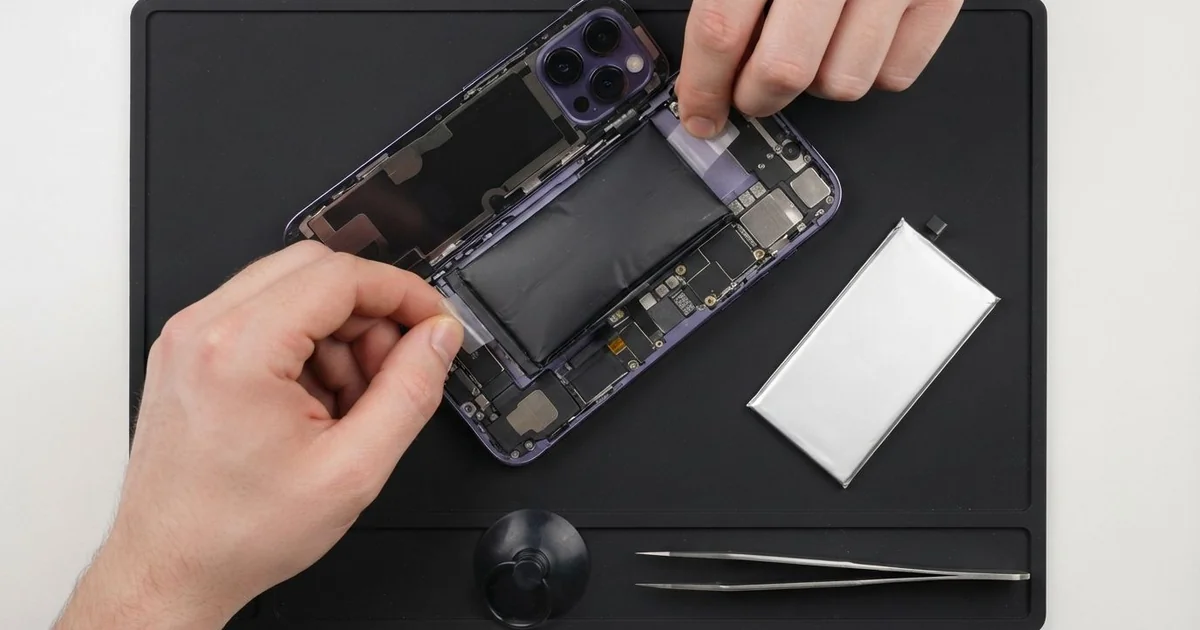
iPhone 14 Pro Battery Replacement in Al Khobar fixes a phone that drains fast, shuts down early or runs hot. We check the battery health free, then fit a new battery under the screen. We seal the phone again and test charging, and most jobs are done the same day.
An iPhone 14 Pro battery draining fast is the sign most people notice first. The phone leaves home full and needs a charger by the afternoon. Some phones switch off at a low reading, or warm up during a simple call.
It's better not to wait. A worn battery can't give the power the phone asks for, so the phone slows itself down to stay on. An old battery can also swell and push the screen out of the frame.
Not every drain needs a new part. The always-on display, a stuck app or a weak charging cable can make a good battery look bad. We check those first and tell you if a setting is the real cause.
When the battery itself is worn out, an iPhone 14 Pro battery replacement is the fix. On this model the battery sits under the screen, held down by stretch tabs. So the phone opens from the front, with care around the screen cables.
How Kabayan Center Replaces an iPhone 14 Pro Battery
These are the battery faults we fix on this phone.
- Fast drain, even on a quiet day
- Sudden shutdowns with charge still showing
- A phone that slows down or lags when you open the camera
- A battery that swells and lifts the screen at one side
- Heat while charging, or during calls and maps
- A low battery health reading, or a message asking for service
This is how an iPhone 14 Pro battery replacement works with us:
- We check the battery health free and test charging with our own cable.
- We explain what it needs, and you decide before any work starts.
- We remove the two tiny bottom screws and warm the screen edges to soften the seal.
- We lift the screen with a suction cup and disconnect the battery before anything else.
- We pull the stretch tabs out slowly, so the old battery comes free without prying.
- We fit the new battery, connect it and test charging and power on the bench.
- We fit a fresh seal, close the phone and let you check it yourself.
Own another model? Our phone battery replacement service covers other phones too. People come to our shop on King Fahd Road from Dammam and Dhahran as well.
Why an iPhone 14 Pro Battery Wears Out: 3 Real Cases
A hotspot in a hot tent
This one starts on a desert camping weekend. A group leader used the phone as a hotspot for the whole camp. It sat in a tent all afternoon, plugged into a power bank.
"Now it won't last half a day in the city," the group leader told us. They had searched for iPhone Battery Replacement in Al Khobar on the drive back.
A hotspot works the battery hard, and a tent in the sun gets very hot. Heat and heavy use together wear a battery down quickly. The phone had also shown a heat warning more than once.
We tested the battery and found its health very low. We did the iPhone 14 Pro battery replacement and ran a long test with the hotspot on. It stayed cool and held its charge.
While testing, the cable kept slipping out of the phone. The Lightning port was packed with fine sand from the camp. So we did a charging port repair, cleaning out the sand and checking each pin.
The phone now lasts a full day again. We suggested keeping it in a shaded cool box on the next trip, away from direct sun.
Charged all night under a thick case
We often see this with phones charged in bed on a wireless pad. A nurse on night shifts slept with the phone charging under a pillow. It sat in a thick rubber case that trapped the heat.
"The screen is coming away at the side," the nurse said. They had looked up mobile repair in Al Khobar between shifts.
Heat over many nights had made the battery swell. With nowhere else to go, it pushed the screen up from inside. A faint dark line had also appeared near that edge.
A swollen battery is not safe to use, even when the phone still works. We took it out at once and fitted a new battery.
The screen went back down flat, but the dark line stayed. The pressure had marked the display itself. The nurse chose to keep the screen for now and plan a phone screen replacement later.
The phone is safe again and lasts a full shift. The small line only shows on white pages. The nurse now charges it on a bedside table, with the case off at night.
A second-hand phone with a tired battery
A customer came to us soon after buying the phone used. It looked almost new, with clean glass and no scratches. But it needed charging twice a day.
The seller had said the battery was fine. The battery health reading in Settings told a different story.
Used phones often come with batteries that have worked hard for a long time. A clean outside says nothing about the parts inside.
We opened it and found the battery well past its best. We also saw old water marks near the battery connector, a sign of a past splash. The previous owner had never mentioned it.
Before fitting the new battery, we did a water damage repair on that area. We cleaned the light crust off the connector and checked the nearby parts under a microscope. Nothing else had been harmed.
With the iPhone 14 Pro battery replacement done, the phone lasted all day on one charge. The customer was relieved the old water had been caught early.
We suggested a quick shop check before buying any used phone. The battery health and a look inside can save a lot of trouble.
How to Keep Your iPhone 14 Pro Battery Healthy
- Keep the phone out of the sun, off the dashboard and out of hot tents.
- Take a thick case off while charging, especially on a wireless pad.
- Turn on Optimised Battery Charging in Settings, so it waits before charging to full.
- Switch off the always-on display if you need every bit of charge.
- Check the battery health in Settings every few months.
- Bring it in for phone repair in Al Khobar the moment the screen starts to lift.
Related services
- Motherboard repair for a phone that still won't power on with a new battery
Questions about this repair
Ask us anything else on WhatsApp
we answer during shop hours.