iPhone 14 Pro Max Battery Replacement in Al Khobar
iPhone 14 Pro Max Battery Replacement in Al Khobar for a big phone that no longer lasts the day. We check the battery free and tell you what it needs. You decide before any work starts, and your photos, chats and apps stay where they are.
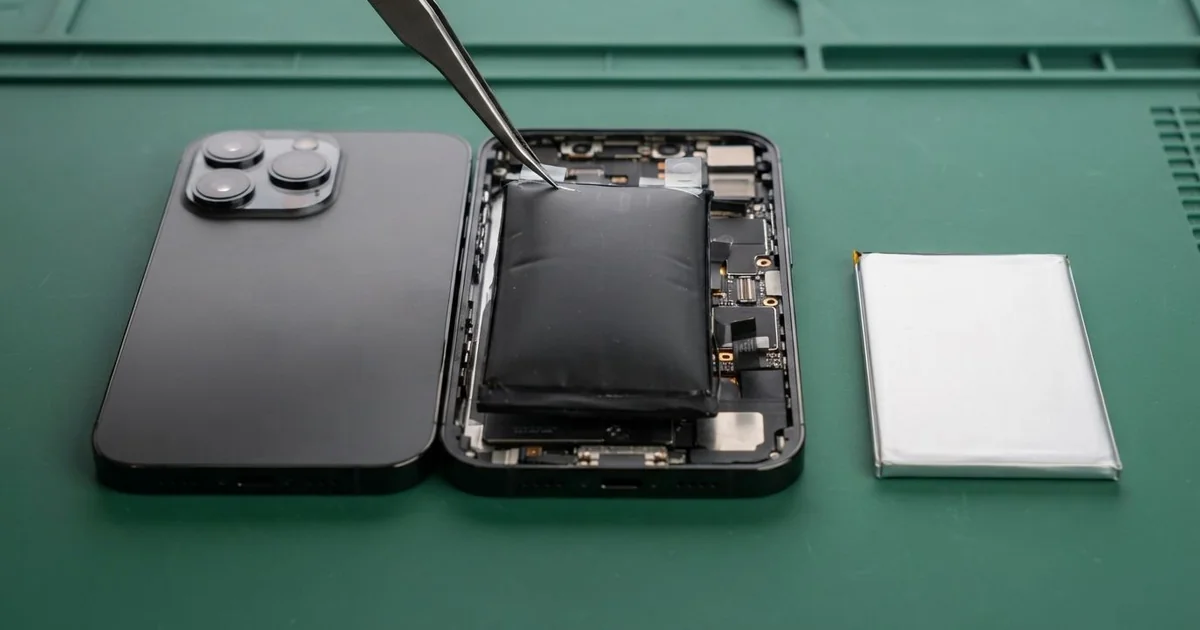
iPhone 14 Pro Max Battery Replacement in Al Khobar fixes a phone that drains fast, dies early or gets hot. We check the battery health free, then fit a new battery under the screen. We close the phone with a fresh seal and test charging, and most jobs are done the same day.
An iPhone 14 Pro Max battery draining fast often comes as a surprise. This phone is known for lasting long, so the change feels sudden. It needs a charger by mid-afternoon, or it switches off with charge still showing.
It's better not to wait. A worn battery can't keep up with the phone, so the phone slows itself down. An old battery can also swell, and that pushes the large screen out of its frame.
Not every drain needs a new part. Bright screen settings, the always-on display or an app stuck in the background can all drain a healthy battery. We check those first and tell you if a setting is the real cause.
When the battery itself is worn, an iPhone 14 Pro Max battery replacement is the answer. The battery sits under the screen, held by stretch tabs. So we open the phone from the front and take great care with the screen cables.
How Kabayan Center Replaces an iPhone 14 Pro Max Battery
These are the battery faults we fix on this phone.
- Fast drain on a normal day
- Sudden shutdowns with charge still on the screen
- A phone that lags in games, the camera or maps
- Heat while charging or during long calls
- A swollen battery lifting the screen at one side
- A low battery health reading, or a message asking for service
Here is how an iPhone 14 Pro Max battery replacement works with us:
- We check the battery health free and test charging with our own cable.
- We explain what it needs, and you decide before any work starts.
- We remove the two tiny bottom screws and warm the screen to soften the seal.
- We lift the screen with a suction cup and disconnect the battery straight away.
- We pull the stretch tabs slowly, so the old battery comes out without bending.
- We fit the new battery, connect it and test charging and power on the bench.
- We fit a fresh seal, close the phone and let you check it yourself.
Have a different phone at home? Our phone battery replacement service covers other models too. Our shop is on King Fahd Road, and customers come from Dammam and Dhahran too.
Why an iPhone 14 Pro Max Battery Wears Out: 3 Real Cases
Maps and charging all day in a taxi
This one starts in a ride-hailing car. The driver ran maps on full brightness for every trip, with the phone charging the whole shift. The windscreen sun hit it from morning to evening.
"It used to last well into the next day. Now it barely lasts my shift," the driver told us. They had searched for iPhone Battery Replacement in Al Khobar while waiting for a rider.
Full brightness, constant charging and strong sun all add heat. Heat is what wears a battery down fastest. The health reading in Settings was far below normal.
We did the iPhone 14 Pro Max battery replacement and ran a long test with maps open. The phone stayed cool and the charge dropped slowly, as it should.
While testing, the cable felt loose and the phone charged slowly. The Lightning pins had dark marks from months of being plugged in all day. So we did a charging port repair, fitting a new port part.
The driver now charges in short bursts and keeps the phone on a vent mount. The new battery gets through a full shift with charge left over.
Long gaming sessions on the charger
We often see this with phones used for games while plugged in. An office worker played for hours each night after work with the phone on charge. The back got so warm it felt uncomfortable to hold.
"It drains so fast now, even when I'm not playing," they said. They had looked up mobile repair in Al Khobar, worried the phone was failing.
Gaming while charging makes heat from two sides at once. Night after night, that wears the battery out early. The battery health reading in Settings confirmed it within a minute.
We fitted a new battery, and the drain went back to normal. During testing, though, we noticed a faint ghost of the game's buttons on the screen. Showing the same bright image for hours can leave a mark on this kind of display.
The mark only showed on grey backgrounds. The owner chose to keep the screen for now and plan a phone screen replacement later if it bothers them.
So the battery problem is fixed, but the faint mark stays. The owner now unplugs before long games and lowers the brightness.
Left flat in a drawer during a long trip
A customer came to us after a long trip home abroad. They had left this phone in a drawer, switched off, with the battery almost empty. When they came back, it would not turn on at all.
"I've had it on the charger all night, and nothing," the customer said. There was no logo, no sound and no charging sign.
A battery left empty for a long time can drain below a safe level. Then it may refuse to take any charge again. The phone looks completely dead, even though the rest of it may be fine.
We measured the battery on the bench, and it gave almost no power. After the iPhone 14 Pro Max battery replacement, the phone started up on the first try. Every photo and chat was still there.
If the new battery had not woken it, the next step would have been a motherboard repair. This time, the battery alone was enough, and no board work was needed.
We suggested leaving a phone at about half charge before storing it. It also helps to charge it once every few months.
How to Keep Your iPhone 14 Pro Max Battery Healthy
- Keep the phone out of strong sun and off the car dashboard.
- Unplug before long games or video calls, so the phone doesn't heat from two sides.
- Turn on Optimised Battery Charging in Settings.
- Store a spare phone at about half charge, never empty.
- Lower the brightness when you can, since this big screen uses a lot of power.
- Check the battery health in Settings every few months.
- Bring it in for phone repair in Al Khobar if the screen starts to lift.
Related services
- Water damage repair for a phone that got wet, even if it still turns on
Questions about this repair
Ask us anything else on WhatsApp
we answer during shop hours.