iPhone 14 Pro Max LCD Display Replacement in Al Khobar
iPhone 14 Pro Max LCD Display Replacement in Al Khobar for cracked glass, lines or dead touch. We check the phone free and tell you what it needs first. You decide before any work starts, and we never wipe your photos or chats.
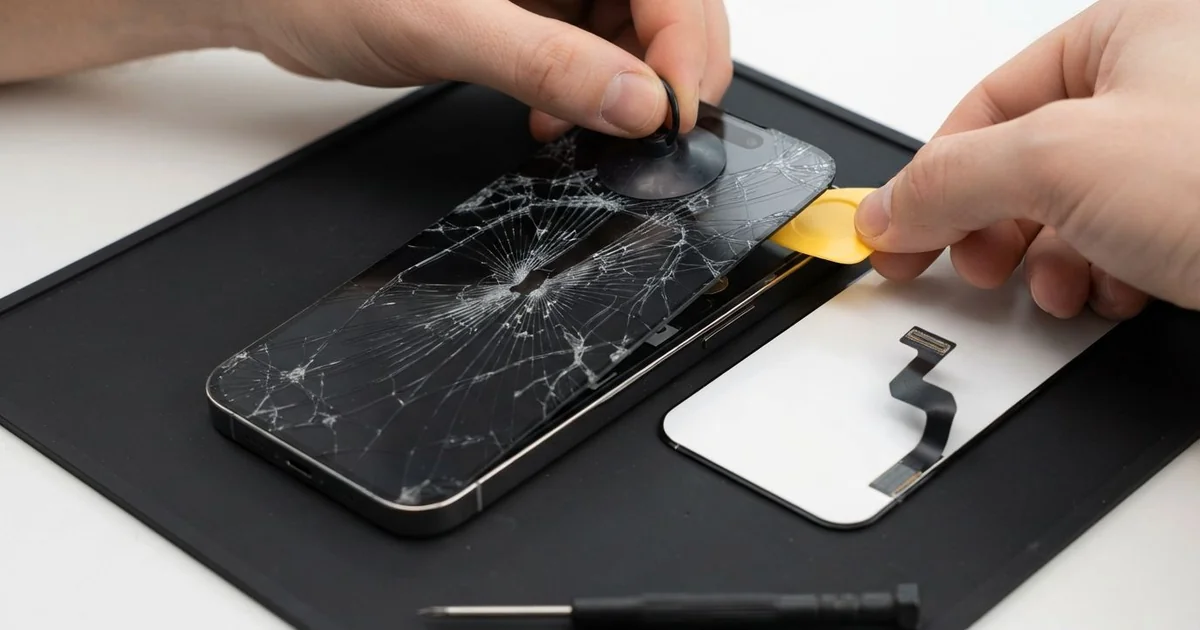
iPhone 14 Pro Max LCD Display Replacement in Al Khobar fixes a cracked, dark or flickering screen. We check the phone free, then replace the large screen as one part, glass and display together. We test touch, Face ID and the always-on display, and most jobs are done the same day.
An iPhone 14 Pro Max broken screen is easy to spot. The big glass cracks from a corner, or lines and black blotches spread across the picture. On some phones the glass looks fine, but one area ignores your finger.
It's better not to wait. A large cracked screen sheds tiny splinters that cut fingers and ears. Cracks also let dust, sweat and drinks reach the board inside.
Not every fault needs a new part. A lifted screen protector can block touch along one side. After a fall, a loose screen cable can black out the picture, so we rule out both first.
Cracked glass, lines and dead patches are a different case. The glass and display on this model are one joined part, so the glass can't be replaced alone. An iPhone 14 Pro Max screen replacement fits a whole new screen, and that fixes all three faults.
How Kabayan Center Replaces an iPhone 14 Pro Max LCD Display
These are the screen faults we fix most on this phone.
- Cracked or shattered front glass
- Green, pink or white lines across the picture
- A black screen while calls and alerts still come in
- Touch that is dead in one area, or ghost taps that open apps
- Black blotches that grow from the edge
- A screen pushed out of the frame after a fall
Here is how an iPhone 14 Pro Max screen replacement goes with us:
- We check the phone free and test sound, cameras, charging and Face ID first.
- We explain what it needs, and you decide before any work starts.
- We remove the two tiny bottom screws and warm the screen edges to soften the seal.
- We lift the screen slowly with a suction cup and a thin pick, then disconnect the battery.
- We connect the new screen and test touch in every corner, plus colour and brightness.
- We check Face ID, the front camera and the always-on display before closing.
- We fit a fresh seal, press the screen down evenly and hand you the phone to test.
Using a different model? Our phone screen replacement service covers other phones too. Our shop is on King Fahd Road, and customers come from Dammam and Dhahran as well.
How an iPhone 14 Pro Max Screen Breaks: 3 Real Cases
Fell from a shirt pocket at the airport
This one starts at an airport check-in desk. A traveller bent down to lift a suitcase, and the big phone slid out of a shirt pocket. It hit the hard floor on its corner, then bounced onto its back.
"I could see my boarding pass through the cracks, just about," the traveller told us after the trip. They had searched for iPhone Screen Replacement in Al Khobar the day they landed.
A large phone has more glass to break and more weight behind each fall. The corner hit had cracked the screen into a web, and a black blotch was slowly spreading from it.
We fitted a new screen and tested touch along every edge. Face ID and the front camera worked straight away. The always-on display showed the clock clearly again.
Then we checked the back. The bounce had cracked the back glass too, with loose pieces near the cameras. So we also did an iPhone back glass replacement before handing it over.
After the iPhone 14 Pro Max LCD display replacement, the phone looked new on both sides. The traveller now uses a case with a raised lip and keeps the phone in a zipped bag at airports.
Pressed under a laptop in a backpack
A common case: a big phone squeezed into a backpack with a laptop and books. A university student noticed a strip near the bottom that ignored every tap. "I can't reach the keyboard's last row," the student said.
The student had looked up mobile repair in Al Khobar before an exam week. The bag had been packed that way every day for months. Heavy weight pressing on a phone can crack the touch layer inside, even when the glass looks whole.
We found a faint pressure mark in the display right where the dead strip was. Cleaning or refitting the cable would not help. We fitted a new screen, and every part of the keyboard worked again.
During the final test, the charging cable felt loose in the phone. The Lightning port was packed with crumbs and lint from the backpack. So we did a charging port repair, cleaning it out and checking the pins.
The iPhone 14 Pro Max LCD display replacement and firm charging were ready just in time for the exams. The student now keeps it in the backpack's front pocket, away from the heavy laptop.
Juice spilled over a cracked corner
We often see a small crack turn into a big problem. A shop owner had used the phone with a cracked corner for a while. Then a cup of cold juice tipped over on the counter, right onto the phone.
By evening, the screen was flickering and Face ID kept failing. The owner wiped it, charged it and hoped for the best.
We opened it and found sticky juice under the display and near the front sensors. A wet phone should never go on charge, even when it still lights up. We did a water damage repair on the board, then fitted a new screen.
The iPhone 14 Pro Max LCD display replacement went well, but Face ID could not be saved. The juice had reached its small parts. They are matched to this phone's board, so they can't simply be swapped.
We explained this honestly before closing the phone. The owner now unlocks with a passcode and uses everything else as normal.
A fixed crack would have kept the juice out. Small cracks are worth fixing early, before a spill finds its way in.
How to Keep Your iPhone 14 Pro Max Screen Safe
- Use a case with a raised lip, since a big phone lands harder.
- Keep the phone in a zipped pocket when you bend, lift or travel.
- Don't pack it under a laptop or heavy books in a bag.
- Fix small cracks early, before juice, sweat or dust get inside.
- Choose a thin, well-fitted screen protector, and replace it once it lifts.
- Back up your photos while the screen still works.
- Bring it in for phone repair in Al Khobar at the first line or dark blotch.
Related services
- Phone battery replacement for a phone that drains fast or lifts its screen
Questions about this repair
Ask us anything else on WhatsApp
we answer during shop hours.