iPhone 15 Charging Port Repair in Al Khobar
iPhone 15 Charging Port Repair in Al Khobar for a USB-C cable that wobbles, slips out or won't charge. We check the port free and tell you what it needs. You decide before any work starts, and nothing on your phone is wiped.
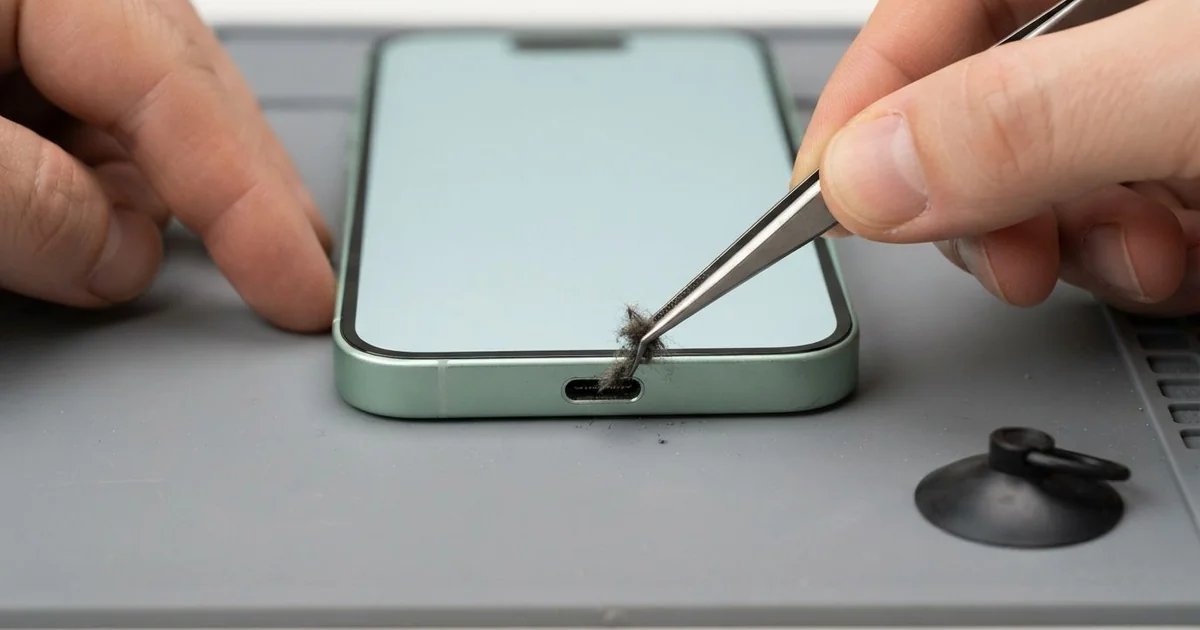
iPhone 15 Charging Port Repair in Al Khobar fixes a phone that charges loosely or not at all. We check the USB-C port free, then clean it or fit a new port part. We test charging, the cable fit and the bottom mic, and most jobs are done the same day.
An iPhone 15 not charging often starts with a loose feeling. The USB-C cable wobbles, slips out, or only works when you hold it still. Some phones show a liquid warning or charge very slowly, even with a good charger.
Many owners try every USB-C cable in the house, but when all fail, the fault is inside the phone. It's better not to wait, because a loose plug heats the contacts and slowly burns them. The battery also keeps running flat, and that wears it out sooner.
Not every fault needs a new part. Lint, sand and dust cause most charging trouble. We clean them out with fine plastic tools, never metal.
A bent centre tab or burnt contacts are different. The iPhone 15 charging port sits on a thin cable at the bottom, together with the bottom mic. We replace that part, and charging and clear calls come back together.
How Kabayan Center Repairs an iPhone 15 Charging Port
These are the charging faults we fix on this phone.
- A USB-C cable that wobbles or slips out
- No charging at all, with any cable
- Charging that keeps stopping and starting
- Slow charging, even with a good charger
- A liquid warning that stays after the phone is dry
- A bent or broken tab in the middle of the port
Here is how an iPhone 15 charging port repair works with us:
- We look into the port under a bright light and magnifier, then test our own cable.
- We explain what it needs, and you decide before any work starts.
- We clean out lint and sand with fine plastic tools, never metal.
- If the port is damaged, we open the phone and disconnect the battery first.
- We lift out the loudspeaker and the small brackets over the port cable.
- We fit the new port cable and test charging, the cable fit and the mic.
- We seal the phone with a fresh seal and let you test it yourself.
Own another model? Our charging port repair service covers other phones too. Customers come to our shop on King Fahd Road from Dammam and Dhahran as well.
Why an iPhone 15 Stops Charging: 3 Real Cases
A bent tab from charging in bed
This one starts late at night. A call centre worker scrolled in bed after shifts, with the phone on charge. The cable bent hard at the port every time they rolled over.
"Now it only charges if the cable points straight up," the worker told us. They had searched for iPhone Charging Port Repair in Al Khobar on a break.
A USB-C port has a thin tab in the middle, covered in tiny contacts. Pressure from the side bends that tab over time. Once it bends, the plug no longer sits flat on the contacts.
Under our magnifier, the tab was clearly tilted to one side. Cleaning could not fix that, so we opened the phone and did the iPhone 15 charging port repair. The cable clicked in firmly and charged at full speed.
During testing, the battery health read low. Months of short charges at night had worn it down. The worker asked us to add a phone battery replacement on the same visit.
The phone now lasts a full shift and charges with any cable. The worker now charges it on a bedside table and scrolls with it unplugged.
Fine sand from a beach day
A common case: a family day at the beach near Half Moon Bay. The phone rode in a shorts pocket all afternoon. That evening the cable would not go in all the way.
"It feels like something is blocking it," the owner said. They had looked up mobile repair in Al Khobar, worried about a costly fix.
Fine sand slips into pockets and then into the port. Each time the cable goes in, it packs the sand down harder. Soon the plug can't reach the contacts at all.
Under our light, the back of the port was full of pale, packed sand. We picked it out slowly with fine plastic tools, taking care not to touch the centre tab.
After cleaning, the cable went in with a clear click. The phone charged normally on the first try. The iPhone 15 charging port repair needed no new part, and the whole visit was short.
We showed the owner how to check the port with a torch. On beach days, the phone now goes into a sealed pouch inside the bag. Brushing sand off hands before touching the phone helps too.
Sea spray on a boat ride
We often see this after a day on the water. A tour guide took photos on a speedboat, and sea spray hit the phone again and again. Back on land, the phone went straight on charge in the hotel room.
The next morning, it showed a liquid warning every time. "It's dry, so why does it still say that?" the guide asked. Salt had dried inside the port and started to eat the contacts.
We found white salt crust in the port and green spots just inside the phone. Charging while salty had burnt part of the centre tab. So we did a water damage repair first, then fitted a new port part.
Charging came back, and the warning went away. But the loudspeaker crackled a little at high volume, because salt had reached its mesh.
Never charge a phone that got wet with sea water, even if it looks dry. The guide chose to leave the speaker for now, since calls and charging worked well. We noted it on the job card for a later visit.
A sealed pouch now goes on every boat trip.
How to Keep Your iPhone 15 Charging Port Working
- Look into the port with a torch every few weeks for lint or sand.
- Never clean it with a metal pin, a needle or a toothpick.
- Don't use the phone hard while it charges, so the cable doesn't bend the tab.
- Pull the cable straight out by its plug, never at an angle.
- Never charge a phone that got wet, especially with salt water.
- Get phone repair in Al Khobar as soon as charging needs a special angle.
Related services
- Motherboard repair for a phone that still won't charge with a new port
- Phone screen replacement for a cracked or dark screen
Questions about this repair
Ask us anything else on WhatsApp
we answer during shop hours.