iPhone 15 LCD Display Replacement in Al Khobar
iPhone 15 LCD Display Replacement in Al Khobar for cracked glass, lines, flicker or touch that stops working. We check your phone free and tell you what it needs. You decide before any work starts, and your photos and chats stay on the phone.
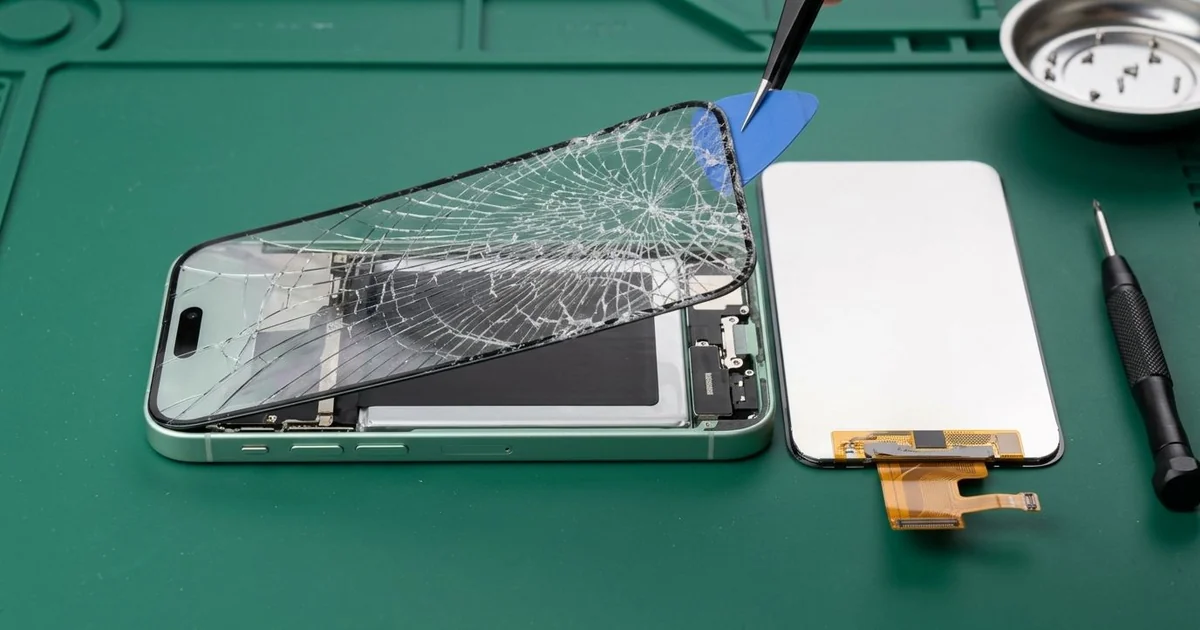
iPhone 15 LCD Display Replacement in Al Khobar fixes a cracked, dark or flickering screen. We check the phone free, then fit a complete new screen, glass and display as one part. We test touch, Face ID and the area around the Dynamic Island, and most jobs are done the same day.
An iPhone 15 broken screen shows up in different ways. The glass cracks in a web, or bright lines cross the picture. Sometimes the screen looks fine, but taps land in the wrong place or not at all.
It's better not to wait. Cracked glass sheds tiny splinters, and the cracks let in dust, sweat and drinks. A screen that goes fully dark also makes it much harder to back up your photos in time.
Not every fault needs a new part. A bubbled screen protector can stop touch near the edges. A drop can also loosen the screen cable, and refitting it brings the picture back.
Cracks, lines and black patches need more than that. On this model the glass and display are joined as one part, so the glass can't be swapped alone. An iPhone 15 screen replacement fits the whole new screen and fixes all three.
How Kabayan Center Replaces an iPhone 15 LCD Display
These are the screen faults we fix on this phone.
- Cracked or shattered front glass
- Bright, green or pink lines across the picture
- A black screen while the phone still rings
- Dead touch in one area, or ghost taps that open apps
- Flicker or a dark patch near the Dynamic Island
- A screen lifting from the frame after a fall
Here is how an iPhone 15 screen replacement works with us, step by step:
- We check the phone free and test sound, cameras, charging and Face ID.
- We explain what it needs, and you decide before any work starts.
- We remove the two tiny screws beside the USB-C port and warm the screen edges.
- We lift the screen with a suction cup and a thin pick, then disconnect the battery.
- We connect the new screen and test touch, colour and brightness in every corner.
- We check Face ID and the front camera, which sit just behind the glass.
- We fit a fresh seal, press the screen down evenly and let you test the phone.
Have another phone too? Our phone screen replacement service covers other models with the same steps. Customers come to our shop on King Fahd Road from Dammam and Dhahran as well.
How an iPhone 15 Screen Breaks: 3 Real Cases
Dropped on a mall escalator
This one starts in a busy shopping mall. A mother was holding a child's hand and her phone at the same time on an escalator. The phone slipped and tumbled down the metal steps.
"The top is black around the camera cutout, and the rest flickers," she told us. She had searched for iPhone Screen Replacement in Al Khobar before leaving the mall.
Metal steps have sharp ridges, and each bounce hit the glass at a new spot. The screen had cracked in several places, and the display behind it was damaged near the Dynamic Island.
We fitted a new screen and tested touch along every edge. Face ID and the front camera worked on the first try.
When we checked the back, the coloured back glass had a long crack from corner to corner.
On this model the back glass comes off on its own. So we did an iPhone back glass replacement on the same visit.
After the iPhone 15 LCD display replacement, the phone looked new on both sides. She now uses a case with a wrist strap, so the phone stays put on busy days. Both hands are free for the child when the escalator ends.
A gym bench and a heavy weight
A common case: a phone left on a gym bench between sets. A personal trainer set a dumbbell down, and it clipped the edge of the phone. "There's a line down the middle now," the trainer said.
The trainer had looked up mobile repair in Al Khobar between clients. A heavy weight doesn't need to hit hard. A small knock on the edge can crack the display inside.
We found a thin crack under the glass where the weight had landed. We fitted a new screen, and the line was gone.
While testing, the USB-C cable kept slipping out. The port was packed with lint and dried sweat from gym pockets. So we did a charging port repair clean, using fine plastic tools.
The cleaning helped, and the phone charged again. But the port still felt a little loose, because the centre tab had worn from forced plugging. The trainer chose to keep it for now and come back for a new port part later.
So the iPhone 15 LCD display replacement is perfect, while the port is only partly fixed. The trainer now keeps the phone in a locker during training.
Cleaning a cracked screen with spray
One morning a phone came in that was tapping all by itself. A receptionist had a small crack near one corner. To keep it looking clean, they sprayed glass cleaner straight onto the screen every day at the desk.
The liquid ran into the crack and settled under the glass. Within days, apps opened on their own and the keyboard typed random letters into every message.
"I only wanted to keep it clean," the receptionist said. They had left it on charge overnight, hoping it would settle.
We opened it and found liquid marks under the display and white crust near the screen connector. Never spray liquid onto a phone, and never charge it after a spill. We did a water damage repair on the board before anything else.
Once the board was clean and dry, we did the iPhone 15 LCD display replacement. Every tap landed in the right place again, and the ghost typing stopped completely.
The receptionist now cleans the phone with a dry, soft cloth. A good screen protector also seals small cracks before they grow.
How to Keep Your iPhone 15 Screen Safe
- Use a case with a raised edge, so the glass doesn't meet the floor first.
- Hold the phone with a strap or put it away on escalators and stairs.
- Keep it off gym benches and floors, where weights and feet land.
- Clean the screen with a dry, soft cloth, never with spray.
- Fix small cracks early, before liquid finds a way in.
- Back up your photos while the screen still works.
- Bring it in for phone repair in Al Khobar at the first line or dark patch.
Related services
- Phone battery replacement for a phone that drains fast or runs hot
Questions about this repair
Ask us anything else on WhatsApp
we answer during shop hours.