iPhone 15 Plus Battery Replacement in Al Khobar
iPhone 15 Plus Battery Replacement in Al Khobar for a long-lasting phone that suddenly needs a charger by evening. We check the battery free and tell you what it needs. You decide before any work starts, and your files stay on the phone.
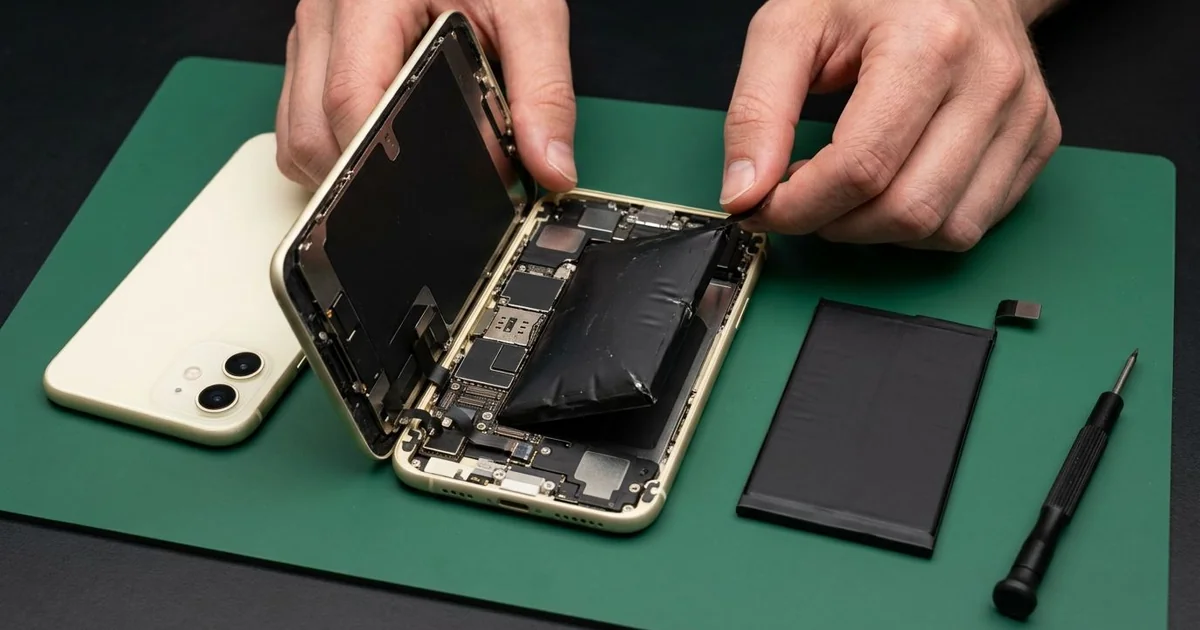
iPhone 15 Plus Battery Replacement in Al Khobar fixes a phone that drains fast, shuts down early or runs warm. We check the battery health free, then fit a new battery from the back of the phone. We seal it again, test charging and power, and most jobs are done the same day.
An iPhone 15 Plus battery draining fast feels strange on a phone made for long days. It once lasted into the next morning, and now it needs a charger by evening. Some phones also turn off early or warm up in a call.
It's better not to wait. A worn battery can't keep up with the phone, so the phone slows itself to stay on. An old battery can also swell and push the screen or back glass outward.
Not every drain needs a new part. A stuck app, full brightness or a poor USB-C cable can all look like a weak battery. We check those first and tell you if a setting is the real cause.
When the battery is worn, an iPhone 15 Plus battery replacement is the answer. The back glass on this model comes off on its own, so we reach the battery from the back. The screen and its cables stay untouched.
How Kabayan Center Replaces an iPhone 15 Plus Battery
These are the battery faults we fix on this phone.
- Fast drain on a normal day
- Shutdowns with charge still on the screen
- A phone that lags in the camera or maps
- Heat while charging or during long calls
- A swollen battery lifting the screen or back glass
- A low battery health reading, or a message asking for service
This is how an iPhone 15 Plus battery replacement works with us:
- We check the battery health free and test charging with our own USB-C cable.
- We explain what it needs, and you decide before any work starts.
- We warm the back glass to soften the seal, then lift it slowly with a suction cup.
- We disconnect the battery before touching anything else inside.
- We release the old battery's adhesive strips slowly, without prying near the cell.
- We fit the new battery, connect it and test charging and power on the bench.
- We seal the back glass again, press it evenly and let you check the phone.
Own another phone too? Our phone battery replacement service covers other models as well. Customers come to our shop on King Fahd Road from Dammam and Dhahran too.
Why an iPhone 15 Plus Battery Wears Out: 3 Real Cases
Plugged in at a reception desk all day
This one starts at a busy clinic reception. A receptionist kept the phone plugged into a desk charger from morning to evening. It sat under a warm desk lamp, always at full charge.
"It's on the charger all day, so why is it always low at night?" the receptionist asked. They had searched for iPhone Battery Replacement in Al Khobar during a quiet hour.
Sitting at full charge in warm air wears a battery out quietly. The battery health reading in Settings was far lower than expected for the phone. That was why it ran down so fast in the evening.
We fitted a new battery and ran a long test away from the charger. It held its charge well and stayed cool.
While testing, the USB-C cable felt loose. The phone had been yanked off the desk charger many times, pulling the plug sideways. So we did a charging port repair, fitting a new port part.
The phone now lasts well past the end of the shift. We suggested turning on the 80% charging limit, since the phone stays plugged in so long.
A magnetic power bank in the summer heat
We often see this in the hottest months. A site supervisor kept a magnetic power bank stuck to the back of the phone all day outdoors. Both got very hot in the sun, and the phone often showed a heat warning.
"The screen is lifting, and there's a gap at the side," the supervisor said. They had looked up mobile repair in Al Khobar on the way home.
Charging adds heat, and the sun adds more. Day after day, the trapped heat made the battery swell. It was now pushing the screen out from inside.
A swollen battery is not safe to use, even when the phone still works. We took it out at once and fitted a new battery.
The screen settled back, but a faint pressure mark stayed near the edge. The supervisor chose to keep it for now and plan a phone screen replacement later.
So the phone is safe again, though the mark remains. It only shows on white pages, and touch still works there. The supervisor now uses the power bank in the shade, and only when the phone is low.
Cold office air, then the humid street
A customer came to us with a drain that started slowly and got worse each week. An office worker walked from a very cold office into the humid evening air every day. The phone often fogged up on the outside, like a cold glass of water.
That fog can also form inside a phone. Over many months, tiny drops had settled on the battery connector. "It drops from half to nothing in minutes," the worker said.
We opened the back and found a light green crust on the connector. The poor contact was wasting power and confusing the battery reading. So we did a water damage repair on that area first.
Then we did the iPhone 15 Plus battery replacement, because the old one had worn from the constant strain. The drain went back to normal, and the reading was steady again. The phone lasted well into the next morning, as it used to.
We suggested keeping the phone in a bag when stepping outside from the cold. That lets it warm up slowly, so less fog forms inside. The phone has held its charge well since.
How to Keep Your iPhone 15 Plus Battery Healthy
- Turn on the 80% charging limit in Settings if the phone is plugged in for long hours.
- Keep the phone and any power bank out of direct sun.
- Let the phone warm up slowly in a bag when you leave a cold room.
- Use a good USB-C cable and charger, and replace a frayed one.
- Check the battery health and cycle count in Settings every few months.
- Bring it in for phone repair in Al Khobar the moment the screen or back lifts.
Related services
- Motherboard repair for a phone that still won't power on with a new battery
Questions about this repair
Ask us anything else on WhatsApp
we answer during shop hours.