iPhone 15 Plus LCD Display Replacement in Al Khobar
iPhone 15 Plus LCD Display Replacement in Al Khobar for a big screen that is cracked, striped or dead. We check it free and tell you what it needs. You decide before any work starts, and your photos and chats are never wiped.
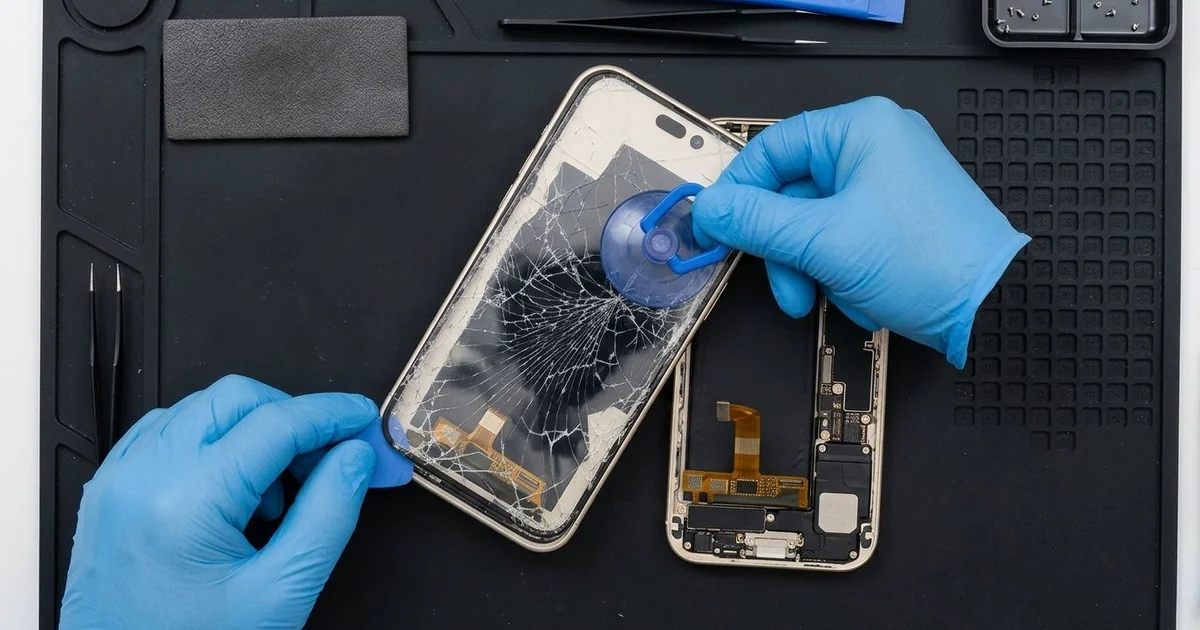
iPhone 15 Plus LCD Display Replacement in Al Khobar fixes a cracked, dark or flickering screen. We check the phone free, then replace the big screen as one part, glass and display together. We test touch, Face ID and the front camera, and most jobs are done the same day.
An iPhone 15 Plus broken screen is hard to miss. Cracks run across the wide glass, or coloured lines and black patches cover part of the picture. On some phones the glass is fine, but one strip ignores every tap.
It's better not to wait, even if the phone still works. Big cracked glass sheds splinters that cut fingers and cheeks. Cracks also let sweat, dust and water reach the parts inside.
Not every fault needs a new part. A cracked screen protector can look just like a broken screen. After a fall, a loose cable can also blank the picture, so we rule out both first.
Cracks, lines and dead areas are a different case. The glass and display on this model are joined as one part, so the glass can't be replaced alone. An iPhone 15 Plus screen replacement fits a complete new screen, and that fixes all three.
How Kabayan Center Replaces an iPhone 15 Plus LCD Display
These are the screen faults we fix on this phone.
- Cracked or shattered front glass
- Coloured lines or flicker across the picture
- A black screen while calls and alerts still come in
- Dead touch in one strip, or taps that land in the wrong place
- Dark patches near the Dynamic Island or the edges
- A screen pushed out of the frame after a fall
Here is how an iPhone 15 Plus screen replacement works with us:
- We check the phone free and test sound, cameras, charging and Face ID first.
- We explain what it needs, and you decide before any work starts.
- We remove the two tiny screws beside the USB-C port and warm the screen edges.
- We lift the wide screen slowly with a suction cup, then disconnect the battery.
- We connect the new screen and test touch in every corner, plus colour and brightness.
- We check Face ID and the front camera, since both sit right behind the glass.
- We fit a fresh seal, press the screen down evenly and let you test the phone.
Have a different model as well? Our phone screen replacement service covers other phones too. People reach our shop on King Fahd Road from Dammam and Dhahran too.
How an iPhone 15 Plus Screen Breaks: 3 Real Cases
Fell from a lap at a drive-through
This one starts at a coffee drive-through. A pharmacist had the phone on their lap to pay, then opened the door to grab a dropped card. The big phone slid off and landed screen down on the kerb.
"Half the screen is black, and the other half is lines," the pharmacist told us. They had searched for iPhone Screen Replacement in Al Khobar while still parked.
A kerb is rough and hard, and a large phone hits it with real weight. The glass had cracked from the corner, and the display under it was broken.
We did the iPhone 15 Plus LCD display replacement and tested touch along every edge. Face ID worked on the first try, and the colours looked even.
Then we turned the phone over for a last check. The back glass had a crack near the camera, from bouncing on the kerb. On this model the back glass comes off on its own.
So we also did an iPhone back glass replacement the same visit. The pharmacist now keeps the phone in a holder on the dashboard vent while driving, never on a lap.
Sat on during a delivery ride
A common case: a big phone in a back pocket on a motorbike. A food delivery rider sat on the phone all shift, hopping on and off between orders. "The bottom of the screen doesn't work, and I can't accept orders," the rider said.
The rider had looked up mobile repair in Al Khobar between deliveries. A big phone bends more easily under body weight. The thin display inside can crack even when the glass stays whole.
We found a pressure line across the lower part of the display, right where the touch had died. After the iPhone 15 Plus LCD display replacement, every tap worked again.
While the phone was open, we saw a slight dent in the battery from the same pressure. A dented battery can swell later, so we explained the risk. The rider chose a phone battery replacement on the same visit, to be safe.
The phone went back on the road with a working screen and a fresh battery. The rider now uses a handlebar mount for maps and orders. Nothing heavy or fragile sits in the back pocket anymore.
Face down on a wet basin
We often see this with phones set down at a hand-wash basin. A restaurant waiter put the phone face down on the wet edge. It slid off onto the tiles, and the glass cracked across one corner.
The waiter kept working that night, and water from the basin got into the crack. By the next day, the screen flickered and the front camera looked foggy.
We opened it and found water marks under the display and near the front camera. A wet phone should never go on charge, even if it still works. We did a water damage repair on the board, then fitted a new screen.
The iPhone 15 Plus LCD display replacement worked, and Face ID came back. The front camera was only partly saved. It worked, but a faint haze stayed in its lens, because water had dried inside it.
The waiter chose to keep the camera as it is for now, since video calls still work. We noted it on the job card for later.
A case with a raised edge and a fixed crack would have kept that water out. Small cracks are always worth fixing early.
How to Keep Your iPhone 15 Plus Screen Safe
- Use a case with a raised edge, since a big phone lands harder.
- Keep the phone off your lap in the car, and use a vent holder instead.
- Keep it out of back pockets, especially on a motorbike or long drive.
- Never set it down on a wet basin, sink edge or counter.
- Fix small cracks early, before water finds a way in.
- Back up your photos while the screen still works.
- Bring it in for phone repair in Al Khobar at the first line or dead strip.
Related services
- Charging port repair for a USB-C cable that is loose or won't charge
Questions about this repair
Ask us anything else on WhatsApp
we answer during shop hours.