iPhone 15 Plus Motherboard Repair in Al Khobar
iPhone 15 Plus Motherboard Repair in Al Khobar for a phone that won't start, loops or won't charge. We check the board free and explain what we find. You decide before any work starts, and your data is never deleted without asking.
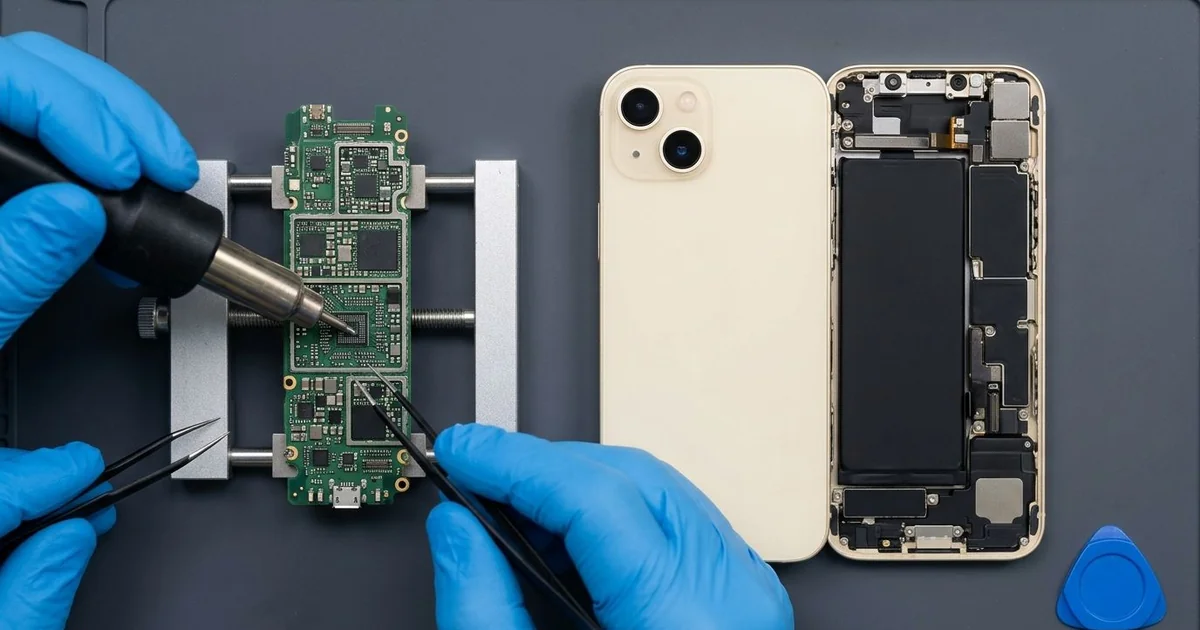
iPhone 15 Plus Motherboard Repair in Al Khobar fixes a phone that won't start, restarts or won't charge. We check the board free and find the faulty part under a microscope. We replace that small part instead of the whole board, and we save your data first wherever we can.
An iPhone 15 Plus not turning on is the most common sign we see. The screen stays black, even on the charger. Other phones show the logo again and again, or lose their signal after a knock.
Owners usually try a forced restart and another charger first, but waiting doesn't help. A short can heat the parts around it and spread the damage. If water is inside, rust keeps growing every day the phone sits in a drawer.
Not every dead phone has a board fault. A flat battery, a broken screen or a damaged USB-C port can look exactly the same. We test those first, so you only pay for what the phone needs.
When the board is really at fault, we look closer. The iPhone 15 Plus motherboard is two thin layers stacked together, packed with tiny parts. Most of the time only one small chip or joint has failed, and we repair that alone.
How Kabayan Center Repairs an iPhone 15 Plus Motherboard
These are the board faults we fix on this phone.
- No power, no logo and no sound
- A logo loop that never reaches the home screen
- No charging with a good port and battery
- No signal after a drop
- Heat from the phone while it is switched off
- Faults that start days or weeks after water
Here is how an iPhone 15 Plus motherboard repair works with us, step by step.
- We check the phone free and test the battery, screen and port to rule them out.
- We connect a power meter that shows how much power the board pulls.
- We explain what we found, and you decide before any work starts.
- We open the phone, disconnect the battery and lift out the board.
- We find the faulty part under a microscope, using the meter and gentle heat.
- We replace that part with a fine hot-air tool and a soldering tip.
- We rebuild the phone and test power, charging, signal and cameras before you check it.
Need help with another phone or a laptop? Our motherboard repair service covers other devices too. Customers come to our shop on King Fahd Road from Dammam and Dhahran as well.
Why an iPhone 15 Plus Board Fails: 3 Real Cases
Dropped in the bath by a toddler
This one starts at bath time. A parent let a toddler hold the phone to watch cartoons, and it slipped into the bath water. It was pulled out quickly and seemed to work fine.
The family dried it with a towel and charged it that night. A week later, it went black and would not come back.
The parent had searched for iPhone Motherboard Repair in Al Khobar, hoping the baby photos could be saved. Bath water with soap leaves a film, and charging a wet phone speeds up rust.
We opened it and found green crust on the power parts and under one chip. We did a water damage repair, cleaning the board in a special bath. But some lines under the chip had already rusted through.
The board could not be brought back to full daily use. We saved the photos and videos first, before any other work. Our data recovery work moved every baby photo onto a new phone.
So the phone itself was lost, but its memories were not. Switching it off and bringing it in the same day would have given the board a much better chance.
A fall from the top bunk
A customer came to us after the phone fell from a top bunk in a shared room. It landed on a hard floor during the night. In the morning, it was stuck on the logo, over and over.
"It never gets past the logo now," the worker told us. They had looked up mobile repair in Al Khobar on a roommate's phone.
A reset at home had not helped, because the fault was not in the software. A hard fall can crack the tiny joints between the two board layers.
We tested the battery and screen first, and both were fine. Our power meter showed the board starting, then dropping out at the same point every time. Under the microscope, we found cracked joints near one corner.
We separated the two layers, cleaned them and joined them again with fresh solder. The phone reached the home screen on the next start. A long bench test passed without a single restart.
After the iPhone 15 Plus motherboard repair, all the photos and chats were still there. The worker now keeps the phone on a shelf beside the bunk, not on the mattress edge.
A power surge after a power cut
We often see this after a summer power cut. When the power came back, there was a loud click at the socket. A tailor's phone was on charge there, and it never switched on again.
"The charger still works on my other phone," the tailor said. So the problem was clearly inside this phone, not in the charger.
A sudden surge can pass through the charger and into the phone. The small chip that controls charging takes the hit first. Our meter showed the board taking no power at all.
Under the microscope, the charging chip had a tiny burnt spot. We did the iPhone 15 Plus motherboard repair with a fine hot-air tool. The phone started up with all its data in place, including the shop's order notes.
But the battery had been damaged by the same surge. It drained fast and would not hold a full charge. We fitted a new one with a phone battery replacement, and the phone ran normally again.
The tailor now charges through a surge protector. During power cuts, it's safer to unplug chargers until the power is steady.
How to Keep Your iPhone 15 Plus Board Safe
- Charge through a surge protector, and unplug chargers during power cuts.
- Never charge a phone that got wet, and skip the rice. Bring it in the same day.
- Keep the phone off bunk edges, high shelves and car roofs.
- Use a good USB-C charger, and avoid unbranded fast chargers.
- Keep it out of hot cars, since heat stresses the board.
- Back up your photos and chats every week.
- Get phone repair in Al Khobar as soon as the phone loops on the logo.
Related services
- Charging port repair for a USB-C cable that is loose or won't charge
Questions about this repair
Ask us anything else on WhatsApp
we answer during shop hours.