iPhone 15 Pro Charging Port Repair in Al Khobar
iPhone 15 Pro Charging Port Repair in Al Khobar for a USB-C cable that slips out or won't charge. We check the port free and tell you what it needs. You decide before any work starts, and your files and photos are never touched.
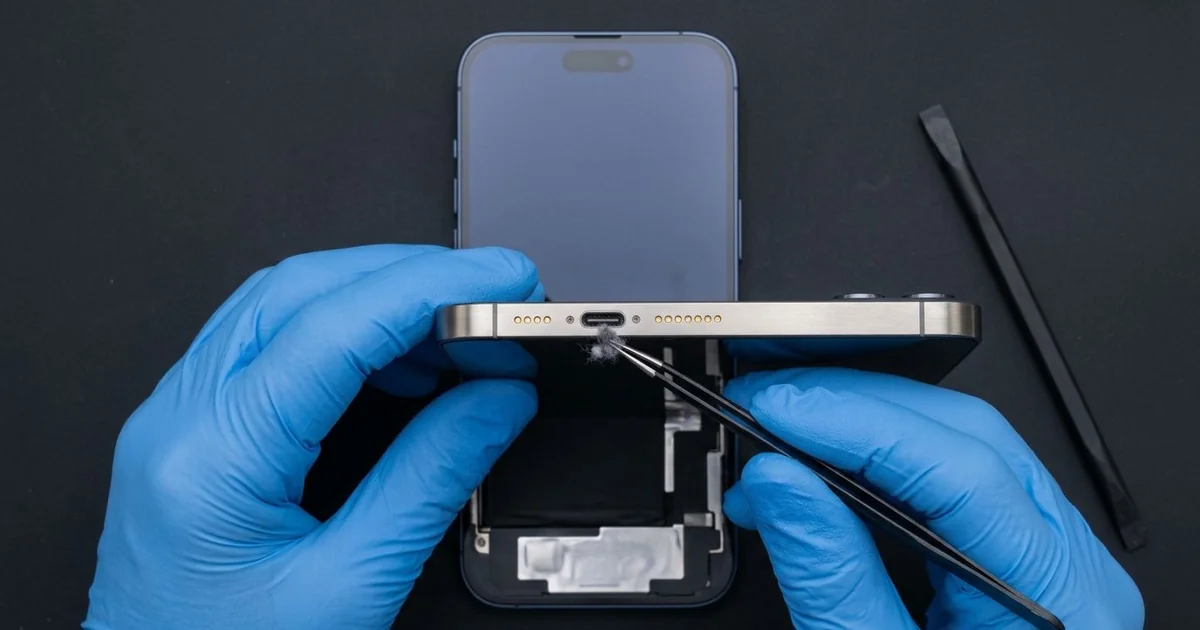
iPhone 15 Pro Charging Port Repair in Al Khobar fixes a phone that charges loosely or not at all. We check the USB-C port free, then clean it or fit a new port part. We test charging, file transfer and the bottom mic, and most jobs are done the same day.
An iPhone 15 Pro not charging often starts with a loose, wobbly cable plug. It slips out or only works at one angle, and file transfers may stop halfway. Many people try a new cable and charger first, but the fault sits inside the port.
It's better not to wait. A loose plug heats the metal contacts and slowly burns them. The battery also keeps running flat, and that shortens its life over time.
Not every fault needs a new part. Lint, sand and dust from pockets and bags cause most charging trouble. A careful clean with fine plastic tools fixes them, and the plug clicks in firmly again.
Worn contacts or a bent centre tab are different. The iPhone 15 Pro charging port sits on a thin cable at the bottom, together with the bottom mic. We replace that part, and charging, transfers and clear calls come back together.
How Kabayan Center Repairs an iPhone 15 Pro Charging Port
These are the charging faults we fix on this phone.
- A USB-C cable that wobbles or slips out
- No charging with any cable or charger
- Charging that keeps stopping and starting
- File transfers or a drive that keeps dropping off
- A liquid warning that stays after the phone is dry
- A muffled mic on calls, since it shares the port part
Here is how an iPhone 15 Pro charging port repair works with us:
- We check the port under a bright light and magnifier, then test our own cable.
- We explain what it needs, and you decide before any work starts.
- We clean out lint, sand and dust with fine plastic tools.
- If the port is damaged, we open the phone and disconnect the battery first.
- We remove the loudspeaker and the small brackets over the port cable.
- We fit the new port cable, then test charging, file transfer and the mic.
- We seal the phone again and let you test it yourself.
Own a different phone? Our charging port repair service covers other models too. Customers come to our shop on King Fahd Road from Dammam and Dhahran as well.
Why an iPhone 15 Pro Stops Charging: 3 Real Cases
Plugged and unplugged all day for files
This one starts in a small design studio. A photographer moved photos from the phone to a laptop many times a day. The cable went in and out, often at an angle, over many months.
"The cable falls out if I even touch the desk," the photographer told us. They had searched for iPhone Charging Port Repair in Al Khobar between shoots.
Each angled plug wears the contacts and loosens the grip inside the port. In time, the plug no longer locks in place. Transfers stop halfway, and charging cuts in and out.
Under our magnifier, the contacts on one side were worn and the grip was loose. Cleaning could not fix that. We opened the phone and did the iPhone 15 Pro charging port repair, and the cable clicked in firmly.
During testing, the battery health was low as well. Constant charging during transfers had kept the phone warm for hours. The photographer asked us to add a phone battery replacement the same visit.
Charging and transfers now work smoothly again. We suggested sending photos over the air for small jobs, and saving the cable for big ones.
Lint and sand from a winter camp
A common case: a phone carried in a jacket pocket on winter desert trips. A university lecturer camped most weekends in the cool months. "It just stopped charging one night at the camp," the lecturer said.
The lecturer had looked up mobile repair in Al Khobar after getting home. Jacket pockets collect lint, and desert trips add fine sand. Together they pack into a firm layer at the back of the port.
Under our light, the port was full of a grey, gritty mat. The cable could only go in part of the way, so the contacts never touched. We worked the layer loose with fine plastic tools, slowly, without touching the centre tab.
After cleaning, the cable went in with a clear click. The phone charged normally on the first try. The iPhone 15 Pro charging port repair needed no new part, and the visit took very little time.
We showed the lecturer how to check the port with a torch before each trip. The phone now travels in a small zip bag inside the jacket. That keeps out both the lint and the sand.
A swim with the phone in a pocket
We often see this at compound pools. A father jumped in to play with his kids and forgot the phone in his swim shorts. It was in the water for a few minutes before he noticed.
It still worked, so he charged it that night. The next morning it showed a liquid warning every time. Pool water had stayed inside the port, and the chlorine had started on the contacts.
We found green spots on the contacts and dampness just inside the phone. So we did a water damage repair first, then fitted a new port part. Never charge a phone that has been in water, even if it seems fine.
Charging came back, and the warning cleared. But fast file transfer to a computer didn't fully return. Our meter showed the fault had reached a small part on the board.
He chose to wait on the board work, since charging was what he needed most. We noted it on the job card for later.
He now leaves the phone in a dry bag by the pool. A quick check after any swim is always worth it.
How to Keep Your iPhone 15 Pro Charging Port Working
- Plug the cable in straight, never at an angle, and pull it out by the plug.
- Send small files over the air, so the port gets less wear.
- Check the port with a torch every few weeks for lint or sand.
- Never clean the port with a pin, a needle or a toothpick.
- Never charge the phone after a swim or a splash until it's checked.
- Get phone repair in Al Khobar as soon as the cable starts to slip.
Related services
- Motherboard repair for a phone that still won't charge or transfer with a new port
- Phone screen replacement for a cracked or dark screen
Questions about this repair
Ask us anything else on WhatsApp
we answer during shop hours.