iPhone 15 Pro LCD Display Replacement in Al Khobar
iPhone 15 Pro LCD Display Replacement in Al Khobar for a cracked, flickering or black screen. We check the phone free and tell you what it needs. You decide before any work starts, and your photos, chats and apps stay just as they are.
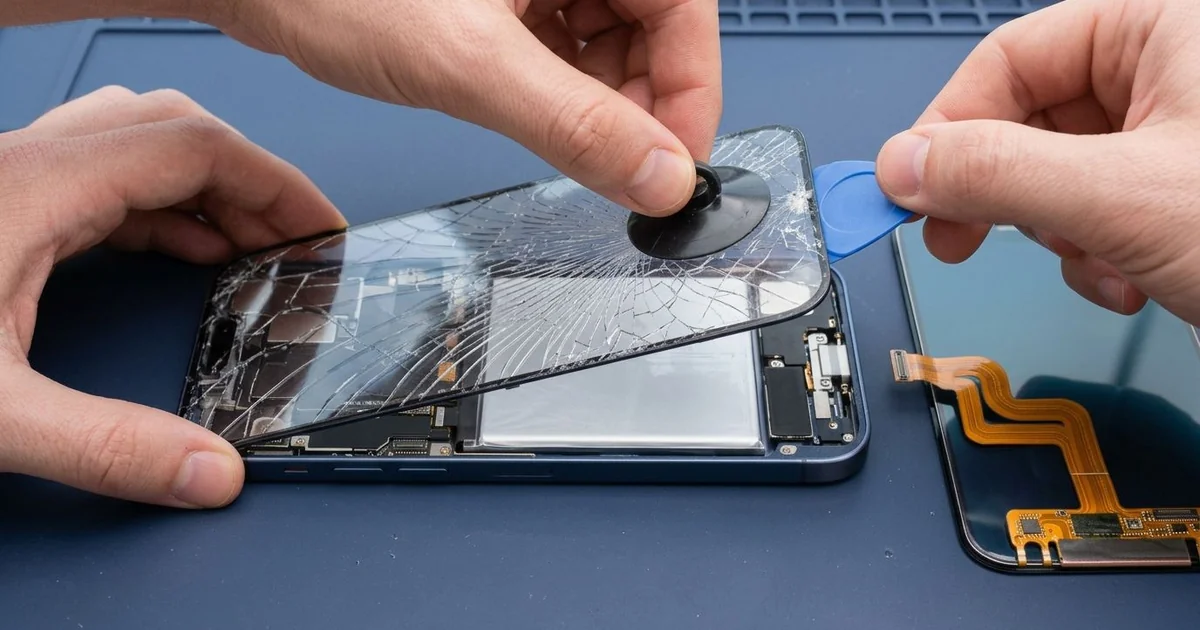
iPhone 15 Pro LCD Display Replacement in Al Khobar fixes a cracked, dark or flickering screen. We check the phone free, then fit a complete new screen, glass and display joined as one part. We test touch, Face ID and the always-on display, and most jobs are done the same day.
An iPhone 15 Pro broken screen can look different from phone to phone. Some crack in a web that spreads out from one corner. Others show green flicker, a black patch, or touch that stops working along an edge.
It's better not to wait. Broken glass sheds small splinters, and cracks let sweat and dust reach the inside. A failing screen can also go fully dark before you get the chance to back up your photos.
Not every fault needs a new part. A bubbled screen protector can block touch near the edges. After a knock, the screen cable can work loose, and refitting it brings the picture back.
Cracks, flicker and black patches need more. On this model the glass and display are one joined part, so the glass can't be changed alone. An iPhone 15 Pro screen replacement fits the whole new screen and fixes all three.
How Kabayan Center Replaces an iPhone 15 Pro LCD Display
These are the screen faults we fix on this phone.
- Cracked or shattered front glass
- Green flicker or lines across the picture
- A black screen while the phone still rings
- Dead touch near the Dynamic Island or along an edge
- Dark patches on the always-on display
- A screen lifting from the frame after a fall
Here is how an iPhone 15 Pro screen replacement works with us, step by step:
- We check the phone free and test sound, cameras, charging and Face ID.
- We explain what it needs, and you decide before any work starts.
- We remove the two tiny screws beside the USB-C port and warm the screen edges.
- We lift the screen with a suction cup and a thin pick, then disconnect the battery.
- We connect the new screen and test touch, colour and brightness in every corner.
- We check Face ID, the front camera and the always-on display before closing.
- We fit a fresh seal, press the screen down evenly and let you test the phone.
Own another model? Our phone screen replacement service covers other phones too. Our shop is on King Fahd Road, and customers come from Dammam and Dhahran as well.
How an iPhone 15 Pro Screen Breaks: 3 Real Cases
Knocked off a bench at a padel court
This one starts at an indoor padel court. A bank employee left the phone on a bench to film a match. A ball hit the bench, and the phone fell flat onto the hard court floor.
"It looks like a spider web, and the bottom won't respond," the employee told us. They had searched for iPhone Screen Replacement in Al Khobar from the court café.
The titanium frame had a small scuff, but the glass took most of the hit. The display under it was broken where the cracks were thickest, near the bottom edge.
We did the iPhone 15 Pro LCD display replacement and tested touch along every edge. Face ID, the front camera and the always-on clock all worked straight away.
Then we checked the back for the final test. The back glass had cracked in a line across the bottom. On this model, the back glass can be replaced on its own.
So we also did an iPhone back glass replacement before handing it over.
The employee now films matches with the phone in a clip stand, well away from the court.
A knock against a door frame
A customer came to us with a screen that looked perfect but flickered green. "I just bumped it on a door frame," the customer said. There was not a single crack or scratch in the glass.
They had looked up mobile repair in Al Khobar, expecting a software fix. A sharp knock on the edge can crack the thin display inside, even when the glass survives. That kind of damage often shows up as flicker or a green tint.
When we opened it, the screen cable was firmly in place. The fault was in the display itself, near the point of the knock. After the iPhone 15 Pro LCD display replacement, the green tint was gone.
While testing, the battery health reading came up low. The phone had been draining fast for a while, and the customer had just learned to live with it. They chose to add a phone battery replacement on the same visit.
The phone left with a clear screen and a full day of charge again. A case with a slightly raised edge now takes any knocks before the glass does.
A small crack, then summer sweat
We often see this in the hottest months. A crane operator worked outdoors all day with the phone in a chest pocket. The screen had a small crack in one corner from an earlier fall.
Sweat soaked through the shirt and into that crack, day after day. Soon the phone began tapping on its own, and the Action button felt sticky.
We opened it and found salty marks under the display and white crust near the screen connector. Sweat is salty, and it rusts parts just like sea water. We did a water damage repair on the board first.
Once the board was clean, we did the iPhone 15 Pro LCD display replacement. Every tap landed where it should again, and the ghost taps stopped.
The Action button was only partly fixed. We cleaned it, and it works, but it still sticks now and then. The sweat had reached its small cable, and the operator chose to wait on that part.
We noted it on the job card for later. The operator now keeps the phone in a sealed pouch at work, away from sweat.
How to Keep Your iPhone 15 Pro Screen Safe
- Use a case with a raised edge, so the glass never hits the floor first.
- Film sports and events from a stand, not from a bench or a ledge.
- Keep the phone out of a sweaty chest pocket in summer, or use a sealed pouch.
- Fix small cracks early, before sweat or water get inside.
- Choose a thin screen protector, and replace it once it bubbles.
- Back up your photos while the screen still works.
- Bring it in for phone repair in Al Khobar at the first green flicker.
Related services
- Charging port repair for a USB-C cable that is loose or won't charge
Questions about this repair
Ask us anything else on WhatsApp
we answer during shop hours.