iPhone 15 Pro Max LCD Display Replacement in Al Khobar
iPhone 15 Pro Max LCD Display Replacement in Al Khobar for a cracked, lined or black screen. It also fixes touch that has stopped working. We look at your phone free and tell you what it needs, and you decide before any work starts.
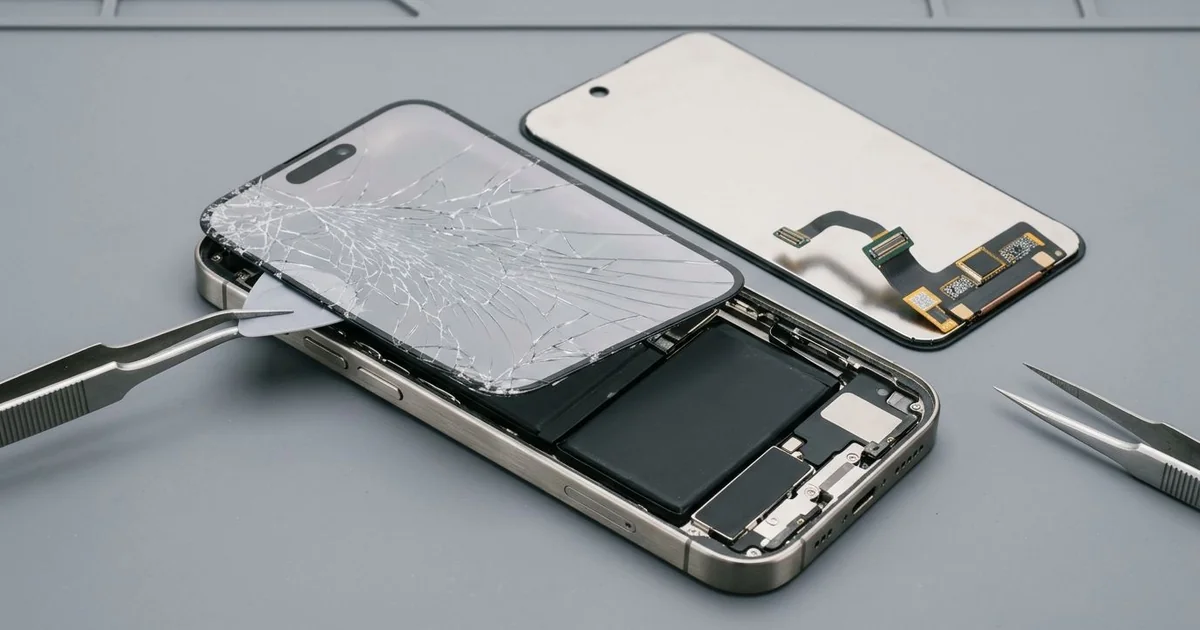
iPhone 15 Pro Max LCD Display Replacement in Al Khobar fixes a cracked, flickering or dead screen. We check it free, then fit a complete new screen, with the glass and display joined as one part. We test touch and Face ID before you leave, and most jobs are done the same day.
An iPhone 15 Pro Max broken screen is easy to spot. Cracks spread from a corner, or a green line runs down the display. Some phones ring and vibrate while the screen stays black.
It's better not to wait. This phone has a big sheet of glass, and cracks grow each time it flexes in a pocket. Small chips also cut fingers, and an open crack lets dust and sweat inside.
Not every fault needs a new part, since a thick screen protector can block touch near the edges. After a hard knock, the screen cable can also slip, and refitting it brings the picture back. We always check those two first.
Cracked glass, lines and dark patches need more. The glass and the display are one part on this model, so the glass can't be changed alone. An iPhone 15 Pro Max screen replacement fits the whole new screen and fixes all three.
How Kabayan Center Replaces an iPhone 15 Pro Max LCD Display
We fix these screen faults on this phone.
- Cracked or shattered front glass, often from a corner hit
- A green or pink line running down the display
- A black screen while calls, sound and vibration still work
- Touch that fails in one area, or ghost taps that open apps
- A flickering picture, or brightness that jumps by itself
- Dark spots or a purple patch that spreads from a crack
Here is how an iPhone 15 Pro Max screen replacement works with us, step by step:
- We check the phone free and test what still works: sound, cameras, charging and Face ID.
- We tell you what it needs, and you decide before any work starts.
- We take out the two tiny screws beside the USB-C port and warm the screen edges.
- We lift the screen with a suction cup and thin picks, working slowly around the frame.
- We disconnect the battery first, then unplug the old screen and connect the new one.
- We test touch, colour, brightness, Face ID and the front camera before closing.
- We fit a fresh seal, press the screen evenly and let you check the phone yourself.
Using another model? Our phone screen replacement service handles other phones too. Many customers drive in from Dammam and Dhahran to our shop on King Fahd Road.
How an iPhone 15 Pro Max Screen Breaks: 3 Real Cases
Knocked off a café table onto stone tiles
One evening a phone came in wrapped in a paper napkin. A sales manager had knocked it off a café table with an elbow. It landed corner first on stone tiles.
"The crack starts at the corner, and that part won't respond," the manager told us. A corner hit sends all the force into one small spot. The glass cracks there, and the touch layer under it often fails too.
The manager had searched for iPhone Screen Replacement in Al Khobar while still at the café. We opened the phone and found the display cracked at that corner. The rest of the picture was still bright.
The metal edge had a small dent, but the frame was still straight. We did the iPhone 15 Pro Max LCD display replacement and tested touch along every edge. Then we turned the phone over for the final check.
The back glass had a crack running from the same corner toward the cameras. So we also did an iPhone back glass replacement, since loose glass there scratches the lenses.
The phone left with a clear screen and a smooth back. We suggested a case with thick corners, because a heavy phone falls hard.
A green line after a hot afternoon in the car
This one starts in a parked car in summer. A real estate agent left the phone on the front seat during a long viewing. When the agent came back, it was too hot to hold.
"There was one thin green line, and the next morning there were three," the agent said. Strong heat can weaken tiny joints inside a display. Lines that multiply are a sign the panel itself is failing.
The agent had looked up mobile repair in Al Khobar while the phone cooled down. There was no crack at all, which surprised the agent. We reseated the screen cable first, but the lines stayed.
When we opened the phone, the battery also looked slightly puffed at one end. The heat had worked on it too. A swelling battery is not safe, even when the phone still works.
So we did a phone battery replacement along with the new screen. Both parts went in, and the iPhone 15 Pro Max LCD display replacement showed clean colours again.
The agent now keeps the phone in a vent mount in the cool air, never on the seat. A sunshade on the windscreen helps a lot as well.
A small crack left open through the humid weeks
We often see this when a crack is left alone for weeks. A hotel receptionist had a thin crack near the top edge, but the phone worked fine. Then the humid weeks of late summer arrived.
Moving between a cold lobby and the wet air outside made the phone sweat inside. "Now it types letters I never pressed," the receptionist said. Moisture had crept in through the crack.
We opened it and found a mist mark under the display and white crust near the top sensors. So we did a water damage repair, cleaning that area before fitting a new screen.
The new screen worked well, and every tap landed in the right place. But Face ID would not set up again. The moisture had damaged the tiny sensor that reads your face.
That sensor can't be swapped like a normal part. The receptionist chose to use the passcode for now. Calls, photos and the screen all work as before.
A crack is a small open door. An early iPhone 15 Pro Max LCD display replacement would have kept the moisture out.
How to Keep Your iPhone 15 Pro Max Screen Safe
- Use a case with raised edges and thick corners, since this heavy phone lands hard.
- Pick a screen protector made for this size, so touch still works at the edges.
- Keep the phone off the car seat and dashboard in summer. Heat can put lines in the display.
- Fix small cracks early, before moisture from humid air finds a way in.
- Stop using the phone if the screen starts to lift, because the battery may be swelling.
- Back up your photos while the screen still works.
- Book phone repair in Al Khobar at the first green line, since lines tend to spread.
Related services
- Charging port repair for a USB-C cable that is loose or only charges at an angle
Questions about this repair
Ask us anything else on WhatsApp
we answer during shop hours.