iPhone 16 Battery Replacement in Al Khobar
iPhone 16 Battery Replacement in Al Khobar for a phone that is empty by mid-afternoon. It also helps when the phone runs warm or switches off early. We test your battery free and explain what it needs, and you decide before any work starts.
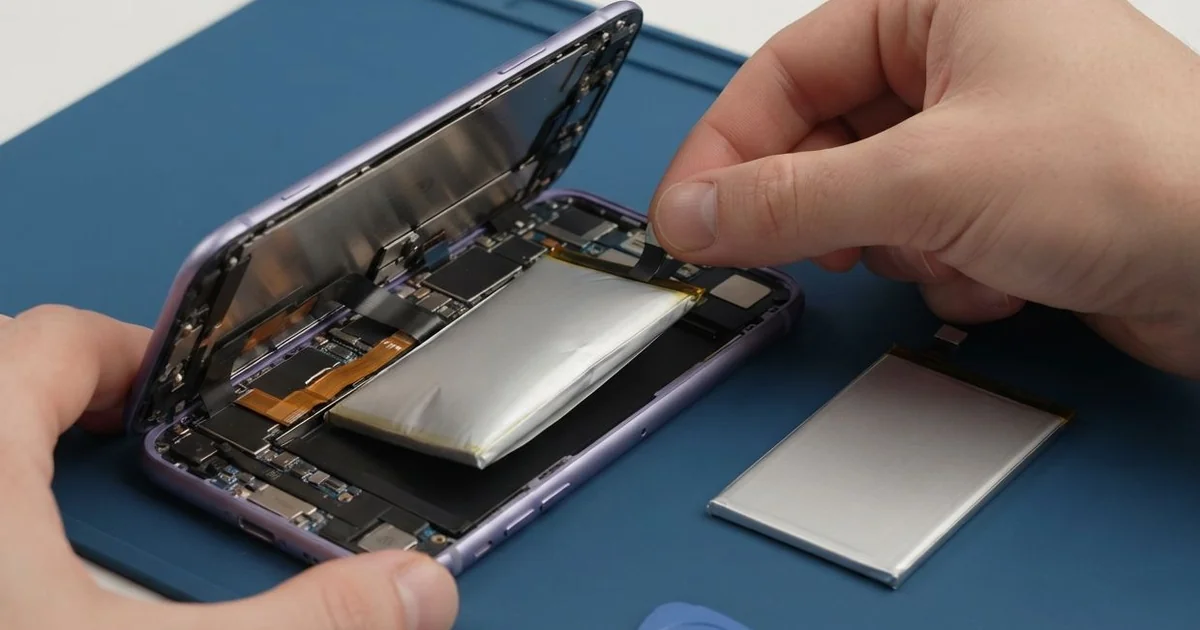
iPhone 16 Battery Replacement in Al Khobar fixes fast drain, heat and early shutdowns. We test it free to confirm the cause, then fit a new battery through the back. We test charging, power and heat, and most jobs are done the same day.
An iPhone 16 battery draining fast is the sign most people notice. The phone leaves home full and needs a charger before the evening. Some phones switch off with charge still showing, and others get warm in a pocket.
It's better not to wait. A tired battery can't keep up when the phone asks for power, so the phone slows itself down. Apps freeze, the camera lags, and you start carrying a power bank everywhere you go.
Not every drain is the battery's fault. A weak signal, an app stuck in the background or a hotspot left on can empty a healthy battery. We check those first and tell you if a setting change is all you need.
When the battery is truly worn, an iPhone 16 battery replacement is the fix. On this model, a special glue holds the battery. It lets go when we pass a small current through it, so there is no prying near the cells.
How Kabayan Center Replaces an iPhone 16 Battery
We fix these battery faults on this phone.
- Fast drain, even with only a few apps open
- Sudden shutdowns while the screen still shows charge
- A slow phone, or a camera that lags and freezes
- A phone that gets hot while charging or during calls
- A low battery health reading, or a service message in Settings
- A battery that swells and lifts the back glass or the screen
Here is how an iPhone 16 battery replacement works with us, step by step.
- We test the battery health free and check charging with our own cable.
- We tell you what it needs, and you decide before any work starts.
- We power the phone off, remove the two screws by the USB-C port and warm the back edges.
- We lift the back glass slowly and disconnect the battery first.
- We pass a small, safe current through the battery glue so it lets go cleanly.
- We fit the new battery, reconnect it and test charging, power and heat.
- We seal the back with fresh adhesive and let you check the phone yourself.
Have a different phone? Our phone battery replacement service covers other models too. Customers reach our shop on King Fahd Road from Dammam and Dhahran as well.
Why an iPhone 16 Battery Wears Out: 3 Real Cases
Video calls home on a hot balcony every night
A customer came to us with a phone that barely lasted the workday. A hotel cook called family abroad every night from the balcony, often for an hour. The phone was always plugged in during those calls.
"It gets so hot I have to put it down," the cook said. Summer nights here stay very warm, and video calls work the phone hard. Charging at the same time adds even more heat to the battery.
The cook had searched for iPhone Battery Replacement in Al Khobar on the way to a shift. Our test showed the battery health well below normal. The phone also cut out when we pushed it with a long video test.
We opened the back, released the old battery with a small current and fitted a new one. After the iPhone 16 battery replacement, the next test call ran smoothly and stayed cool.
We suggested making the calls indoors, under the AC, with the charger unplugged. A full battery lasts a long call easily now.
The cook was glad not to buy a new phone. The rest of the phone had been healthy all along. Only the battery had worn out from the heat.
A power bank that ran hot in a pocket
This one starts with an unknown power bank bought at a market stall. A courier charged the phone from it in a trouser pocket during long rides. The phone and the power bank both got hot.
"It shut off in my pocket and never came back," the courier said. The courier had looked up mobile repair in Al Khobar, sure the battery was dead.
Our test showed the battery was badly worn, so we fitted a new one first. But the phone still would not start. A poor power bank can send uneven power, and that can hurt more than the battery.
Under the microscope, a small power part on the board had a burnt mark. We did a motherboard repair, replacing that tiny part with fine tools. After that, the phone powered on with all its chats and photos.
Never charge a phone in a closed pocket. Heat has nowhere to go, and both devices suffer.
The courier now uses a known power bank in a side bag. The phone stays cool, and it lasts the whole round of deliveries.
Dropped into water by the washing taps
We often see this one. A teacher dropped the phone into the water by the washing taps and picked it up within seconds. It worked fine, so the teacher dried it with a tissue and forgot about it.
Weeks later, the phone started dying fast and feeling warm. "The battery is dropping like a stone," the teacher said. A little water had got past an old seal and settled near the battery connector.
We found green crust on the connector and a white trace beside it. So we did a water damage repair, cleaning that area in a special bath. The battery itself was damaged too, so we fitted a new one.
Charging and battery life came back to normal after the iPhone 16 battery replacement. But the bottom speaker stayed a little quiet, because the water had reached it as well. The teacher chose to keep it for now, since calls through the earpiece were clear.
We noted the speaker on the job card for a later visit. So the phone lasts all day again, though music sounds softer. A check right after the splash would likely have saved the speaker too.
How to Keep Your iPhone 16 Battery Healthy
- Keep the phone out of the sun and off the dashboard, since heat wears the battery fastest.
- Unplug the charger during long video calls when you can.
- Use a power bank and charger from a maker you know.
- Never charge the phone inside a closed pocket or under a pillow.
- Turn on the charge limit in battery settings if you charge overnight.
- Check battery health in Settings every few months.
- Get phone repair in Al Khobar if the phone runs hot while resting.
Related services
- Charging port repair for a USB-C cable that is loose or charges slowly
- Phone screen replacement for a cracked or dark screen
Questions about this repair
Ask us anything else on WhatsApp
we answer during shop hours.