iPhone 16 LCD Display Replacement in Al Khobar
iPhone 16 LCD Display Replacement in Al Khobar for cracked glass or a spreading black patch. It also fixes touch that has stopped working. We check your phone free and say what it needs, and you decide before any work starts.
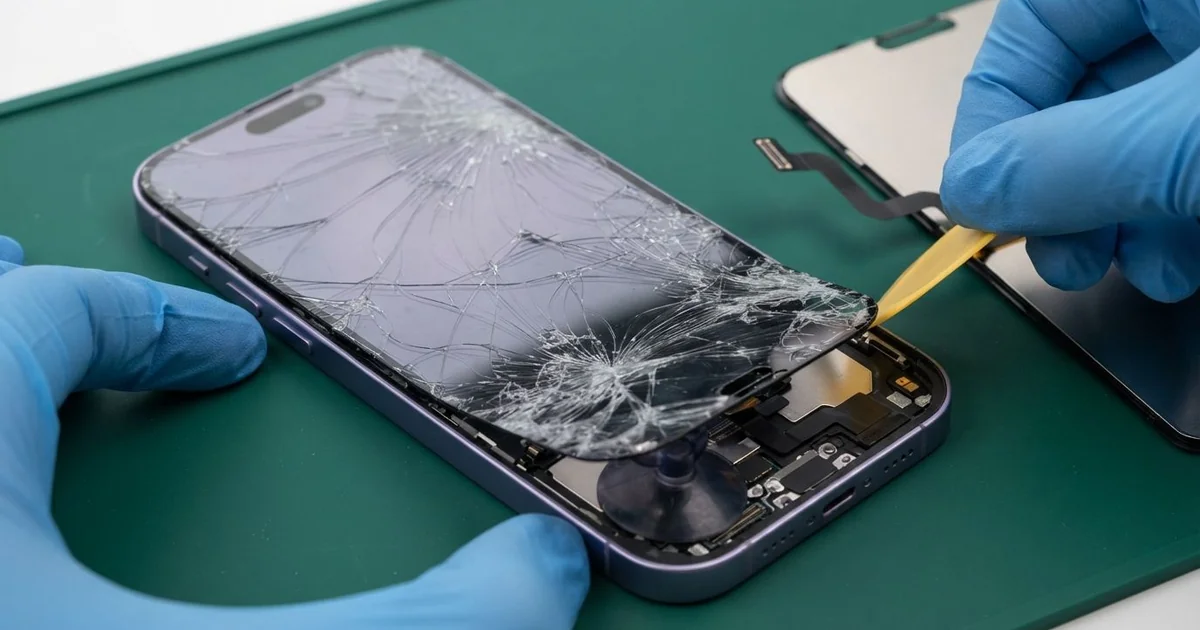
iPhone 16 LCD Display Replacement in Al Khobar fixes cracked glass and dead touch. We check it free, then fit a complete new screen, with the glass and display as one part. We test touch, Face ID and the front camera, and most jobs are done the same day.
An iPhone 16 broken screen does not always look dramatic. Sometimes it is a web of cracks from one corner, or a strip that ignores your finger. Other times the glass is whole, but a black blot spreads under it.
It's better not to wait. Cracks grow a little every time the phone warms up and cools down. A broken screen also lets in sweat and moisture, and loose chips of glass can cut your thumb.
Some faults need no new part at all. A badly fitted screen protector can block touch along the edges. A cable knocked loose in a drop can blank the picture, so we check both first.
Cracks, lines and black patches are another matter. On this model the glass and the display are joined, so the glass can't be swapped alone. An iPhone 16 screen replacement puts in the whole new screen and clears all three faults together.
How Kabayan Center Replaces an iPhone 16 LCD Display
We fix these screen faults on this phone.
- Cracked or shattered front glass
- A black blot or ink-like patch that spreads under the glass
- Green, white or pink lines across the picture
- Touch that fails in one strip, or ghost taps that open apps
- A black screen while the phone still rings and vibrates
- A screen that flickers or dims by itself
Here is how an iPhone 16 screen replacement works with us, step by step.
- We check the phone free and test sound, cameras, charging and Face ID first.
- We tell you what it needs, and you decide before any work starts.
- We remove the two tiny screws next to the USB-C port and warm the screen edges.
- We lift the screen with a suction cup and thin picks, slowly, so the cables stay safe.
- We disconnect the battery, unplug the old screen and connect the new one.
- We test touch, colour, brightness, Face ID and the front camera before closing.
- We fit a fresh seal, press the screen evenly and hand you the phone to check.
Need a screen for another model? Our phone screen replacement service covers most phones. Customers come to our King Fahd Road shop from Dammam and Dhahran too.
How an iPhone 16 Screen Breaks: 3 Real Cases
Slipped from a bike mount on the Corniche path
This one starts on an early morning ride by the sea. A software developer had the phone clipped to the handlebars for a fitness app. On a bump, the clip snapped, and the phone hit the path face down.
"I could still hear the music, but the screen was just black," the developer said. They had searched for iPhone Screen Replacement in Al Khobar before even riding home.
A face-down fall on a rough path hits the whole glass at once. We opened the phone and found the display cracked behind the glass. The screen cable was still firmly in place.
We finished the iPhone 16 LCD display replacement and tested touch in every corner. The side button for the camera had a scuff, but it still worked well. Then we turned the phone over.
The back glass had a long crack under the case, near the cameras. So we also did an iPhone back glass replacement, because a cracked back lets dust and water in.
The phone went home looking new on both sides. We suggested a mount with a metal clip and a case with a raised lip. A thin plastic clip gets brittle in the sun after one summer.
A cracked screen next to a busy kitchen sink
A customer came to us from a restaurant kitchen. The cook had used a cracked screen for weeks, because it still worked. The phone sat on a shelf above the sink during every shift.
Steam and splashes found the crack little by little. "Now it opens apps on its own," the cook said. The cook had looked up mobile repair in Al Khobar between lunch and dinner service.
We opened it and found water marks under the display and a little white crust near the top. The moisture had gone beyond the screen. So we did a water damage repair on that area first.
Once everything was clean and dry, we did the iPhone 16 LCD display replacement. The ghost taps stopped, and touch worked across the whole display.
But the front camera had a faint fog mark inside its lens. Selfies came out a little soft. The cook chose to leave it for now, since calls and the main camera were fine.
A small crack is an open door for steam. Fixing it early would likely have kept the camera clear too. The phone now lives in a sealed pocket during each shift.
Squashed at the bottom of a heavy backpack
We often see this with students. A university student carried the phone under a laptop and a stack of books. There was no drop at all, just weeks of daily squeezing on the bus.
"There's no crack, so why is there a black patch?" the student asked. Steady pressure can break the display layer under the glass, even when the glass itself survives. The patch started small at the centre and grew each day, like ink in water.
We confirmed the glass was whole and the display behind it was damaged. We did the iPhone 16 LCD display replacement, and the picture came back clean and bright.
While the phone was open, our battery test showed low health. The student said the phone had been dying by the afternoon for months. So we also did a phone battery replacement in the same visit.
The phone now lasts a full day of classes, and the screen is clear. We suggested the outer pocket of the bag for the phone, away from heavy books. A stiff case also spreads pressure better than a soft one.
How to Keep Your iPhone 16 Screen Safe
- Use a case with a raised lip, so the glass doesn't touch the ground first.
- Carry the phone in an outer pocket, never under a laptop or books.
- Choose a strong metal clip for bike and car mounts.
- Fix small cracks early, so steam and sweat never force an iPhone 16 LCD display replacement.
- Keep the phone off the car dashboard in summer, since heat weakens the screen seal.
- Back up your photos while the screen still works.
- Take it for phone repair in Al Khobar at the first black spot, because it spreads.
Related services
- Charging port repair for a USB-C cable that is loose or only charges at an angle
Questions about this repair
Ask us anything else on WhatsApp
we answer during shop hours.