iPhone 16 Motherboard Repair in Al Khobar
iPhone 16 Motherboard Repair in Al Khobar for a phone that stays black or restarts by itself. It also helps when the signal disappears. We check the board free and tell you what it needs, and we never delete your data without asking.
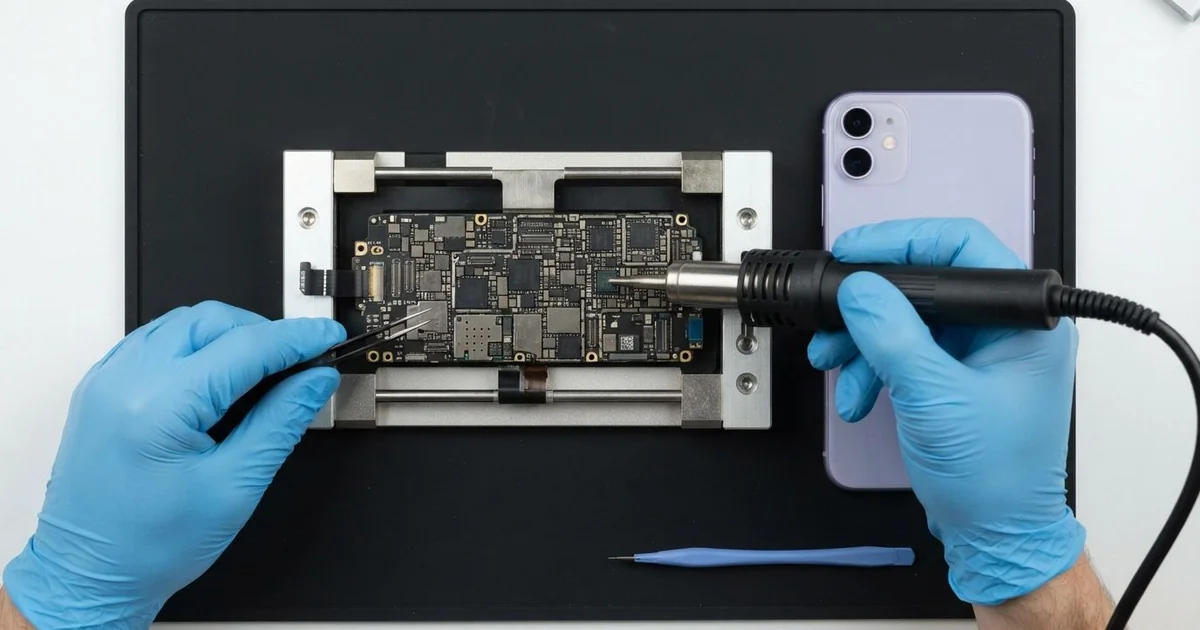
iPhone 16 Motherboard Repair in Al Khobar fixes a phone that won't start, restarts or loses signal. We check the board free and find the faulty part under a microscope. Then we replace that one part instead of the whole board, and we keep your data wherever we can.
An iPhone 16 not turning on is the sign that brings most people in. The screen stays black on the charger, and the buttons do nothing. Other phones get stuck on the logo, restart every few minutes, or feel warm while they seem dead.
Most owners try a force restart and a night on the charger first. When that changes nothing, the fault often sits on the board. A screen or a battery can fail in the same way, though.
It's better not to wait. A short on the board keeps warming the parts around it. If water is inside, it keeps eating the board every day, so a small fault grows into a big one.
We always test the simple parts first, so you only pay for board work you need. The iPhone 16 motherboard is two thin layers stacked like a sandwich, packed with tiny parts. Often just one small part has failed, and we replace only that.
How Kabayan Center Repairs an iPhone 16 Motherboard
We fix these board faults on this phone.
- No power at all, even on a good charger
- Stuck on the logo, or restarting again and again
- No service, or a phone that keeps losing its network
- No charging, even with a good port and a good battery
- Heat on the back while the phone is switched off
- Faults that start days or weeks after water got in
Here is how an iPhone 16 motherboard repair works with us, step by step.
- We check the phone free and test the battery, screen and port to rule them out.
- We connect a power meter that shows how much power the board pulls.
- We tell you what we found, and you decide before any work starts.
- We open the phone, disconnect the battery and lift the board out.
- We find the faulty part under a microscope, using the meter and a heat camera.
- We replace that part with a fine hot-air tool and a soldering tip.
- We rebuild the phone and test power, charging, signal and cameras with you.
Have a laptop or tablet that won't start? Our motherboard repair service covers other devices too. Customers come to our shop on King Fahd Road from Dammam and Dhahran as well.
Why an iPhone 16 Board Fails: 3 Real Cases
Charging on the dashboard in the midday sun
A customer came to us after a long drive in high summer. A surveyor had the phone charging on the dashboard for maps, right under the windscreen. Halfway through the trip, a heat warning appeared, and then the screen went black.
"It cooled down, but it never turned on again," the surveyor said. They had searched for iPhone Motherboard Repair in Al Khobar from a petrol station. Strong heat while charging puts the power parts under heavy stress.
The power meter showed the board pulling far too much current. With the heat camera, one small power part lit up bright at once. The iPhone 16 motherboard repair used a hot-air tool, and the phone started normally.
But the battery had suffered too. It was slightly swollen at one end, from the same heat. A swollen battery is never safe to keep using.
So we also did a phone battery replacement before closing the phone. All the maps, photos and chats were still in place.
The surveyor now uses a vent mount in the cool air from the AC. A sunshade on the windscreen keeps the whole car cooler too.
A slip into the sea on a fishing trip
This one starts on a small boat off the Corniche. A fisherman leaned over the side, and the phone slid out of a shirt pocket. A friend scooped it out quickly, but it had been under the salt water.
The phone was dried in the sun and seemed to work. Soon after, it died completely and would not even charge. "Most of my work contacts are in there," the fisherman said, worried.
Salt water dries into crystals that pull in moisture and turn into rust. We found white and green crust across both layers of the board. We did a water damage repair, cleaning every part of the board in a special bath.
The phone turned on again, so we saved everything first. We copied the contacts and photos through our data recovery service, before any other work.
The phone now works for calls, chats and the main camera. But Face ID and the camera flash stayed dead, because the salt had eaten their parts. The fisherman chose to use a passcode for now.
A dry bag on the boat would have kept it all safe. So would a same-day check, before the salt had time to work.
Stuck on the logo after a fall at the gym
We often see this after a drop onto a hard floor. A physiotherapist had the phone on a treadmill console during a run. It slid off the back and hit the rubber floor, then the metal frame.
From then on, it showed the logo, went black and started again, over and over. The physiotherapist had looked up mobile repair in Al Khobar, scared of losing every patient note.
A sharp knock can crack a tiny solder joint between the two board layers. The phone then loses contact with one of its main chips while starting up.
Under the microscope, we found cracked joints near the edge of the board. We separated the layers under heat, cleaned them and joined them again with fresh solder. Then we left the phone running a long test on the bench.
After the iPhone 16 motherboard repair, it started cleanly every time and never looped again. All the notes, photos and apps were still there, with nothing wiped.
We suggested a case with thick corners, and a pocket instead of the console. Weekly backups also mean a board fault never costs the notes.
How to Keep Your iPhone 16 Board Safe
- Keep the phone off the dashboard, and don't charge it in direct sun.
- Use a dry bag near the sea, and bring the phone in the same day if it gets wet.
- Use a good charger and cable, so you avoid an iPhone 16 motherboard repair.
- Choose a case with thick corners to soften hard drops.
- Back up your photos and chats every week.
- Get phone repair in Al Khobar as soon as the phone restarts by itself or runs hot while off.
Related services
- Charging port repair for a USB-C cable that is loose or only charges at an angle
Questions about this repair
Ask us anything else on WhatsApp
we answer during shop hours.