iPhone 16 Plus Charging Port Repair in Al Khobar
iPhone 16 Plus Charging Port Repair in Al Khobar for a USB-C cable that won't stay in. It also helps when charging is slow or keeps cutting out. We check the port free and tell you what it needs, and you decide before any work starts.
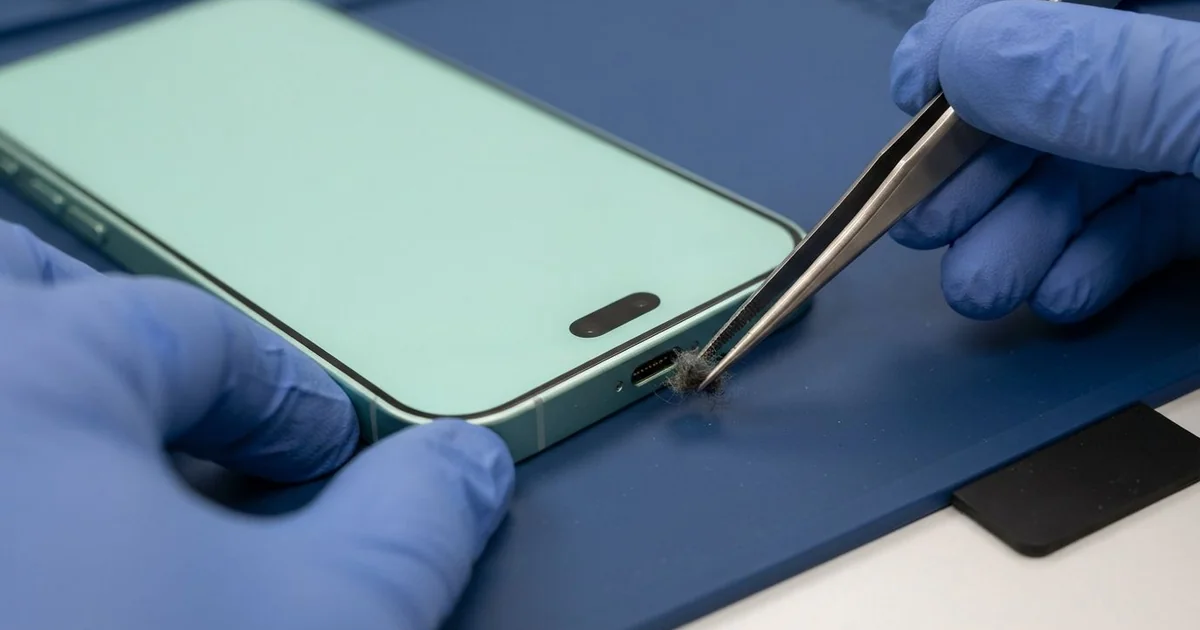
iPhone 16 Plus Charging Port Repair in Al Khobar fixes charging that is loose, slow or dead. We check the USB-C port free, then clean it or fit a new port part. We test charging with several cables, and most jobs are done the same day.
An iPhone 16 Plus not charging rarely fails all at once. The cable starts to feel loose, then it works only when held at an angle. Later the charging sign flashes on and off at night, or a message says the accessory isn't supported.
A wireless pad is a useful test at home. If the phone charges on a pad but not by cable, the battery is likely fine. The port is where the trouble sits, and that is usually a smaller repair.
It's better not to wait. A loose plug makes tiny sparks that burn the pins a little each time. The battery also runs flat again and again, and each deep drain wears it out faster.
Not every fault needs a new part. Many ports are just packed with lint or dirt around the thin centre tab, and careful cleaning fixes them. Bent, burnt or rusted pins mean the iPhone 16 Plus charging port part must be replaced.
How Kabayan Center Repairs an iPhone 16 Plus Charging Port
We fix these charging faults on this phone.
- A cable that won't stay in, or falls out with a small touch
- Charging that only works one way up, or at an angle
- No charging by cable, while a wireless pad still works
- Slow charging, even with a good charger
- A liquid warning that stays after the phone is dry
- Something stuck inside the port, like a broken tip
Here is how an iPhone 16 Plus charging port repair works with us, step by step.
- We look into the port under magnification and test it with our own cable.
- We tell you what it needs, and you decide before any work starts.
- We clean out lint and dirt with fine plastic tools, never with metal.
- If the port is damaged, we power the phone off, open it and disconnect the battery.
- We lift out the parts that cover the port, then remove the old port part.
- We fit the new port part and test charging, data and calls.
- We seal the phone with fresh adhesive and let you test it with your own cable.
Have a different phone with a loose cable? Our charging port repair service covers other models too. Customers come to our King Fahd Road shop from Dammam and Dhahran as well.
Why an iPhone 16 Plus Stops Charging: 3 Real Cases
A magnetic cable tip stuck in the port
A customer came to us with a small metal tip stuck deep in the port. They had used a magnetic cable, where a tiny tip stays in the phone. One day the tip would not come out.
A friend tried to pull it out with pliers and a pin. "Now it's out, but nothing charges at all," the owner said. They had searched for iPhone Charging Port Repair in Al Khobar right after.
Under our magnifier, the centre tab was scratched and bent. Two pins were pushed out of line, and one was snapped. Metal tools inside a port often do more harm than the stuck part did.
Cleaning could not fix pins like that, so we fitted a new port part. After the iPhone 16 Plus charging port repair, each cable clicked in firmly and charged at full speed. Data worked again too, so photos could move to a computer.
We suggested a normal good-quality USB-C cable from now on. Magnetic tips can loosen, trap dirt and get stuck again.
If anything ever gets stuck in a port, bring the phone in as it is. Pulling with metal tools almost always damages the pins.
Cold car air and humid evenings by the sea
This one starts with moisture, not a spill. A tour driver ran the car AC very cold all day near the Corniche. Each time the driver stepped out into the humid evening, the cold phone fogged up.
"It never fell in water, but it says liquid detected," the driver told us. Warm, wet air turns into drops on a cold surface. Day after day, that moisture settled inside the port.
We found light green rust on the pins and a damp trace further in. So we did a water damage repair, cleaning the inside before the rust spread to the board.
The port pins were too far gone to clean, so we fitted a new port part as well. The warning stopped, and charging was strong again.
We suggested a less icy AC setting, or a phone kept in a pocket instead of on the cold vent. Letting a cold phone warm up before plugging it in also helps.
It is a slow kind of damage that many people never expect. A quick port check every few months catches it early, before the pins rust through.
A frayed cable that sparked
We often see this with cables that have been bent for years. A nurse charged the phone by the bed with an old cable split near the plug. One night it sparked, and the phone stopped charging.
"I smelled something burning, and then nothing," the nurse said. The nurse had looked up mobile repair in Al Khobar the next morning. A split cable can short and push a burst of heat straight into the port.
We found two pins black and burnt, so we fitted a new port part. The iPhone 16 Plus charging port repair worked, and the phone charged again at full speed.
But the battery had taken heat too, and our test showed its health had dropped sharply. We explained that a phone battery replacement would bring back full use. The nurse chose to plan it for later.
So the phone charges well, but it runs down earlier than before. We noted the battery on the job card for the next visit.
Throw away any cable with a split or bare wire at once. A new cable is far safer than a burnt port.
How to Keep Your iPhone 16 Plus Charging Port Working
- Look into the port with a torch every few weeks, and bring it in if you see lint.
- Never push metal pins, needles or pliers into the port.
- Replace split or bare cables, so you avoid an iPhone 16 Plus charging port repair.
- Let a cold phone warm up before charging it in humid air.
- Avoid magnetic cable tips that stay inside the port.
- Pull the cable out by its plug, never by the wire.
- Get phone repair in Al Khobar as soon as charging needs a special angle.
Related services
- Motherboard repair for a phone that still won't charge with a new port
- Phone screen replacement for a cracked or dark screen
Questions about this repair
Ask us anything else on WhatsApp
we answer during shop hours.