iPhone 16 Plus Motherboard Repair in Al Khobar
iPhone 16 Plus Motherboard Repair in Al Khobar for a phone that is dead, stuck on the logo or restarting. We check the board free and tell you what it needs. You decide before any work starts, and we never delete your data without asking.
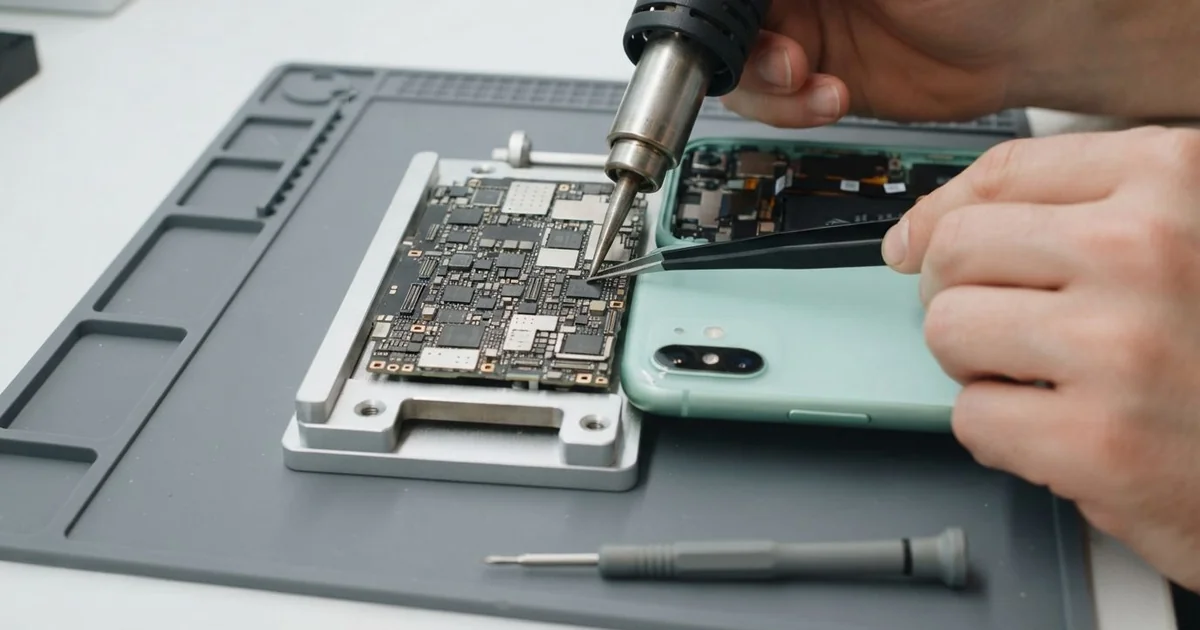
iPhone 16 Plus Motherboard Repair in Al Khobar fixes a dead, looping or restarting phone. We check the board free and find the faulty part under a microscope. Then we replace that small part instead of the whole board, and we save your data wherever we can.
An iPhone 16 Plus not turning on is the most common reason people come in. The screen stays black, even on the charger, and no button wakes it. Other phones show the logo and restart, again and again, or get warm while they look switched off.
Most owners try a force restart and a long charge first. When nothing changes, the board is often where the fault sits. A dead battery or a loose screen cable can look just the same, though.
It's better not to wait. A short on the board keeps warming the parts around it, even while the phone seems dead. Water left inside keeps working too, so a small fault grows bigger each day.
We always test the simple parts first, so you only pay for board work you need. The iPhone 16 Plus motherboard is two thin layers stacked together, full of tiny parts. Often just one small part has failed, and we replace only that.
How Kabayan Center Repairs an iPhone 16 Plus Motherboard
We fix these board faults on this phone.
- No power at all, even on a good charger
- Stuck on the logo, or restarting again and again
- No service, or a phone that can't find a network
- No charging, even with a good port and battery
- Heat on the back while the phone is switched off
- Faults that appear days or weeks after water got in
Here is how an iPhone 16 Plus motherboard repair works with us, step by step.
- We check the phone free and test the battery, screen and port to rule them out.
- We connect a power meter that shows how much power the board pulls.
- We tell you what we found, and you decide before any work starts.
- We open the phone, disconnect the battery and take the board out.
- We trace the fault under a microscope, using the meter and a heat camera.
- We replace the faulty part with a fine hot-air tool and a soldering tip.
- We rebuild the phone and test power, charging, signal and cameras.
Have another device with a board fault? Our motherboard repair service covers phones, tablets and laptops too. Customers come to our shop on King Fahd Road from Dammam and Dhahran as well.
Why an iPhone 16 Plus Board Fails: 3 Real Cases
Soapy water from a car wash bucket
This one starts in a driveway on a weekend. A father was washing the car with the phone in his shirt pocket. He bent over the bucket, and the phone dropped into the soapy water.
He pulled it out fast and it kept working. That evening, it switched off and would not start again. "I didn't charge it, I just left it to dry," he told us, which was the right thing to do.
He had searched for iPhone Motherboard Repair in Al Khobar the next morning. Soap helps water creep into places it normally can't reach. It went under the seal and onto the board.
We found a soapy film and early white crust near the power parts. We did a water damage repair, cleaning the board in a special bath and drying it fully.
Because he came in quickly, the rust had not taken hold yet. The phone started normally after cleaning. Calls, charging, the cameras and Face ID all tested fine.
He was lucky, and he knew it. Not charging a wet phone and bringing it in early are what saved it.
A scorched wall socket in an old flat
A customer came to us with a phone that died on the charger overnight. The charger was plugged into an old wall socket with a brown burn mark. "The socket buzzes sometimes, but it always worked," they said.
A damaged socket can send a sudden spike of power through the charger. The small chip that manages charging sits right in its path. The customer had looked up mobile repair in Al Khobar, sure the phone was finished.
The power meter showed the board pulling nothing at all, not even a flicker. Under the microscope, the charging chip had a tiny cracked spot. The iPhone 16 Plus motherboard repair used a hot-air tool, and the phone powered on with its data.
The USB-C port had also taken the spike, with two pins darkened. So we did a charging port repair, fitting a new port part as well.
The phone charges smoothly again. We advised the customer to stop using that socket and have it checked by an electrician soon.
A buzzing or burnt socket is a warning for every device in the home, not only phones.
Caught in a closing car door
We often see bent phones, but this one was bad. A teacher had the phone in a hand when the car door swung shut on it. The frame bent, and the phone went black at once.
"Please, my class photos are on there," the teacher said. A bend like that stresses the board. It can crack the tiny joints under the main chips, even when the screen survives.
Under the microscope, we found cracked joints under one large chip and a hairline crack in the board itself. We rejoined what we could, and the phone started for a short time. That was just long enough to work with.
The iPhone 16 Plus motherboard repair could not last, because the crack ran through its inner layers. So we saved the photos and contacts first. We used our data recovery service, and the teacher moved everything to a new phone.
So the phone itself was lost, but the class photos were safe. Regular backups would have made that day much calmer.
The teacher now keeps the phone in a bag while getting in and out of the car. Automatic cloud backup is switched on too.
How to Keep Your iPhone 16 Plus Board Safe
- Never charge a phone that got wet, and bring it in the same day.
- Keep the phone out of shirt pockets when you bend over water.
- Stop using any wall socket that buzzes, smells hot or has burn marks.
- Use a good charger and cable, so you avoid an iPhone 16 Plus motherboard repair.
- Back up your photos and chats every week.
- Get phone repair in Al Khobar as soon as the phone restarts by itself or runs hot while off.
Related services
- Phone battery replacement for a phone that drains fast or shuts down early
Questions about this repair
Ask us anything else on WhatsApp
we answer during shop hours.