iPhone 16 Pro LCD Display Replacement in Al Khobar
iPhone 16 Pro LCD Display Replacement in Al Khobar for a cracked, flickering or blank screen. It also fixes touch that jumps or misses. We check your phone free and tell you what it needs, and you decide before any work starts.
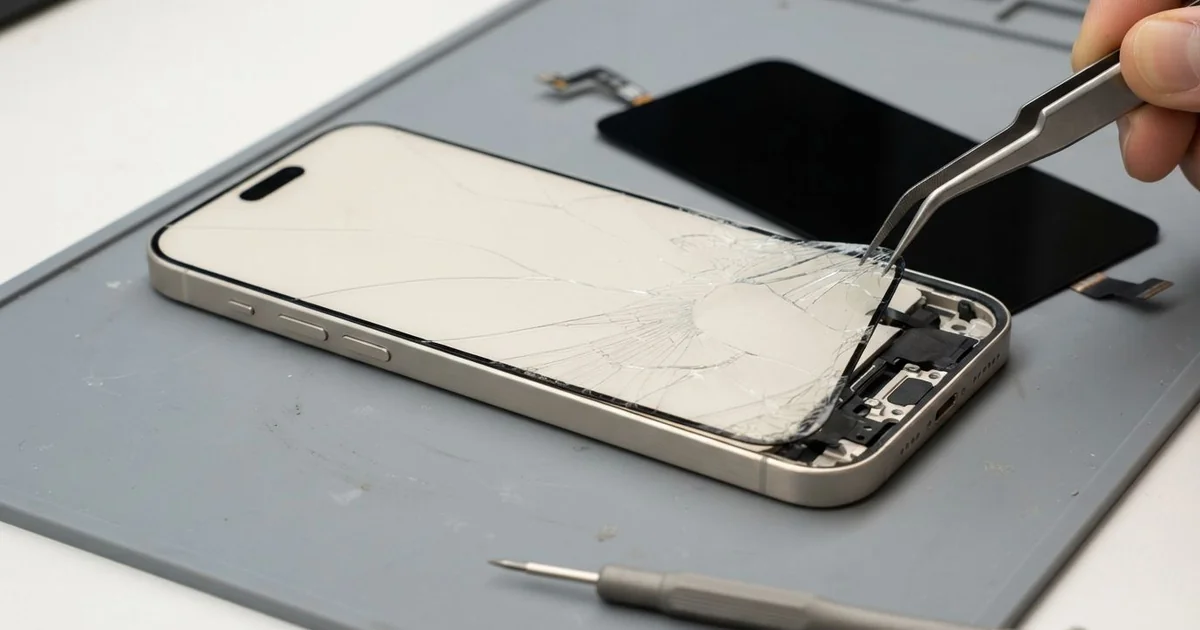
iPhone 16 Pro LCD Display Replacement in Al Khobar fixes cracked, flickering or blank screens. We check it free, then fit a complete new screen, with the glass and display as one part. We test touch, Face ID and smooth scrolling, and most jobs are done the same day.
An iPhone 16 Pro broken screen can look many ways. The glass cracks from the edge where it hit, or green lines appear after a fall. Sometimes the picture is fine, but taps land in the wrong place or not at all.
This model has very thin borders around the screen. That looks great, but it leaves less frame to soak up a knock at the edge. Even a small side hit can crack the glass.
It's better not to wait, because cracks spread and let dust, sweat and water reach the display. Sharp chips can also cut your fingers and catch on pockets. A dark screen makes backing up your photos much harder, too.
Some faults are simple. A thick screen protector can block touch near the edges, and a cable shaken loose can blank the picture. Cracks, lines and black patches need an iPhone 16 Pro screen replacement, because the glass and display are joined.
How Kabayan Center Replaces an iPhone 16 Pro LCD Display
We fix these screen faults on this phone.
- Cracked front glass, often from a hit on the edge
- Green, white or pink lines across the picture
- A black screen while the phone still rings
- Touch that misses taps, or ghost taps that open apps
- Flickering, or scrolling that stutters and jumps
- A black blot that spreads from a crack
Here is how an iPhone 16 Pro screen replacement works with us, step by step.
- We check the phone free and test sound, cameras, charging and Face ID.
- We tell you what it needs, and you decide before any work starts.
- We take out the two tiny screws beside the USB-C port and warm the screen edges.
- We lift the screen with a suction cup and thin picks, taking care around the thin borders.
- We disconnect the battery, unplug the old screen and connect the new one.
- We test touch, colour, brightness, scrolling and Face ID before closing.
- We fit a fresh seal, press the screen evenly and let you check it yourself.
Using a different phone? Our phone screen replacement service covers other models too. Customers come to our King Fahd Road shop from Dammam and Dhahran as well.
How an iPhone 16 Pro Screen Breaks: 3 Real Cases
Blown off a tripod by sea wind
This one starts at the Corniche at sunset. A wedding photographer had the phone on a small tripod, filming the view. A gust of sea wind tipped it over onto the rocks.
"It hit face down, and now there's a green line," the photographer said. They had searched for iPhone Screen Replacement in Al Khobar from the car park. Rocks hit the glass at a few hard points, and the display behind them cracked.
We opened the phone and found the display cracked at the top edge. The cable was firm, so the panel itself had failed. We did the iPhone 16 Pro LCD display replacement and tested scrolling, touch and colour.
Then we checked the back. A crack ran across the glass near the cameras, from the same fall. So we also did an iPhone back glass replacement, because loose glass there can scratch the lenses.
The photographer tested the cameras before leaving, and every lens was clear. The phone looked new on both sides.
We suggested a heavier tripod with a wide base for windy spots. A wrist strap on the phone helps too when you film near water or rocks.
Sprinkler water through a cracked corner
A customer came to us from a compound garden. The gardener had a small crack in one corner, but the phone worked, so it stayed that way. Every morning, the phone sat near the sprinklers in a shirt pocket.
Over a few weeks, water found the crack, a little more each morning. "The screen flickers, and the camera button feels strange," the gardener said. Moisture had reached the display edge and the side button area.
We found water marks under the display and light crust near the side. So we did a water damage repair, cleaning that area before fitting the new screen.
After the iPhone 16 Pro LCD display replacement, the flicker was gone. Touch reached every corner again.
But the camera button only answered firm presses now, not light ones. The gardener chose to leave it for now, since the shutter button on the screen still worked. So the screen is fixed, while that button stays a little stiff.
A crack is an open door for water, even on a phone with good seals. Fixing it early would likely have saved the button too.
Knocked against a dumbbell rack
We often see this with gym phones. A fitness coach rested the phone on a rack between sets, and a weight bumped it to the floor. It landed on its edge against the metal foot of the rack.
A crack ran in from the edge, and the touch near it went dead. "I can't even swipe to unlock," the coach said. The coach had looked up mobile repair in Al Khobar between clients, hoping for a quick job.
We did the iPhone 16 Pro LCD display replacement, and the new screen worked across every edge. But when we tested charging, the cable would not click in.
The USB-C port was packed with white chalk from the gym. Chalk dust is fine and sticky, and it packs hard around the centre tab. So we also did a charging port repair, cleaning it out with plastic tools.
The phone left with a clear screen and firm charging. We suggested keeping it in a locker or a zip pocket during training, away from weights.
A thick case with raised corners also takes edge hits much better than a slim one.
How to Keep Your iPhone 16 Pro Screen Safe
- Use a case with raised corners, since the thin borders leave little room for knocks.
- Pick a screen protector made for this size, so touch still works at the edges.
- Use a strong tripod and a wrist strap near wind, rocks and water.
- Keep the phone away from weights and metal racks at the gym.
- Fix small cracks early, to avoid an iPhone 16 Pro LCD display replacement.
- Back up your photos while the screen still works.
- Book phone repair in Al Khobar at the first line or flicker on the screen.
Related services
- Phone battery replacement for a phone that drains fast or lifts the screen
Questions about this repair
Ask us anything else on WhatsApp
we answer during shop hours.