iPhone 16e Motherboard Repair in Al Khobar
iPhone 16e Motherboard Repair in Al Khobar for a phone that stays black or loops on the logo. We check it free and explain what we find. You decide before any work starts, and we delete nothing without asking.
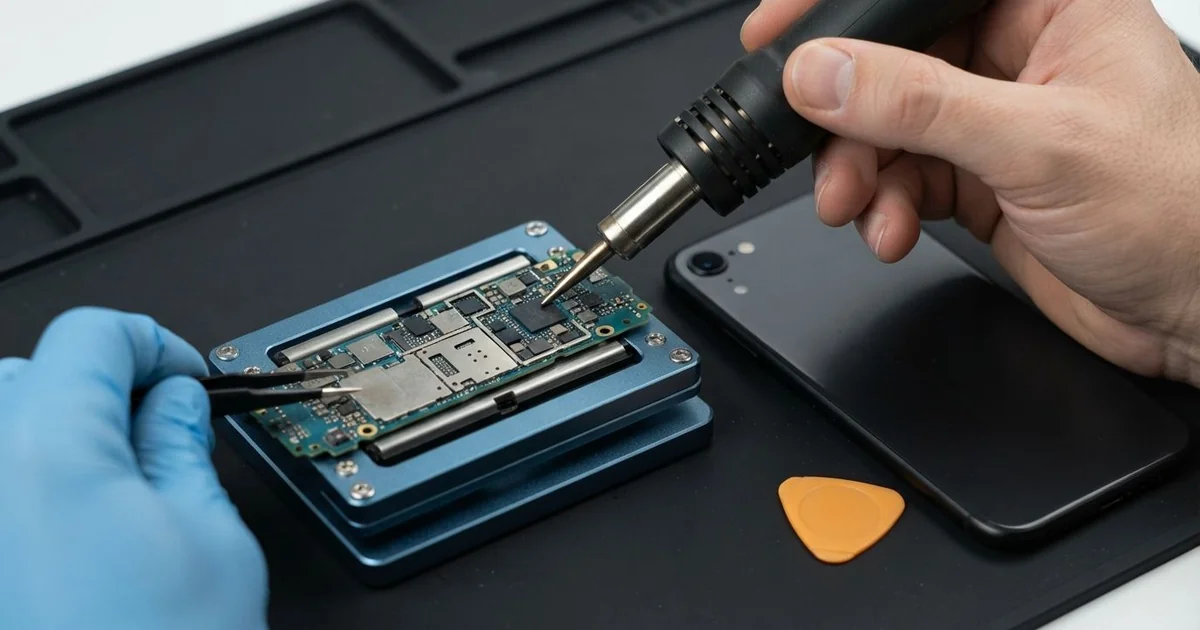
iPhone 16e Motherboard Repair in Al Khobar fixes a phone that won't power on or keeps restarting. We check the board free and find the faulty part under a microscope. Then we replace that small part, not the whole board, and we save your data wherever we can.
An iPhone 16e not turning on is the most common sign. The screen stays black, even when it sits on a good charger. Other phones get stuck on the logo, restart every few minutes or lose their signal.
It's better not to wait, as a short can heat the parts around it. Water left inside keeps eating the board, so a small fault grows bigger every day. Your photos and chats are locked to this board, so they only come back once it starts.
Not every dead phone has a board fault. A flat battery, a bad cable or a software problem can look exactly the same. We test those first, so you never pay for board work you don't need.
When the fault is on the board, we look closer. The iPhone 16e motherboard is small and packed with tiny parts. Often only one of them has failed, and we replace just that part.
How Kabayan Center Repairs an iPhone 16e Motherboard
We fix these board faults on this phone.
- No power at all, even on the charger
- Stuck on the logo, or restarting again and again
- No service or no signal after a drop
- No charging, even with a good port and battery
- A phone that gets hot while switched off
- Faults that start days or weeks after water
Here is how an iPhone 16e motherboard repair works with us, step by step.
- We check the phone free and test the battery, screen and port to rule them out.
- We connect a power meter that shows how much current the board pulls.
- We tell you what we found, and you decide before any work starts.
- We open the phone, disconnect the battery and take the board out.
- We find the faulty part under a microscope, using the meter and a heat camera.
- We replace that part with a fine hot-air tool and a soldering iron.
- We rebuild the phone, test power, charging, signal and cameras, then let you check it.
Have a different phone or a laptop? Our motherboard repair service covers other devices too. Customers reach our shop on King Fahd Road from Dammam and Dhahran as well.
Why an iPhone 16e Board Fails: 3 Real Cases
Pulled from a compound pool
This one starts at a pool party in a housing compound. A child dropped the phone into the deep end, and it took a while to fish it out. The owner dried it with a hair dryer, and it seemed to work.
Weeks later, it went black on a desk and never woke up. "It was fine for so long," the owner said. They had searched for iPhone Motherboard Repair in Al Khobar that same evening.
Pool water carries chlorine and minerals. Over weeks, they turn into rust under the tiny chips. A hair dryer only heats the outside and can push water deeper.
We found green crust around the power parts. We did a water damage repair, cleaning the board in a special bath. The board started again, but only for short periods.
We copied the photos and contacts first, before trying anything else. We did that through our data recovery service while the board was still running.
The board then failed for good, because the rust had eaten through lines under a chip. So the phone was lost, but the family photos were not. A check on the day of the swim would likely have saved the board.
A fall down the mall stairs, then no service
A customer came to us after the phone slipped from a bag on a mall staircase. It bounced down several steps but didn't crack. "Everything works, but it says no service," they told us.
They had first looked up mobile repair in Al Khobar, sure it was a SIM problem. A new SIM changed nothing. A hard knock can crack a tiny solder joint, and the signal parts are very sensitive to that.
We tested the phone and saw it could not find any network at all. The power meter showed the signal part was not waking up properly. Under the microscope, we found a cracked joint beside it.
The iPhone 16e motherboard repair cleaned the area and joined it again with fresh solder. Then we left the phone on the bench with calls and data running. The signal stayed strong the whole time.
Every photo and chat was still in place after the iPhone 16e motherboard repair. Nothing had to be reset or wiped.
We suggested a case with thick corners. A corner hit sends the shock straight into the board, while a soft corner takes most of it. The customer now keeps the phone in a zipped pocket on the stairs too.
Stuck on the logo after an update
We often see this after an update started late at night. A night-shift nurse let the phone update with very little charge left. In the morning, it showed the logo, went dark, and showed the logo again.
"I think the board is gone," the nurse said. The phone had also been shutting down early for weeks, often with plenty of charge still showing. A long hospital shift had made that easy to ignore.
We tested the board first, and it drew power normally. The real trouble was a worn battery. It had cut out in the middle of the update, leaving the software half finished.
We connected the phone to a computer and ran the update again, choosing the option that keeps your data. The phone started normally, with every message and photo in place. The nurse was relieved that nothing was lost.
Then we did a phone battery replacement, so the early shutdowns would stop too. No board work was needed at all.
The nurse now starts updates on the charger, with plenty of charge left. A healthy battery and a full charge make updates much safer. It is a small habit that saves a lot of worry.
How to Keep Your iPhone 16e Board Safe
- Use a good charger and cable, so you avoid an iPhone 16e motherboard repair.
- Never charge a phone that got wet, and skip the hair dryer and the rice.
- Use a case with thick corners to soften hard drops.
- Run updates on the charger, never on a low battery.
- Back up your photos and chats often, so a board fault never costs you your files.
- Get phone repair in Al Khobar as soon as the phone restarts by itself or runs hot while off.
Related services
- Charging port repair for a cable that is loose or only charges at an angle
Questions about this repair
Ask us anything else on WhatsApp
we answer during shop hours.