iPhone 17 Charging Port Repair in Al Khobar
iPhone 17 Charging Port Repair in Al Khobar for a plug that wobbles, slips out or does nothing. We look into the port free and tell you what it needs. You decide before any work starts, and we never look through your files.
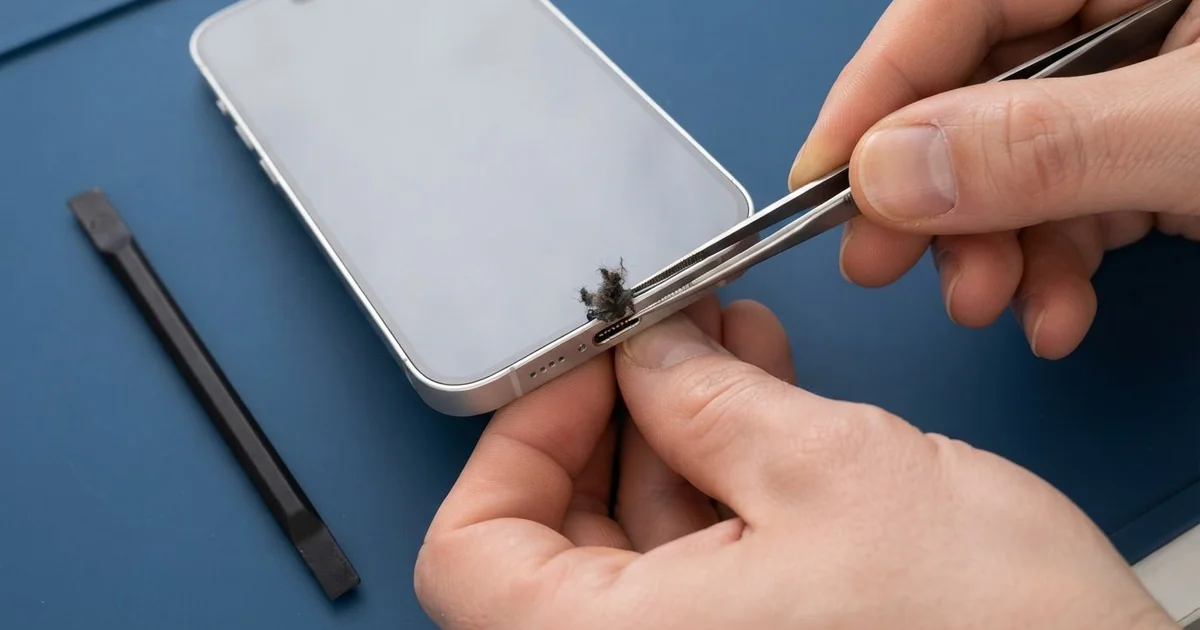
iPhone 17 Charging Port Repair in Al Khobar fixes a phone that charges slowly, loosely or not at all. We check the USB-C port free, then clean it or fit a new port part. We test charging speed and the plug fit, and most jobs are done the same day.
An iPhone 17 not charging usually starts with small signs. The plug feels soft, charging stops when the phone moves, or a liquid warning shows on a dry phone. Some owners switch to a wireless pad, but the real fault stays and often gets worse.
It's better not to wait. A loose plug makes heat right at the pins, and heat slowly burns them. A phone that keeps running flat also wears out its battery sooner, which means a second repair.
Not every fault needs a new part. The iPhone 17 charging port is a USB-C port with a slim tongue in the middle. Lint, sand and crumbs build up around that tongue, and a careful clean with plastic tools often fixes it.
A bent tongue, worn pins or rust are different. Then we fit a new port part. The plug clicks in firmly again, and charging returns to full speed.
How Kabayan Center Repairs an iPhone 17 Charging Port
We fix these charging faults on this phone.
- A plug that is loose or slips out
- No charging, even with a new cable
- Slow charging with a good charger
- A liquid warning on a dry phone
- Charging that cuts out when the phone moves
- Green or dark marks on the pins
Here is how an iPhone 17 charging port repair works with us, step by step:
- We look into the port with a bright light and a magnifier.
- We test charging with our own cable and a meter that shows the charging speed.
- We tell you what it needs, and you decide before any work starts.
- We clean out lint and dirt with fine plastic tools, never with metal.
- If the port is damaged, we open the phone, disconnect the battery and fit a new port part.
- We test charging, the plug fit and file transfer, then let you try your own cable.
Have a different phone? Our charging port repair service covers other models with the same steps. Customers reach our shop on King Fahd Road from Dammam and Dhahran too.
Why an iPhone 17 Stops Charging: 3 Real Cases
Lint from a thobe pocket
We often see this with phones carried in a chest pocket. An office worker kept the phone in a thobe pocket every day. Each evening the plug went in a little less far.
"I bought a new cable, and it still won't stay in," he told us. He had searched for iPhone Charging Port Repair in Al Khobar, fearing the port was broken.
Soft cloth sheds tiny fibres. A phone in a pocket collects them all day, and each plug pushes them deeper into the port.
Under the magnifier, we saw a firm white pad of lint at the back of the port. It sat around the tongue, so the plug could never reach the pins. We lifted it out slowly with a plastic tool.
After the iPhone 17 charging port repair, the plug clicked in with a clear sound. The meter showed full charging speed at once. No new part was needed.
The new cable was fine all along. It simply never had a clean port to reach.
We showed him how to check the port with a torch. A quick look every few weeks now keeps the lint from building up again.
A wireless pad hid the problem
A customer came to us after months of charging on a wireless pad. The port had started to fail, so the pad seemed like an easy answer. Then the phone began to run warm and drain quickly.
The pad itself felt hot to the touch by morning. "Now even the pad feels slow," the customer said.
They had looked up mobile repair in Al Khobar to fix both problems.
Inside the port, we found dark marks on the pins from a loose plug. Cleaning could not fix that, so we did the iPhone 17 charging port repair. The plug now clicked in firmly, with no wobble at all.
The battery was a different story. Months of warm charging on a pad, inside a thick case, had worn it down. We suggested a phone battery replacement, but the customer chose to wait.
So the phone charges by cable again, fast and firmly. It still runs down a little early, and we noted the battery reading for next time.
The customer now uses the cable at night and the pad only at the desk. Taking off the case on the pad also keeps things cooler.
From freezing AC into the summer air
This one starts in a very cold office. A receptionist sat under a strong AC vent all day, with the phone on the desk. At lunch, she walked straight out into the hot, damp air.
The cold phone gathered drops of water inside, just like a cold glass on a summer day. This happened every working day for months. Then a liquid warning started to appear, and charging stopped.
We found a thin green crust on the pins and light marks on the board near the port. So we did a water damage repair, cleaning the board and the area around the port.
Never charge a phone that shows a liquid warning, even if it looks dry. Power on damp pins speeds up the rust.
The port pins were too worn to save, so we did the iPhone 17 charging port repair. The warning stopped, and charging was back to full speed.
She now keeps the phone in a bag at work, away from the vent. Letting it warm up slowly before going outside also helps. The bag keeps the sudden change of air off the phone.
How to Keep Your iPhone 17 Charging Port Working
- Check the port with a torch every few weeks for lint or sand.
- Never poke the port with a pin, a needle or a toothpick.
- Push the plug in straight, and pull it out by the plug, not the wire.
- Keep the phone away from cold AC vents if you go outside often.
- Never charge the phone while it shows a liquid warning.
- Get phone repair in Al Khobar as soon as the plug feels loose.
Related services
- Motherboard repair for a phone that still won't charge with a new port
- Phone screen replacement for a cracked or dark screen
Questions about this repair
Ask us anything else on WhatsApp
we answer during shop hours.