iPhone 17 LCD Display Replacement in Al Khobar
iPhone 17 LCD Display Replacement in Al Khobar for shattered glass, black patches or touch that misbehaves. We check the phone free and tell you what it needs. You approve the work first, and we never go through your photos or messages.
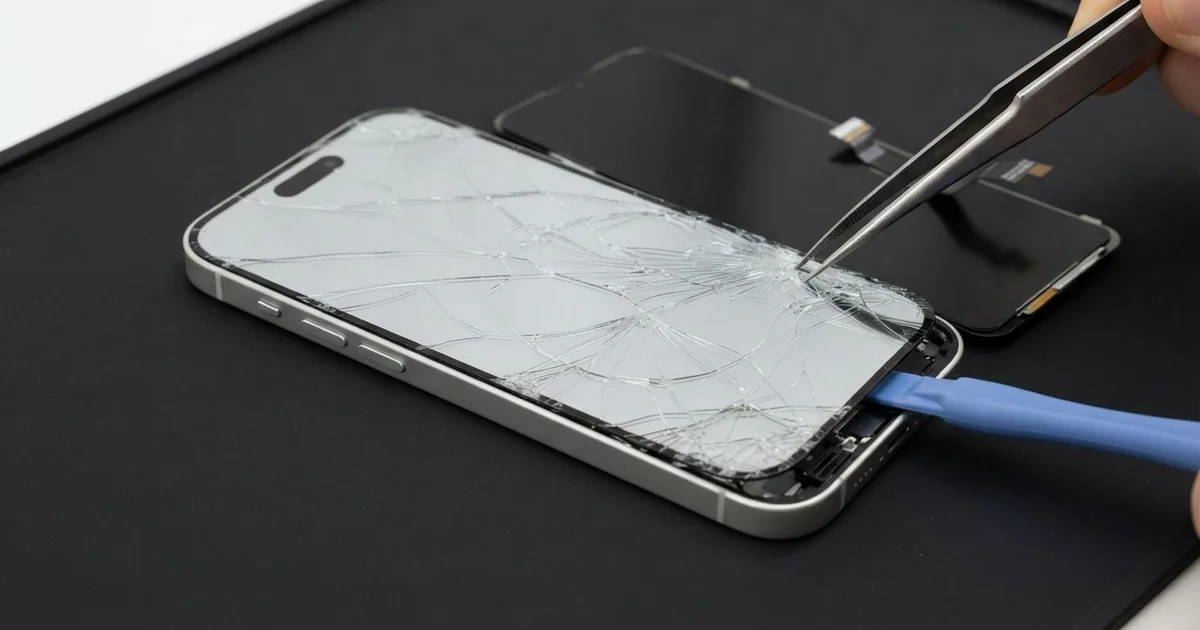
iPhone 17 LCD Display Replacement in Al Khobar fixes cracked glass, a dark display or touch that stops working. We check the phone free, then fit a whole new screen with the glass and display joined as one part. We test touch, Face ID and brightness, and most jobs are done the same day.
An iPhone 17 broken screen is not always a big web of cracks. Sometimes it's a black blot that spreads from one edge. Sometimes the picture looks perfect, but the phone opens apps you never touched.
Owners of a new phone often hope to live with a small crack, but that rarely lasts. Glass that has cracked once keeps spreading with every knock and every hot day. It's better not to wait, because a crack breaks the seal that keeps dust and water out.
Not every fault needs a new part. A screen protector with a bubble can stop touch near the edge. A loose screen cable after a fall can also leave the display dark, and refitting it is a quick fix.
Cracks, lines and blots are different. The glass and display are one part on this model, so the glass can't be changed alone. An iPhone 17 screen replacement puts in the complete new screen.
How Kabayan Center Replaces an iPhone 17 LCD Display
We fix these screen faults on this phone.
- Cracked or shattered front glass
- A black blot or a dark patch that spreads
- Lines or a flickering picture after a drop
- Ghost taps, or touch that is dead in one area
- A blank screen while sound and calls still work
- A screen edge that has lifted from the frame
Here is how an iPhone 17 screen replacement works with us, step by step:
- We check the phone free and test what still works, including Face ID and the cameras.
- We tell you what it needs, and you decide before any work starts.
- We remove the two small screws at the bottom and gently warm the edges of the screen.
- We lift the screen with a suction cup and a thin pick, then disconnect the battery.
- We fit the new screen, keeping clear of the Face ID parts at the top.
- We test touch across the whole glass, plus colour, brightness and the earpiece.
- We fit a fresh seal, press the screen down evenly and let you check the phone.
Have a different phone? Our phone screen replacement service covers other models with much the same steps. Customers reach our shop on King Fahd Road from Dammam and Dhahran too.
How an iPhone 17 Screen Breaks: 3 Real Cases
Knocked off a café table on the Corniche
One evening a phone came in that had fallen at a seaside café. A teacher had left it on the edge of a table, and a passing tray knocked it onto stone tiles. It landed on one corner and then flat on its back.
"The screen is cracked, and the camera looks strange," the teacher said. They had searched for iPhone Screen Replacement in Al Khobar on the way home.
A corner hit sends all the force into one point of the glass. The display under that corner had a dark patch the size of a fingertip. The iPhone 17 LCD display replacement left the picture clean edge to edge.
The back took the second hit. Its glass was cracked across, and small pieces were loose around the camera. So we also did an iPhone back glass replacement before the sea air could get inside.
The teacher took the phone home whole again on both sides. We suggested keeping it in a bag at busy tables. A case with a raised lip around the camera would also protect the lens from the next fall.
Crushed by a weight plate at the gym
A common case: a phone left on the gym floor next to the bench. A gym-goer set a weight plate down, and its edge landed on the phone. There was no loud crack, so it seemed lucky at first.
An hour later, a black patch had appeared in the middle of the screen. By night, it covered half of the display. "I can only see the top of my messages," the gym-goer told us.
Heavy pressure breaks the display layer under the glass. The glass can survive, while the picture behind it leaks and spreads.
We opened the phone and found the display badly crushed in the middle. The frame was straight, and the battery was untouched. That was good news, so an iPhone 17 screen replacement was all it needed.
After the iPhone 17 LCD display replacement, touch and colour tested perfectly. The gym-goer had first looked up mobile repair in Al Khobar, fearing the whole phone was gone.
Now the phone stays in a locker or a zipped pocket during workouts. A floor is never a safe shelf for a phone, however careful you are.
A small chip, then a splash in the pool
We often see this in summer. A father had a tiny chip in the screen's corner and kept using the phone. Then a child splashed him at a compound pool while he was filming.
That evening, the screen flickered and touch went wild. Water had slipped in through the chip, past the seal.
He dried it in front of the AC and put it on charge to check it. Charging a wet phone is what turns water into rust on the parts inside. By morning, the screen showed a pale green tint.
When we opened it, we found water marks under the display and a light crust near the top. We did a water damage repair on the board first. Then we fitted the new screen.
The screen and touch worked well again. The earpiece stayed a little quiet, though, because water had reached its small grille. He chose to use the speaker for calls for now.
A chip in the corner looks harmless, but it opens the seal. Fixing it early would have kept the pool water out. A sealed pouch is also handy for filming by the pool.
How to Keep Your iPhone 17 Screen Safe
- Use a case with a raised lip on the front and around the camera.
- Fit a good glass protector and change it as soon as it cracks.
- Keep the phone off floors, benches and table edges.
- Fix small chips early, to avoid an iPhone 17 LCD display replacement.
- Never charge a phone that has just got wet.
- Get phone repair in Al Khobar at the first dark patch, since it usually spreads.
Related services
- Phone battery replacement for a phone that drains fast or lifts its screen
- Charging port repair for a USB-C port that charges loosely or not at all
Questions about this repair
Ask us anything else on WhatsApp
we answer during shop hours.