iPhone 17 Pro Charging Port Repair in Al Khobar
iPhone 17 Pro Charging Port Repair in Al Khobar for a loose plug or a phone that won't charge. We check the port free and explain what we see. You decide before any work starts, and your data stays where it is.
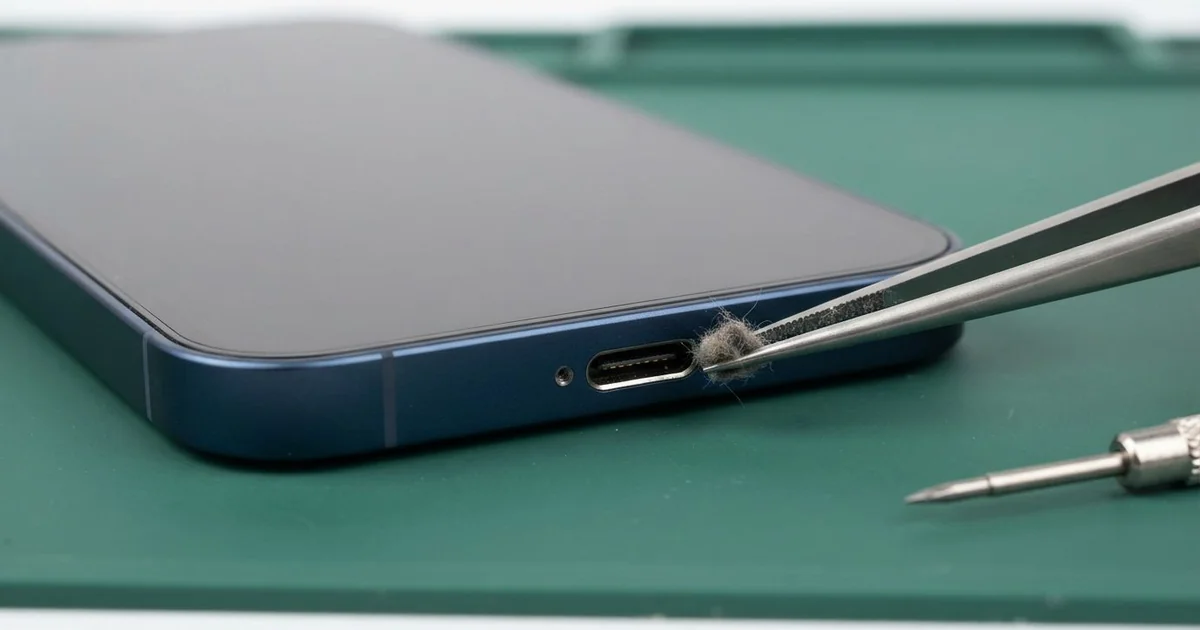
iPhone 17 Pro Charging Port Repair in Al Khobar fixes a phone that charges slowly, loosely or not at all. We check the USB-C port free, then clean it or replace the port part. We test charging speed and the plug fit, and most jobs are done the same day.
An iPhone 17 Pro not charging rarely fails all at once. First the plug needs a wiggle. Then charging drops in and out, or a liquid warning appears on a dry phone.
Many owners also use this port for more than charging. They move videos to a computer or plug in other gear. A weak port makes all of that unreliable, and big files may stop copying halfway.
It's better not to wait. A loose plug creates heat at the pins and slowly burns them. A phone that keeps running flat also wears its battery out much faster.
The iPhone 17 Pro charging port is a USB-C port with a thin tongue in the middle. Crumbs, lint and sand collect around that tongue, and a careful clean often fixes it with no new part. A worn, bent or rusted port needs a new part, and then charging speed comes back.
How Kabayan Center Repairs an iPhone 17 Pro Charging Port
We handle these faults as part of every iPhone 17 Pro Charging Port Repair.
- A plug that wobbles or falls out
- No charging with any cable
- Slow charging from a good charger
- A liquid warning on a dry phone
- Files that stop copying halfway to a computer
- Dark or green marks on the pins
Here is how an iPhone 17 Pro charging port repair works with us, step by step:
- We look into the port under a magnifier and a bright light.
- We test charging with our own cable and a meter that reads the speed.
- We tell you what the iPhone 17 Pro Charging Port Repair needs, and you decide before any work starts.
- We clean out dirt with fine plastic tools, never with metal.
- If the port is damaged, we open the phone, disconnect the battery and fit a new port part.
- We test charging, the plug fit and file copying before you take it home.
Have a different phone? Our charging port repair service covers other models with the same care. Customers reach our shop on King Fahd Road from Dammam and Dhahran too.
Why an iPhone 17 Pro Stops Charging: 3 Real Cases
Washed under the tap after a fall in the garden
This one starts in a garden after the sprinklers. A gardener dropped the phone in wet soil, and mud went into the port. To clean it, he held the phone under a running tap.
"Now it says there's liquid every time," he told us. He had searched for iPhone Charging Port Repair in Al Khobar when the warning would not stop.
Tap water carries minerals, and mud carries more. Together they dried into a hard crust around the pins. The tap had also pushed the mud deeper inside.
We found that crust inside the port and light marks on the board nearby. So we did a water damage repair, cleaning the board in a special bath. The port pins were too far gone, so we fitted a new port part.
Charging came back at full speed, and the warning stopped. The speaker at the bottom stayed a little muffled, though. Water had reached its grille, and he chose to leave it for now.
Never rinse a phone under the tap, even if it resists water. A dry, soft brush and a free check are much safer.
Crumbs from a lunch bag
A common case: a phone that travels in a lunch bag every day. A delivery worker kept the phone in the same bag as snacks and bread. Little by little, the plug stopped going all the way in.
"It charges only if I hold it," the worker said. They had looked up mobile repair in Al Khobar between drop-offs.
Crumbs are soft at first, but they pack hard in a warm port. Sugar from snacks makes them sticky, so they grip the tongue. Each plug-in then presses the layer down a little harder.
Under the magnifier, we saw a brown layer of crumbs and lint at the back. The pins were clean underneath. We worked it out slowly with plastic tools, so nothing scratched the contacts.
The plug then clicked in firmly, and the meter showed full speed. No new part was needed, and the phone was ready while the worker waited.
The phone now has its own zipped pocket in the bag, away from the food. A quick look with a torch once in a while keeps the port clear.
A desk stand that bent the plug
We often see this with phones used for live streams. A content maker kept the phone on a desk stand for hours, always plugged in. The stand pushed the cable down at a sharp angle.
Over months, that constant pull loosened the port. The plug started to droop and slip out by itself. Streams cut off in the middle more than once before the phone came to us.
Inside, the port's tongue was worn, and the pins had dark marks from heat. Cleaning could not fix that, so we fitted a new port part. Then the plug sat straight and tight again.
Our test also showed a tired battery. Hours of streaming on the charger had kept it hot, and its health reading was low. So we did a phone battery replacement in the same visit.
Both faults were fixed together, and the phone stayed cool on a long test stream. The plug did not move once, even when we tilted the stand.
The content maker now uses a right-angle cable that doesn't bend the plug. Raising the stand a little also helps the cable hang straight.
How to Keep Your iPhone 17 Pro Charging Port Working
- Look into the port with a torch now and then for lint or crumbs.
- Never rinse the phone under a tap, and never poke the port with metal.
- Use a right-angle cable if the phone sits on a stand while charging.
- Keep food and snacks out of the pocket that holds your phone.
- Never charge the phone while it shows a liquid warning.
- Get phone repair in Al Khobar as soon as the plug starts to droop.
Related services
- Motherboard repair for a phone that still won't charge with a new port
- Phone screen replacement for a cracked or dark screen
Questions about this repair
Ask us anything else on WhatsApp
we answer during shop hours.