iPhone 17 Pro LCD Display Replacement in Al Khobar
iPhone 17 Pro LCD Display Replacement in Al Khobar for broken glass, flicker or dead touch. A black screen can often be fixed too. We check your phone free, and you decide before any work starts. Your photos and messages stay private.
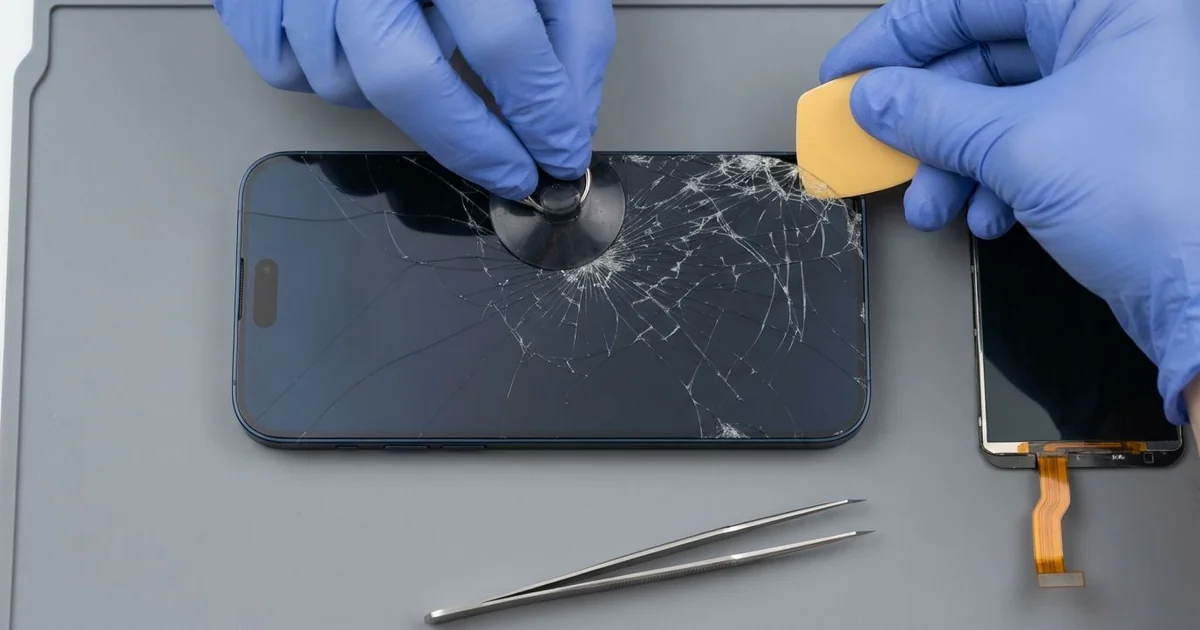
iPhone 17 Pro LCD Display Replacement in Al Khobar fixes broken glass, a flickering display or touch that stops working. We check the phone free, then fit a complete new screen, with glass and display as one part. We test touch, colour and Face ID, and most jobs are done the same day.
An iPhone 17 Pro broken screen can look different from phone to phone. One has a crack running out from a corner. Another looks perfect but flickers, shows a purple stripe or ignores your thumb near the edge.
It's better not to wait. A crack breaks the seal that keeps out water and dust. Black patches spread too, until you can't read the screen or see what you film.
Not every fault needs a new part. A lifted screen protector can block touch along one whole side of the glass. After a drop, a loose screen cable can also leave the display black, and refitting it fixes that.
Cracks, stripes and dead touch are different, and need a new part. The glass and display are joined, so the glass can't be swapped on its own. An iPhone 17 Pro screen replacement fits the whole new screen and fixes all three faults.
How Kabayan Center Replaces an iPhone 17 Pro LCD Display
We handle these faults as part of every iPhone 17 Pro LCD Display Replacement.
- Cracked or shattered front glass
- Stripes, flicker or a purple or green tint
- Black patches that grow from an edge
- Touch that misses taps or types by itself
- A blank screen while the phone still rings
- A screen that has lifted from the frame
Here is how an iPhone 17 Pro screen replacement works with us, step by step:
- We check the phone free and note what works, including the cameras and Face ID.
- We tell you what the iPhone 17 Pro LCD Display Replacement needs, and you decide before any work starts.
- We warm the edges of the screen to soften the seal.
- We lift the screen with a suction cup and thin picks, then disconnect the battery.
- We connect the new screen, keeping clear of the Face ID parts at the top.
- We test touch, colour, brightness and the earpiece before closing.
- We fit a fresh seal, press the screen evenly and let you check the phone yourself.
Have a different phone? Our phone screen replacement service covers other models with much the same care. Customers reach our shop on King Fahd Road from Dammam and Dhahran too.
How an iPhone 17 Pro Screen Breaks: 3 Real Cases
A tripod tipped over at a wedding hall
This one starts at a crowded wedding hall. A guest was filming on a small tripod set on a chair. Someone bumped the chair, and the phone fell face first onto the marble floor.
"The video kept recording, but the screen is all lines," the guest said. They had searched for iPhone Screen Replacement in Al Khobar that same night.
A small tripod holds the phone high, so the fall is longer than it looks. The top corner hit first, and the display behind it broke into bright lines.
We did the iPhone 17 Pro LCD display replacement and tested touch across the whole glass. The video from that night was safe, since nothing on the phone was touched.
The back had a long crack across its glass panel, too. So we also did an iPhone back glass replacement, because a cracked back lets dust reach the cameras.
The guest took the phone home looking new on both sides. We suggested a tripod with a wider base and a firm clamp. Setting it on the floor, not a chair, also helps in a busy room.
Keys in the same handbag
A common case: a phone thrown in a handbag with a heavy bunch of keys. A teacher noticed fine scratches on the screen for weeks. Then one morning, a crack ran across the middle.
"I never dropped it, I promise," the teacher told us. That is often true with this kind of crack. The damage builds up slowly, out of sight.
Keys rub and press on the glass every time the bag moves. Each scratch weakens it, and one hard squeeze can finish the job. On a hot day, the glass is under even more stress.
The crack had reached the display, and a small dark patch sat beside it. We fitted a new screen, and the picture was clear again.
The frame had picked up deep scratches from the same keys. Those stay, because the frame is part of the phone's body. The teacher chose to keep it as it was.
The teacher had first looked up mobile repair in Al Khobar to ask about the glass only. Now the phone rides in its own small pocket inside the bag, and the keys hang on a hook.
Slipped into the sea from a boat
We often see this in the boating months. A fisherman leaned over the side to take a photo, and the phone slipped into the sea. A friend grabbed it quickly, but it had been under the water.
Back on shore, it still turned on and seemed fine.
The screen had a small chip from an old fall, right at one corner. Salt water found its way in through that chip.
By evening, the screen had a faint green tint and touch jumped about. He switched it off and did not charge it, which was exactly right.
When we opened it, we found salt marks under the display and on the board. So we did a water damage repair first, cleaning the board in a special bath.
Then we finished the iPhone 17 Pro LCD display replacement. The tint was gone, and every tap landed where it should. All his fishing photos were still on the phone.
The fisherman now uses a floating pouch on the boat. He now knows a small chip is an open door for water. Next time, he will have it fixed early, before the sea can find it.
How to Keep Your iPhone 17 Pro Screen Safe
- Use a case with a raised lip on the front and around the cameras.
- Keep keys and coins out of the pocket that holds your phone.
- Use a tripod with a wide base, set low and steady.
- Fix small chips early, before salt water or sweat get in.
- Switch the phone off after a fall into water, and never charge it.
- Get phone repair in Al Khobar at the first stripe or dark patch.
Related services
- Phone battery replacement for a phone that drains fast or gets hot
- Charging port repair for a USB-C port that charges loosely or not at all
Questions about this repair
Ask us anything else on WhatsApp
we answer during shop hours.