iPhone 17 Pro Max LCD Display Replacement in Al Khobar
iPhone 17 Pro Max LCD Display Replacement in Al Khobar for cracked glass, stripes or a dark screen. We check the phone free and tell you what it needs. You decide before we start, and we keep out of your photos and chats.
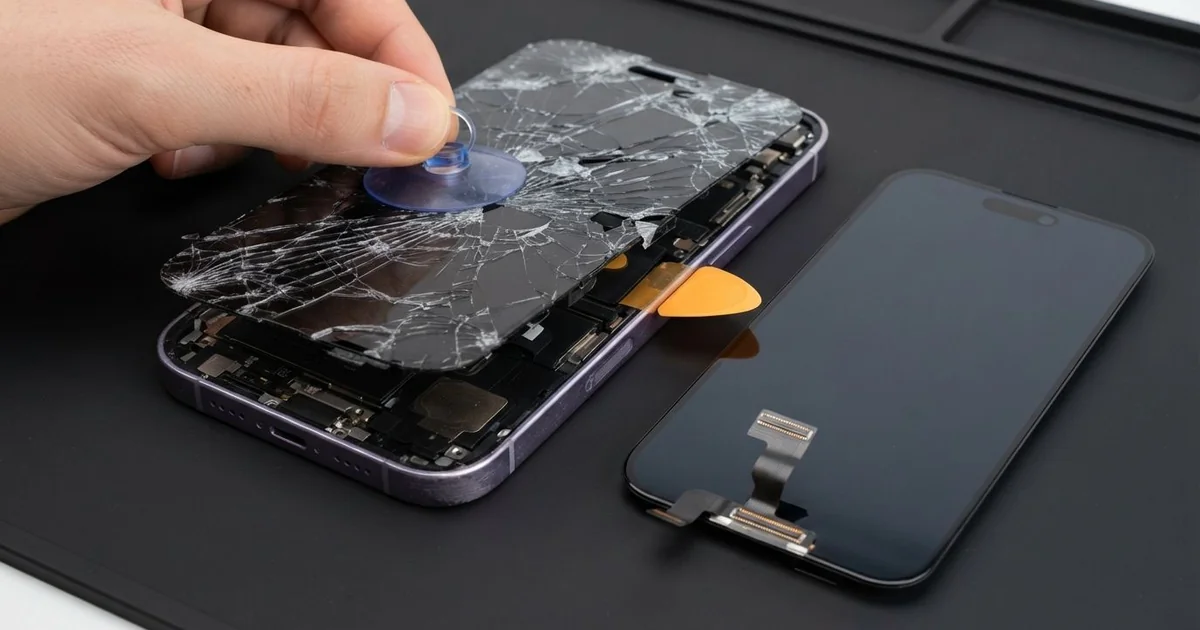
iPhone 17 Pro Max LCD Display Replacement in Al Khobar fixes cracked glass, stripes or a dark screen. We check the phone free, then fit a complete new screen, glass and display as one part. We test touch, colour and Face ID, and most jobs are done the same day.
An iPhone 17 Pro Max broken screen is easy to get. It's a big, heavy phone, so it falls hard. The glass may crack from a corner, or the display may show stripes with no crack at all.
Owners often keep typing around a crack across the middle, but it's better not to wait. A crack breaks the seal that keeps water and dust out. Dark patches and stripes usually spread, and the phone gets harder to unlock.
Not every fault needs a new part. A bubbled screen protector can stop touch near an edge. A loose screen cable after a drop can also leave the display black, and we fix that by refitting it.
Cracks, stripes and dead patches are different. The glass and display are joined, so the glass can't be changed alone. An iPhone 17 Pro Max screen replacement fits the whole new screen and fixes all of them.
How Kabayan Center Replaces an iPhone 17 Pro Max LCD Display
We handle these faults as part of every iPhone 17 Pro Max LCD Display Replacement.
- Cracked or shattered front glass
- Stripes, flicker or a coloured tint
- Dark patches that spread from an edge
- Dead touch in one area, or ghost taps
- A black screen while calls still ring
- A screen edge lifting from the frame
Here is how an iPhone 17 Pro Max screen replacement works with us, step by step:
- We check the phone free and test what works, including Face ID and the cameras.
- We tell you what the iPhone 17 Pro Max LCD Display Replacement needs, and you decide before any work starts.
- We warm the edges of the screen to soften the seal.
- We lift the screen with a suction cup and thin picks, then disconnect the battery.
- We connect the new screen, keeping clear of the Face ID parts at the top.
- We test touch over the whole glass, plus colour, brightness and the earpiece.
- We fit a fresh seal, press the screen down evenly and let you check it.
Have a different phone? Our phone screen replacement service covers other models with much the same steps. Customers reach our shop on King Fahd Road from Dammam and Dhahran too.
How an iPhone 17 Pro Max Screen Breaks: 3 Real Cases
Slid off a treadmill shelf
This one starts at a busy gym in the evening. A runner rested the phone on the small shelf of a treadmill. The belt shook the machine, and the phone slid off onto the hard floor behind.
"It landed on the corner, then flipped over," the runner said. They had searched for iPhone Screen Replacement in Al Khobar on the walk home.
A big phone carries a lot of weight into a corner hit. The glass cracked in a web, and touch stopped working along the top. We did the iPhone 17 Pro Max LCD display replacement, and every tap landed where it should.
When it flipped, the back took a hit too. Its glass panel had a crack near the cameras. So we also did an iPhone back glass replacement, so sweat and dust couldn't get in.
The runner now uses an armband on the treadmill. It holds the phone firmly, even at full speed, and the music keeps playing.
We also suggested a case with a raised lip around the cameras. A treadmill shelf is fine for a water bottle, but not for a phone that size.
Squeezed in a crowded backpack
A common case: a phone packed tight in a backpack full of books and a laptop. A university student stuffed the bag for a long day of classes. By the afternoon, stripes ran down one side of the screen.
"There's no crack, so how is it broken?" the student asked. Steady pressure can crack the display under the glass, even when the glass survives. A big screen bends a little more easily under a heavy load.
We opened the phone and found a pressure mark across the display. We did the iPhone 17 Pro Max LCD display replacement, and the stripes were gone.
The student had first looked up mobile repair in Al Khobar about the screen only. During the visit, they mentioned the phone dying before evening classes. Our test showed a worn battery, much weaker than normal.
So we also did a phone battery replacement in the same visit. It now lasts through the full day of classes, with charge to spare.
The phone now rides in the front pocket of the bag, away from the heavy books. A hard case also spreads the pressure if the bag gets squeezed.
Bath time with a toddler
We often see this with young families. A mother was playing music for her toddler at bath time. A small hand reached out, and the phone went straight into the water.
The screen already had a thin crack along one edge from an old fall. Water got in that way, even though the phone resists water when it's sealed.
That night the screen flickered, and touch opened apps on its own. She switched it off and did not charge it, which was the right thing to do.
When we opened it, we found soapy water marks under the display and on the board. We did a water damage repair first, then fitted the new screen.
The screen and touch worked well again. But one rear camera stayed a little hazy, because water had reached inside its lens. She chose to live with it for now and use the other cameras.
A sealed screen would have kept the bath water out. Small cracks are worth fixing early, before water finds them. A shelf high above the bath is the safest place for music.
How to Keep Your iPhone 17 Pro Max Screen Safe
- Use a case with a raised lip on the front and around the cameras.
- Use an armband or a zipped pocket at the gym, never a machine shelf.
- Keep the phone in its own pocket in a packed bag.
- Fix thin cracks early, before water or sweat get inside.
- Keep the phone out of reach at bath time.
- Get phone repair in Al Khobar at the first stripe or dark patch.
Related services
- Charging port repair for a USB-C port that charges loosely or not at all
Questions about this repair
Ask us anything else on WhatsApp
we answer during shop hours.