iPhone 17 Pro Motherboard Repair in Al Khobar
iPhone 17 Pro Motherboard Repair in Al Khobar for a phone that won't wake up or loses Wi-Fi. We check the board free and explain what we find. You decide before any work starts, and nothing is deleted without your say.
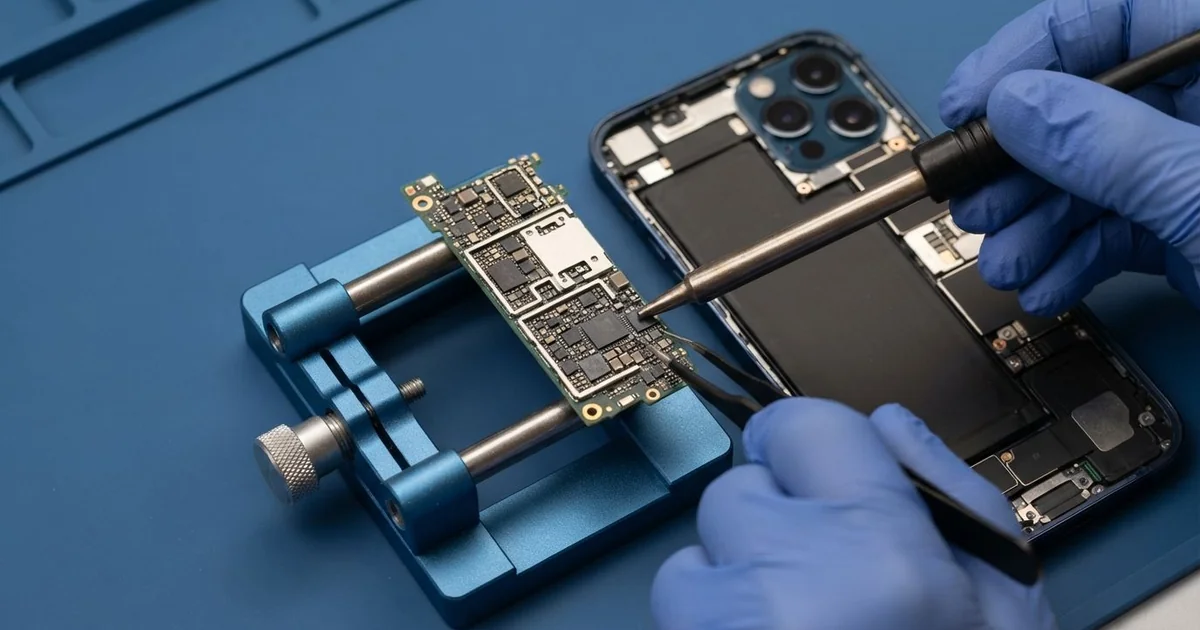
iPhone 17 Pro Motherboard Repair in Al Khobar fixes a phone that won't power on, restarts or loses Wi-Fi. We check the board free and find the faulty part under a microscope. Then we replace that small part, not the whole board, and save your data wherever we can.
An iPhone 17 Pro not turning on is the most common reason people come in. The screen stays dark, even on a good charger. Other phones lose Wi-Fi, lose signal or restart in the middle of a video.
It's better not to wait. A short on the board keeps heating the parts around it, even when the phone looks dead. Water or soap left inside keeps eating the board, so a small fault spreads.
Your data needs the board too. On this phone, your photos and chats are locked to the board itself. They can't be read on another device, so the board must start before they come back.
Not every dead phone has a board fault. A drained battery, a broken cable or a stuck update can look exactly the same, so we test those first. When the iPhone 17 Pro motherboard is at fault, we find and replace the one failed part.
How Kabayan Center Repairs an iPhone 17 Pro Motherboard
We handle these faults as part of every iPhone 17 Pro Motherboard Repair.
- No power, even on the charger
- Restarts on the logo, or in the middle of a video
- No Wi-Fi, no Bluetooth or no signal after a drop
- No charging with a good port and battery
- Heat while the phone is switched off
- Faults that start days after water or a spill
Here is how an iPhone 17 Pro motherboard repair works with us, step by step.
- We check the phone free and rule out the battery, screen and port first.
- We connect a power meter that shows how much current the board draws.
- We tell you what we found in the iPhone 17 Pro Motherboard Repair, and you decide before any work starts.
- We open the phone, disconnect the battery and take out the board.
- We find the faulty part under a microscope, using the meter and a heat camera.
- We replace it with a fine hot-air tool and a soldering iron.
- We rebuild the phone and test power, charging, Wi-Fi, signal and cameras.
Have a different phone or a laptop? Our motherboard repair service covers other devices too. Customers reach our shop on King Fahd Road from Dammam and Dhahran as well.
Why an iPhone 17 Pro Board Fails: 3 Real Cases
Through the washing machine in a uniform pocket
This one starts on laundry day. A hotel worker left the phone in a uniform pocket, and it went through a full wash. It came out warm, wet and dead.
"It was in there with all the soap," the worker said. They had searched for iPhone Motherboard Repair in Al Khobar that same hour.
Soapy water gets into gaps that plain water can't reach. The spin pushes it deep, and the soap leaves a film that keeps rust going.
We found soap marks and early rust all over the board. We copied the photos and contacts first, as soon as the board would start. We did that through our data recovery service.
Then we did a full water damage repair, cleaning the board in a special bath. We replaced a few small parts the rust had eaten.
The phone now works for calls, apps and cable charging. Wireless charging did not come back, because the water had damaged that part too. The worker chose to charge by cable from now on.
A pocket check before every wash would have saved all of this.
A hard fall on a car park ramp, then no Wi-Fi
A customer came to us after the phone slipped from a jacket on a concrete ramp. The glass survived, so it looked like a lucky escape. "But now Wi-Fi is greyed out," they said.
They had looked up mobile repair in Al Khobar and tried a settings reset first. Nothing changed, because the fault was not in the software. A new router at home made no difference either.
A hard knock can crack a tiny joint under a chip. The part that runs Wi-Fi and Bluetooth is sensitive to that kind of shock. Once its joint breaks, the phone can't find it at all.
On the power meter, the wireless part was not waking up. Under the microscope, we found a cracked joint right beside it. We cleaned the pads and joined it again with fresh solder.
Wi-Fi and Bluetooth both switched on at once. We left the phone streaming video on the bench for a long test, and the connection stayed steady.
Every photo and chat was still in place. We suggested a case with thick corners and a zipped pocket for busy car parks.
Left on a hot car seat until it shut down
We often see this in the peak of summer. A driver left the phone on the passenger seat in direct sun during a long errand. It showed a heat warning, went dark and would not come back on.
"I think the heat killed the board," the driver said. A night on the charger had changed nothing, and the screen stayed fully black.
We tested the board first, and it drew power normally. The real problem was the battery. The heat had damaged it, and it had then drained so deeply that it refused to charge.
So no board work was needed at all, which surprised the driver. We did a phone battery replacement, and the phone started at once.
Every message and photo was still there. The new battery charged normally and stayed cool through our tests, even with the camera running.
The driver now keeps the phone in the glove box, out of the sun. A phone left on a seat in summer heats up very quickly. A free check first saved the driver from paying for a board that was fine.
How to Keep Your iPhone 17 Pro Board Safe
- Check every pocket before a wash, especially work uniforms.
- Never charge a phone after water or a spill. Bring it in first.
- Keep the phone out of direct sun in the car.
- Use a case with thick corners to soften hard drops.
- Back up your photos and chats often, so a board fault never costs you your files.
- Get phone repair in Al Khobar as soon as Wi-Fi greys out or the phone restarts by itself.
Related services
- Charging port repair for a plug that is loose or charges only at an angle
Questions about this repair
Ask us anything else on WhatsApp
we answer during shop hours.