iPhone (1st generation) Battery Replacement in Al Khobar
iPhone (1st generation) Battery Replacement in Al Khobar for a phone that dies fast or won't charge. We check the battery free and tell you what it needs. You decide before any work starts, and your old photos and songs stay on the phone.
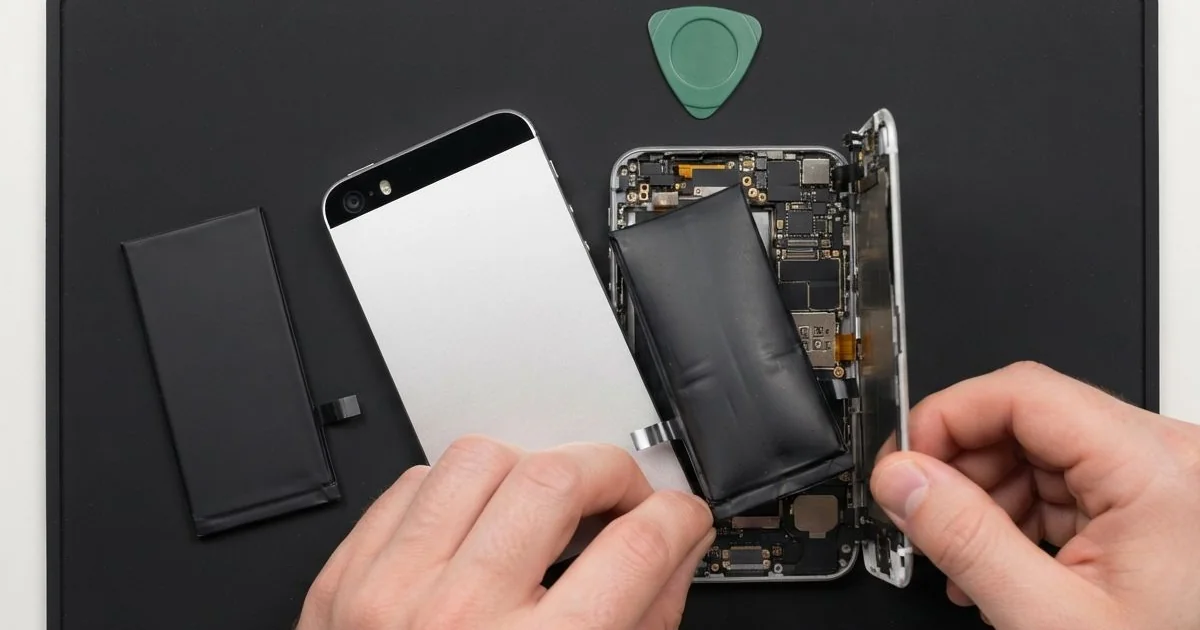
iPhone (1st generation) Battery Replacement in Al Khobar fixes a phone that drains fast or won't charge. We check the battery free, then fit a new battery soldered to the board. We test charging on the bench and run the phone on battery before you take it home.
A first iPhone battery draining fast is the usual sign. The phone is full in the evening and flat by the next morning. Others switch off in the middle of a song or won't wake up after months in a drawer.
It's better not to wait. A worn battery can swell, and on this phone it pushes against the screen from inside. A battery left empty for too long can also stop taking a charge for good.
Not every drain needs a new part. A dirty dock port or a worn cable can stop the phone charging properly. We test with our own cable first, so you never pay for a battery you don't need.
When the battery itself is worn, a first iPhone battery replacement is the fix. On this model the battery is soldered to the board, so it takes a careful hand. Batteries for this older phone can be harder to find, and some take time to arrive.
How Kabayan Center Replaces an iPhone (1st generation) Battery
We handle these faults as part of every iPhone (1st generation) Battery Replacement.
- Fast drain, even while the phone sits unused
- Sudden shutdowns during music or calls
- No charging at all after months in a drawer
- A battery that gets warm on the charger
- A swollen battery lifting the screen or bending the metal back
- A charge sign that jumps up and down
Here is how a first iPhone battery replacement works with us, step by step:
- We check the phone free and test charging with our own dock cable.
- We tell you what the iPhone (1st generation) Battery Replacement needs, and you decide before any work starts.
- We ease off the black plastic cover at the bottom of the back and take out the screws.
- We lift the front out of the metal back and free the board with care.
- We unsolder the old battery and loosen its glue with gentle heat, never by prying.
- We solder in the new battery and check each joint under a magnifier.
- We close the phone, test charging and power, and let you check it yourself.
Have a newer phone? Our phone battery replacement service covers other models, with the same care. Customers come to our shop on King Fahd Road from Dammam and Dhahran too.
Why a First iPhone Battery Gives Up: 3 Real Cases
Left empty in a drawer for years
A customer came to us with a phone wrapped in an old cloth. "My old voice notes are on it, but it won't even show the charging sign," they said.
They had searched for iPhone Battery Replacement in Al Khobar after a week of trying different chargers. A phone stored empty keeps losing a tiny bit of power. In the end the battery drops so low that it can't wake up again.
We tested the battery, and it showed almost no voltage at all. It could not be brought back safely. So we unsoldered it and did the iPhone (1st generation) battery replacement.
The phone still would not charge from the cable. We looked into the dock port and found dull, dirty pins under a layer of dust.
Years in a drawer had left a thin film on every pin. We did a charging port repair, cleaning each pin until the cable clicked in firmly.
The phone switched on and showed the old home screen. The voice notes played back clearly, and the customer copied them to a computer the same day.
We suggested charging it to about half every few months if it goes back in the drawer.
A hot tent on a desert camping trip
This one starts at a desert camp. A teacher used the old phone as a music player during a weekend trip. It sat in a closed tent through the afternoon.
By evening, the screen had lifted at one side. "It looks like it's opening by itself," the teacher told us. A small chip had also broken off the glass at the raised corner.
Heat makes an old battery swell. Inside a closed tent in summer, the air gets far hotter than outside. The battery had puffed up and pressed the screen out of the frame.
A swollen battery is not safe to use, even when the phone still works. We took it out at once and soldered in a new one. The screen then sat back down in its frame.
The chipped corner stayed, because the glass itself was damaged. We explained the choice, and the teacher planned a phone screen replacement for later, once the part arrives.
For now the phone works and the battery is safe. The chip is small, but it catches a finger at the edge. The teacher now keeps the phone in a cool bag on trips.
Sweat from long workouts at the gym
We see a lot of this from gyms. A trainer used the first iPhone as a music player, strapped to an arm for hours every day.
The trainer had looked up mobile repair in Al Khobar when the phone began dying halfway through each session. "It used to last all day," the trainer said.
Sweat is salty water. Over many months it seeped in at the bottom edge and the headphone socket. The salt reached the battery joints and slowly ate into them.
We opened it and found green crust around the battery solder points and on the board nearby. The crust was leaking power even while the phone was off. So we did a water damage repair, cleaning the board in a special bath.
Then we finished the iPhone (1st generation) battery replacement with fresh solder joints. The phone ran a long music test on the bench without dropping out once. It also stayed cool on the charger, which it had not done for a while.
The trainer now wipes the phone after each session and keeps it in a sweat-proof pouch. Small habits like that keep salt away from the board.
How to Keep Your First iPhone Battery Healthy
- Charge it to about half before storing it, and top it up every few months.
- Keep the phone out of hot cars, tents and direct sun.
- Use a good dock cable and charger that fit firmly.
- Wipe off sweat after workouts and keep the phone in a pouch at the gym.
- Stop using the phone if the screen lifts or the back bends.
- Bring it in for phone repair in Al Khobar if it won't wake up, before you try more chargers.
Related services
- Motherboard repair for a phone that still won't power on with a new battery
Questions about this repair
Ask us anything else on WhatsApp
we answer during shop hours.