iPhone (1st generation) Charging Port Repair in Al Khobar
iPhone (1st generation) Charging Port Repair in Al Khobar for a cable that wobbles or won't charge. We check the dock port free and tell you what it needs. You decide before any work starts, and nothing on the phone is wiped.
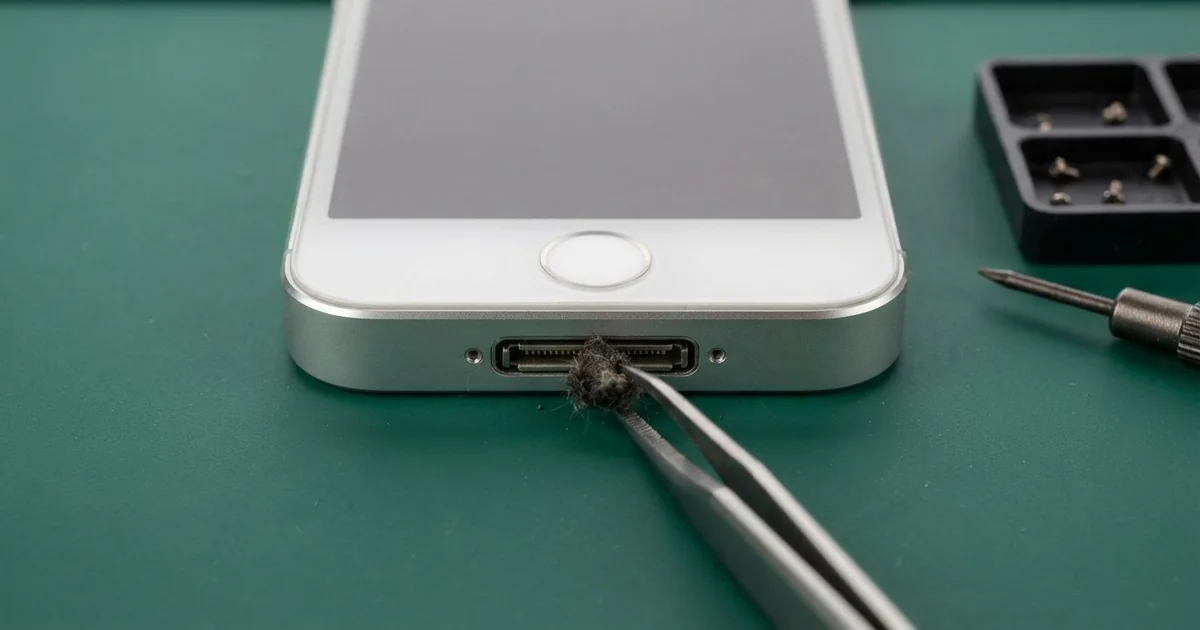
iPhone (1st generation) Charging Port Repair in Al Khobar fixes a phone that charges loosely or not at all. We check the 30-pin dock port free, then clean it or fit a replacement port. We test charging with a few cables, so you know it works before you leave.
A first iPhone not charging shows up in a few ways. The wide cable plug wobbles in the port. The phone charges only when you press the plug down, or the charging sign flashes on and off.
Don't give up on the old phone, since the fault is often just a dirty or bent pin. A loose plug makes sparks on the tiny pins and slowly burns them. The battery also keeps running flat, and an old battery doesn't like that at all.
Not every fault needs a new part. The first iPhone charging port is wide, so it collects lint, sand and dust easily. Most of the time we clean it out with fine plastic tools, and the plug clicks in firmly again.
Bent, burnt or rusted pins are different. On this model the port sits deep inside, close to the main board, so a new one is careful work. The part for this older phone can be harder to find, and some take time to arrive.
How Kabayan Center Repairs an iPhone (1st generation) Charging Port
We handle these faults as part of every iPhone (1st generation) Charging Port Repair.
- A wide dock plug that wobbles or falls out
- Charging only at one angle, or only when pressed
- No charging at all, even with a good cable
- A charging sign that flashes on and off
- A message that the accessory is not supported
- Sticky or green pins after a spill
Here is how a first iPhone charging port repair works with us, step by step:
- We look into the port under a bright light and test charging with our own dock cable.
- We tell you what the iPhone (1st generation) Charging Port Repair needs, and you decide before any work starts.
- We clean out lint and sand with fine plastic tools, never with a metal pin.
- If pins are damaged, we ease off the black plastic cover at the bottom of the back.
- We lift the front out of the metal back and reach the port near the board.
- We fit the replacement port and check every joint under a magnifier.
- We close the phone and test charging and syncing with a few different cables.
Have a newer phone? Our charging port repair service covers other models too. Customers come to our shop on King Fahd Road from Dammam and Dhahran as well.
Why a First iPhone Stops Charging: 3 Real Cases
Sand from a warehouse floor
A common case: a phone that lives in a work trouser pocket. A warehouse supervisor kept the old phone as a second handset for a work SIM.
"I push the cable in, and it just slides back out," the supervisor said. The supervisor had searched for iPhone Charging Port Repair in Al Khobar, expecting a new port.
Fine sand and dust blow around a warehouse all day. They settle in pockets and get pushed into the wide port each time the cable goes in.
Under our light, the port was packed with a hard grey layer of sand and lint. The plug could only reach halfway. We picked it out slowly until we could see clean, straight pins.
The plug clicked in firmly, and the phone began to charge. No iPhone (1st generation) charging port repair was needed.
During the test, the charge level dropped quickly once the cable came out. Months of charging at a bad angle had worn the old battery down too. So we also did a phone battery replacement, and the phone now lasts through a full shift.
We showed the supervisor how to check the port with a torch every few weeks.
Sweet tea spilled on a speaker dock
One evening a phone came in still smelling of sweet tea. It had sat on an old speaker dock in a family sitting room when a glass tipped over.
The tea ran straight down into the dock and the phone's port. "It played music for a minute, then stopped charging," the owner told us. They had dried it with a towel and plugged it in again.
Sugar in the tea dried into a sticky film on the pins. This model has no water protection, so the tea also crept inside, along the bottom edge.
We found brown sticky crust in the port and green spots near the board. So we did a water damage repair first, cleaning the board in a special bath.
Two pins were too damaged to save, so we did the iPhone (1st generation) charging port repair. Charging came back firm and steady on every cable we tried.
The bottom speaker stayed a little muffled, because the sugar had reached its thin mesh too. The owner chose to keep it as it is for now. Never plug in a phone after a spill, even if it seems dry.
An unbranded car charger burnt a pin
This one starts with a car charger from a roadside stall. A taxi driver kept the first iPhone for music and plugged it into an unbranded car adapter every shift.
The driver had looked up mobile repair in Al Khobar when the phone went dead on the charger. There was a faint burnt smell near the bottom edge. "It charged fine for years in this car," the driver said.
A poor charger can send uneven power down the cable. The pins carrying that power heat up, and one can burn black. Summer heat inside a taxi makes it worse.
We found one pin scorched dark and the plastic around it slightly melted. We fitted a replacement port, but the phone still would not charge.
The burn had gone further, into the small charging part on the board. So we did a motherboard repair and replaced that part under a microscope.
After that, the phone charged normally from the wall and from a good car charger. Music played all through a long test. The driver now uses a known car charger and threw the old adapter away.
How to Keep Your First iPhone Charging Port Working
- Look into the port with a torch every few weeks, and bring it in if you see lint or sand.
- Never clean the port with a metal pin, a needle or a toothpick.
- Pull the wide plug straight out, never by the wire or at an angle.
- Use a good car charger, not an unbranded one from a roadside stall.
- Keep drinks away from speaker docks, and never plug in a wet phone.
- Get phone repair in Al Khobar as soon as the plug needs pressing to charge.
Related services
- Phone screen replacement for cracked glass or a dark display
Questions about this repair
Ask us anything else on WhatsApp
we answer during shop hours.