iPhone (1st generation) LCD Display Replacement in Al Khobar
iPhone (1st generation) LCD Display Replacement in Al Khobar for cracked glass, a dark patch or dead touch. This classic phone can still be saved. We check it free and tell you what it needs. You decide before any work starts, and we delete nothing without asking.
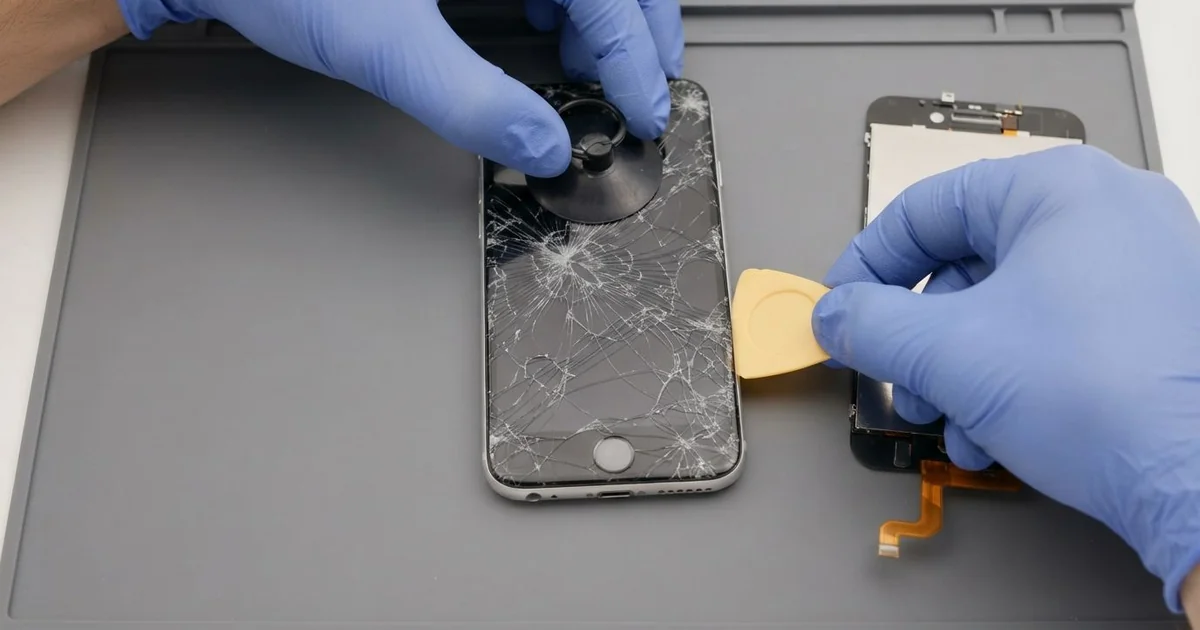
iPhone (1st generation) LCD Display Replacement in Al Khobar fixes cracked glass, a dark display or touch that stopped working. We check it free and find the broken layer, then fit new screen parts. We test touch, the picture and the Home button before you take it home.
A first iPhone broken screen shows up in a few ways. The glass cracks from one corner, or a dark patch spreads across the picture. Sometimes the picture looks fine, but taps in one strip along the edge do nothing.
It's better not to wait. Cracked glass can cut a finger, and dust slips in through the gaps. If touch stops completely, you can't unlock the phone to copy its old photos, notes and saved songs.
Not every fault needs a new part. On this model the touch glass and the display are separate layers. A cable can also slip loose after a drop, and we fix that by seating it again.
Cracked glass or a broken display is different. A first iPhone screen replacement puts in the layer that failed, or both when both are hurt. Parts for this older phone are harder to find, so we say first if one needs time to arrive.
How Kabayan Center Replaces an iPhone (1st generation) LCD Display
We handle these faults as part of every iPhone (1st generation) LCD Display Replacement.
- Cracked or shattered front glass
- A dark blotch or lines across the picture
- A white or blank screen while music still plays
- Taps that miss, or a strip of glass that ignores your finger
- A screen that lifts away from the metal back after a fall
- A dim picture, or a light that flickers behind the display
Here is how a first iPhone screen replacement works with us, step by step:
- We check the phone free and test sound, the Home button, Wi-Fi and charging.
- We tell you which screen part failed, and you decide before any work starts.
- We ease off the black plastic cover at the bottom of the back.
- We take out the small screws and lift the front out of the metal back.
- We free the screen cables slowly, since old cables turn stiff and brittle.
- We fit the new glass or display, then test touch from edge to edge.
- We close the phone, check the Home button and let you try it yourself.
Have a newer phone? Our phone screen replacement service covers other models, with much the same care. Customers come to our shop on King Fahd Road from Dammam and Dhahran too.
How a First iPhone Screen Breaks: 3 Real Cases
Knocked off a marble table at home
One morning a phone came in that most people only know from old photos. A parent kept it in a drawer as a music player for the children. It still played their favourite songs every evening.
It slid off a marble table and hit the floor on one corner. "The glass is broken, and the speaker sounds strange now," the parent told us.
The parent had searched for iPhone Screen Replacement in Al Khobar, unsure anyone still fixed this model. A corner drop bends the metal back a little. That bend stresses the glass, and it cracks from that corner.
We opened the phone and found the glass cracked, but the display underneath was fine. So we did an iPhone (1st generation) LCD display replacement with the touch glass only.
During the test, the bottom speaker buzzed on loud songs. The fall had pushed the speaker out of place and torn its thin mesh. We did a phone camera and speaker repair before closing it again.
The children got their music player back, with clear sound and smooth glass. We suggested a soft case, because the metal corners take every fall.
Left in a glovebox on a summer afternoon
This one starts in a parked car. A collector of old phones left this one in the glovebox while shopping on a summer afternoon.
Back in the car, the screen showed a dark brown blotch in the middle. "It was fine this morning," the collector said. The blotch grew a little bigger over the next few days.
The collector had looked up mobile repair in Al Khobar, worried the phone was lost for good. Strong heat can cook the display layer. The liquid inside darkens, and that patch does not fade when it cools.
The glass was fine, so the iPhone (1st generation) LCD display replacement used a new display behind it. The picture came back bright and even, with no patch at all.
We also tested the battery, because heat hurts it too. It ran down fast and felt warm on a short test.
On this model the battery is soldered to the board. So we did a careful phone battery replacement with a soldering tip.
The phone now holds a charge and shows a clean picture. Never leave a phone in a parked car in summer, not even in the glovebox.
Foggy glass after an evening by the sea
We often see this after a humid night. A retired engineer carried the old phone from a cold hotel lobby straight onto the Corniche.
The cold glass fogged up at once in the warm, wet air. Over the next week, touch stopped working along the top of the screen. "I can't press anything up there," the owner said.
This model has no water protection at all. When a cold phone meets hot, humid air, water forms inside it, not only on the glass. Sea air also carries salt, and salt turns small drops into rust.
We opened it and found white crust on the touch cable and near the board. So we did a water damage repair first, cleaning the board and drying every connector.
The touch glass had rust on its own cable and needed replacing. A new display would take longer to arrive, so the owner chose the glass only. Touch now works across the whole screen.
A faint cloudy spot stays in one corner of the old display, where the damp sat longest. The owner may swap the display later. We suggested letting a cold phone warm up in a bag before stepping outside.
How to Keep Your First iPhone Screen Safe
- Use a soft case, since the metal back passes every knock to the glass.
- Keep the phone out of hot cars, even inside the glovebox.
- Let a cold phone warm up in a bag before you step into humid air.
- Wipe the screen with a dry soft cloth, never with sprays or alcohol.
- Copy old photos and notes to a computer while touch still works.
- Bring it in for phone repair in Al Khobar at the first crack, before dust gets under the glass.
Related services
- Charging port repair for a dock port that charges loosely or not at all
Questions about this repair
Ask us anything else on WhatsApp
we answer during shop hours.