iPhone (1st generation) Motherboard Repair in Al Khobar
iPhone (1st generation) Motherboard Repair in Al Khobar for a phone that won't turn on or keeps restarting. We check the board free and tell you what it needs. You decide before any work starts, and we never delete your old files without asking.
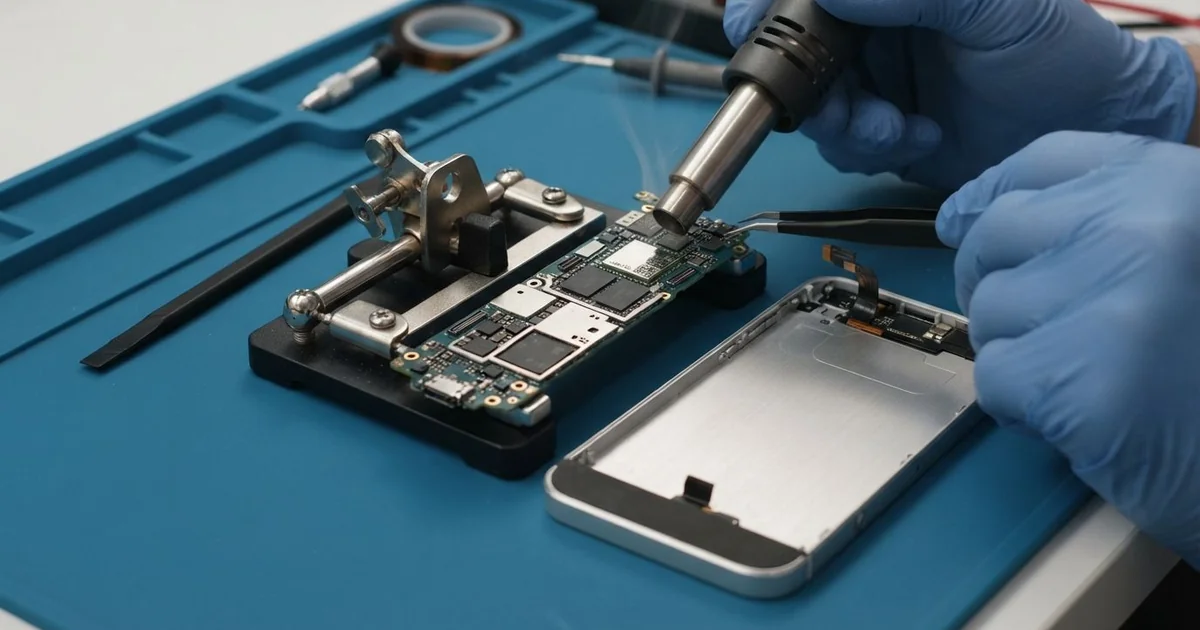
iPhone (1st generation) Motherboard Repair in Al Khobar fixes a phone that won't power on or keeps restarting. We check the board free and find the faulty part under a microscope. Then we replace that part, and we save your old files first wherever we can.
A first iPhone not turning on is the most common sign. The screen stays black, even after a whole night on the charger. Other phones get stuck on the logo, restart by themselves or lose Wi-Fi and signal.
It's better not to wait. Damp or rust on the board keeps spreading, even while the phone sits switched off. The old photos, voice notes and messages on it often exist nowhere else.
Not every dead phone has a board fault. A flat battery, a dirty dock port or a loose screen cable can look the same. We test those first, so you never pay for board work you don't need.
The first iPhone motherboard holds the storage, the power parts and the radios on one board. Often just one small part has failed, and we replace only that one. Parts for this older phone can take time to arrive, so we tell you before we order.
How Kabayan Center Repairs an iPhone (1st generation) Motherboard
We handle these faults as part of every iPhone (1st generation) Motherboard Repair.
- No power at all, even on the charger
- Stuck on the logo, or restarting again and again
- No Wi-Fi, or Wi-Fi that switches off by itself
- No signal after a drop or a spill
- A phone that gets warm while it's switched off
- Faults that start weeks after damp or water
Here is how a first iPhone motherboard repair works with us, step by step.
- We check the phone free and test the battery, screen and dock port to rule them out.
- We connect a power meter that shows how much power the board draws.
- We tell you what we found in the iPhone (1st generation) Motherboard Repair, and you decide before any work starts.
- We ease off the black plastic cover at the back and lift the front out of the metal case.
- We take out the board and find the faulty part under a microscope.
- We replace that part with a fine hot-air tool and a soldering tip.
- We rebuild the phone, test power, Wi-Fi, sound and charging, then let you check it.
Have a newer phone or a laptop? Our motherboard repair service covers other devices too. Customers come to our shop on King Fahd Road from Dammam and Dhahran as well.
Why a First iPhone Board Fails: 3 Real Cases
Steam from daily hot showers
This one starts in a bathroom. A nurse used the old phone as a shower radio, on a shelf right next to the mirror.
It never got splashed, so the nurse was surprised when it died. "It was dry the whole time," the nurse said. The nurse had searched for iPhone Motherboard Repair in Al Khobar after a week of trying chargers.
Hot steam does not stay outside the phone. It slips in through the speaker and the dock port, then cools into tiny drops on the board. Day after day, those drops turn into rust.
We opened it and found a fine green film around the power parts. The power meter showed the board pulling power while switched off. So we did a water damage repair, cleaning the board in a special bath and drying it fully.
One small power part had rusted through, so the iPhone (1st generation) motherboard repair meant replacing it under the microscope. The phone then switched on and played music again.
We ran a long test with Wi-Fi and sound, and it stayed steady. The nurse now keeps the phone outside the bathroom and uses a small speaker on the shelf.
Old family photos on a dead phone
We often see this with phones kept for memories. A customer brought in a first iPhone that had belonged to a parent. "The only photos of our old house are on here," they told us.
The customer had looked up mobile repair in Al Khobar, hoping someone still worked on boards this old. The phone had been stored for years and now showed nothing at all.
We tested the battery and the screen first, and both were fine. The power meter pointed to the board. Under the microscope, a tiny part near the storage chip had cracked with age.
We finished the iPhone (1st generation) motherboard repair, and the phone started, but it froze after a minute each time. Those short minutes were enough to work with. Through our data recovery service, we copied the photos and notes off before anything else.
We saved the files first, before trying any more board work. The board could not be made fully stable again.
So the phone still freezes and is not fit for daily use. But the customer left with every photo of the old house on a computer.
Dropped on tiles, then stuck on the logo
A customer came to us after the phone fell from a kitchen counter onto hard tiles. The screen survived without a crack. "It shows the logo, then goes black, again and again," they said.
A hard knock can crack a tiny solder joint under a chip. The phone tries to start, loses contact with that chip and starts over. A reset at home does not help, because the fault is not in the software.
We watched the restart on the power meter and found the joint under the microscope. Pressing gently near one chip made the phone restart at once. We cleaned the area and joined the chip again with fresh solder.
The phone then started fully and stayed on through a long test. Every photo and message was still in place. During that test, though, the old battery dropped fast and turned warm.
The customer chose a phone battery replacement at the same visit. The phone now starts every time and holds its charge. We suggested a soft case, since the metal back passes every knock straight to the board.
How to Keep Your First iPhone Board Safe
- Keep the phone out of bathrooms and steamy kitchens.
- Use a good dock cable and charger, never an unbranded fast one.
- Use a soft case to take the shock out of hard drops.
- Never charge a phone that got wet. Bring it in quickly instead.
- Copy old photos, voice notes and messages to a computer now, while the phone still works.
- Get phone repair in Al Khobar as soon as the phone restarts by itself or feels warm while off.
Related services
- Charging port repair for a dock port that charges loosely or not at all
Questions about this repair
Ask us anything else on WhatsApp
we answer during shop hours.