iPhone 3G Battery Replacement in Al Khobar
iPhone 3G Battery Replacement in Al Khobar for a phone that is flat by noon or shuts off early. We test the battery free and tell you what it needs. You decide before any work starts, and your photos and contacts stay on the phone.
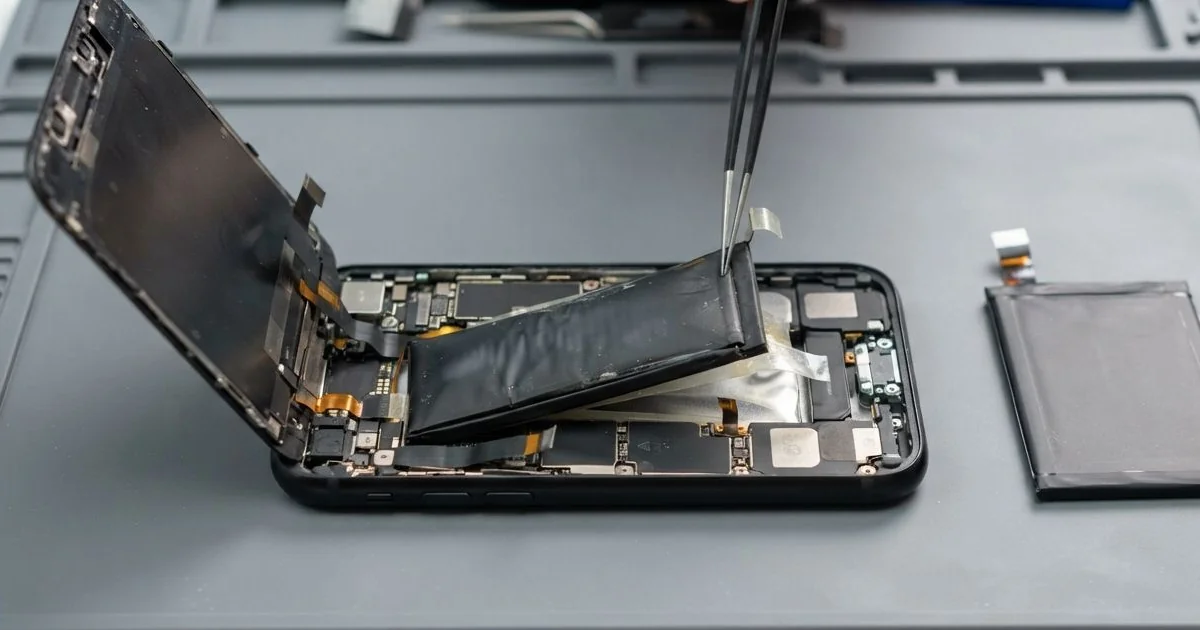
iPhone 3G Battery Replacement in Al Khobar fixes a phone that drains fast, shuts off early or swells. We check the battery free, then fit a new battery in the plastic back. We test charging on the bench, and most jobs are done the same day.
An iPhone 3G battery draining fast is the most common sign. You charge it fully, and it's nearly flat by noon. Some phones switch off while the charge sign still shows a third left.
It's better not to wait. If the front starts lifting, the battery is swelling, and it keeps pushing until the glass cracks. A tired battery also cuts out during calls, just when you need it most.
Not every drain needs a new part. Wi-Fi searching all day or a dirty dock port can both look like a weak battery. We check those first and tell you if a setting is the real cause.
When the battery itself is worn, an iPhone 3G battery replacement is the fix. It sits under the main board in the plastic back, so we open the phone from the front. A new battery for this older model can be harder to find, so we tell you before we order.
How Kabayan Center Replaces an iPhone 3G Battery
We handle these faults as part of every iPhone 3G Battery Replacement.
- Fast drain, even with the phone in standby
- Shutdowns while the charge sign still shows power
- A phone that gets warm in your pocket or on the charger
- A swollen battery lifting the front away from the back
- Charging that stops before it reaches full
- A phone that won't wake up after weeks without charge
Here is how an iPhone 3G battery replacement works with us, step by step:
- We test the battery free and check charging with our own dock cable.
- We tell you what the iPhone 3G Battery Replacement needs, and you decide before any work starts.
- We take out the two small screws beside the dock port and lift the front with a suction cup.
- We unplug the screen cables and lift out the main board with care.
- We warm the old battery's glue and ease it out with a plastic tool, never metal.
- We fit the new battery, connect it and put the board and front back in place.
- We test charging and power on the bench, then let you check the phone yourself.
Have a newer phone? Our phone battery replacement service covers other models, with the same care. Customers come to our shop on King Fahd Road from Dammam and Dhahran too.
Why an iPhone 3G Battery Wears Out: 3 Real Cases
Maps all day on a motorbike mount
This one starts on a delivery route. A rider kept the old iPhone 3G on a handlebar mount for maps, plugged in all day in the sun.
"It's flat before I finish my second street," the rider told us. The rider had searched for iPhone Battery Replacement in Al Khobar during a break.
Maps keep the screen and the GPS working nonstop. Add the summer sun, and the battery stays hot for hours. Heat wears a battery out faster than anything else.
We tested the battery, and it lost charge far too quickly. We fitted a new one and ran a long map test on the bench.
While testing, the cable kept dropping the connection. Bumps on the road had worked the plug loose inside the port, day after day.
Dust from the road had packed in behind it too. We did a charging port repair, cleaning the port and checking each pin.
The phone now lasts a full shift and charges with a firm click. We suggested a mount with a sun shade, and a short cable that doesn't pull on the port.
The front lifted, then cracked
A customer came to us after noticing a gap at the top of the screen. "I pressed it back down, and then I heard it crack," they said.
The battery had been swelling slowly for weeks. On this phone it sits under the board, so it pushed everything above it upwards. Pressing the front down put all that force on the glass.
Never press down a lifting screen, and stop using the phone at once. A swollen battery can tear the cables, or worse, if it gets squeezed.
We opened it with care and took the swollen battery out first. Then we fitted a new one, and the front sat flat in the frame again. The cables underneath had survived without a tear.
The crack in the glass stayed, because the pressing had broken it. Touch still worked, so the customer chose to wait. They planned a phone screen replacement for later, once the glass arrives.
For now the phone is safe and holds its charge well through the day. The crack runs across one corner and doesn't reach the keyboard.
Salt air on the fishing trips
We often see this with phones used near the sea. A retired fisherman took the old phone on every trip near Half Moon Bay, in a shirt pocket.
The fisherman had looked up mobile repair in Al Khobar when the phone began dying in the middle of calls. "New charger, same problem," he said.
Sea air carries salt and damp. The plastic back had a small crack near the headphone socket, and the salt crept in through it. Over many months, it settled on the battery plug and the board.
We opened it and found white salt crust on the battery plug and green spots beside it. The crust was leaking power, even with the phone off. So we did a water damage repair, cleaning the board in a special bath.
Then we fitted a new battery and connected it to a clean plug. The phone now holds charge through a full day of calls.
He now keeps it in a sealed bag on the boat. A small dry bag is a very good habit for any phone near the sea.
How to Keep Your iPhone 3G Battery Healthy
- Keep the phone out of direct sun, on mounts as well as dashboards.
- Charge between 20% and 80% when you can, and avoid running it flat.
- Turn off Wi-Fi and location when you don't need them.
- Use a good dock cable and charger, and a short cable on a mount.
- Keep the phone in a sealed bag near the sea or on a boat.
- Stop using it if the front starts lifting, and bring it in for phone repair in Al Khobar.
Related services
- Motherboard repair for a phone that still won't power on with a new battery
Questions about this repair
Ask us anything else on WhatsApp
we answer during shop hours.