iPhone 3G Charging Port Repair in Al Khobar
iPhone 3G Charging Port Repair in Al Khobar for a dock plug that wobbles, slips out or won't charge. We look at the port free and tell you what it needs. You decide before any work starts, and your photos and songs stay where they are.
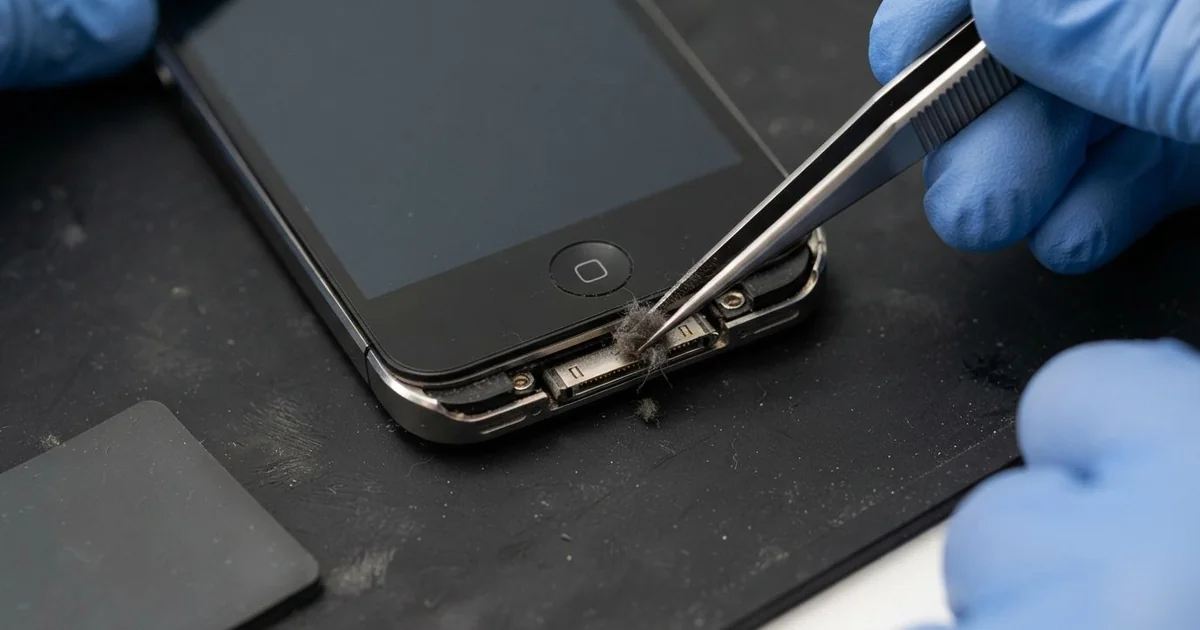
iPhone 3G Charging Port Repair in Al Khobar fixes a phone that charges loosely, slowly or not at all. We check the 30-pin dock port free, then clean it or fit a replacement port. We test charging and syncing with a few cables, so you see it working before you leave.
An iPhone 3G not charging shows up in a few ways. The wide plug wobbles, slides out by itself or works only at one angle. A new cable feels just as loose, because the fault is inside the phone.
It's better not to wait. A loose plug sparks on the tiny pins and slowly burns them. The battery also keeps running flat, and that wears it out faster.
Not every fault needs a new part. The iPhone 3G charging port is wide, and it fills with lint, crumbs and dust over time. Most of the time we clean it with fine plastic tools, and the plug clicks in firmly again.
Bent, burnt or rusted pins need a replacement port. On this model the port sits at the bottom edge of the main board, under the plastic back. The part for this older phone can be harder to find, and some take time to arrive.
How Kabayan Center Repairs an iPhone 3G Charging Port
We handle these faults as part of every iPhone 3G Charging Port Repair.
- A dock plug that wobbles, slips out or only works at one angle
- No charging at all, even with a good cable and charger
- A charging sign that flashes on and off
- A computer that won't see the phone over the cable
- A message that the accessory is not supported
- Greasy, green or burnt pins inside the port
Here is how an iPhone 3G charging port repair works with us, step by step:
- We look into the port under a bright light and test it with our own dock cable.
- We tell you what the iPhone 3G Charging Port Repair needs, and you decide before any work starts.
- We clean out lint and dirt with fine plastic tools and a soft brush.
- If pins are damaged, we take out the two screws beside the port and lift the front.
- We unplug the screen cables and lift out the board to reach the port.
- We fit the replacement port and check each pin under a magnifier.
- We rebuild the phone and test charging and syncing with a few cables.
Have a newer phone? Our charging port repair service covers other models too. Customers come to our shop on King Fahd Road from Dammam and Dhahran as well.
Why an iPhone 3G Stops Charging: 3 Real Cases
Tripped over the charging cable
A customer came to us after the phone was yanked off a bedside table. Someone had tripped over the cable in the dark. The phone landed on the floor with the plug still in.
"Now the cable just falls out," the customer said. They had searched for iPhone Charging Port Repair in Al Khobar the next morning.
A sharp pull on the plug acts like a lever on the port. It cracked the plastic back right beside the port. It also tore the port's joints on the main board.
We opened it and found the port tilted and its pads lifted from the board. A new port alone would not hold on damaged pads. So we did a motherboard repair, rebuilding the pads under a microscope.
Then we fitted a replacement port and tested it with several cables. Each one clicked in firmly and charged at once.
The hairline crack in the plastic back stayed. It is small and doesn't move the port any more. We suggested charging the phone on a low shelf, with the cable kept away from where people walk.
Flour and grease from a busy kitchen
This one starts in a restaurant kitchen. A cook used the old phone as a music player and timer, on a shelf near the stove.
The cook had looked up mobile repair in Al Khobar when the phone stopped charging. "I wipe the screen every day," the cook said. Nobody ever wiped the port.
Kitchen air carries flour, fine crumbs and a thin film of grease. They mix into a paste that sticks in the port and hardens with heat. Each time the plug goes in, it presses the paste deeper.
Under our light, the pins were hidden under a brown, waxy layer. We cleaned them slowly with plastic tools and a soft brush. The plug then went all the way in, and the phone charged again.
The test showed another problem, though. Months of patchy charging had worn the battery down badly. It dropped fast once the cable came out.
The cook chose a phone battery replacement at the same visit. Now the phone plays music through a long shift. We suggested a small dust cap for the port while it sits in the kitchen.
Water dripping from an air conditioner
We often see this in summer. A guard kept the phone charging on a window ledge, right under a wall air conditioner.
The unit dripped water all afternoon, straight onto the plugged-in phone. "It got hot, then it stopped charging," the guard told us.
Water on a charging port is the worst mix. The power turns the wet pins into rust in hours, not days. This model has no water protection, so the water also ran inside.
We found green crust on the pins and white marks along the board's bottom edge. So we did a water damage repair first, cleaning the board in a special bath.
Two pins had burnt black, so we fitted a replacement port. Charging came back firm and steady on every cable we tried.
The headphone socket sits right beside the port, and the water had reached it too. One ear of the earphones still crackles a little, and the guard chose to live with it for now.
Never leave a phone charging where water can drip on it. The guard now charges it indoors, on a dry desk.
How to Keep Your iPhone 3G Charging Port Working
- Look into the port with a torch every few weeks, and bring it in if you see lint or dirt.
- Never clean the port with a metal pin, a needle or a knife tip.
- Pull the plug straight out by its head, never by the wire.
- Charge the phone where nobody can trip over the cable.
- Keep it away from sinks, stoves and dripping air conditioners.
- Get phone repair in Al Khobar as soon as the plug feels loose.
Related services
- Phone screen replacement for cracked glass or a dark display
Questions about this repair
Ask us anything else on WhatsApp
we answer during shop hours.