iPhone 3G LCD Display Replacement in Al Khobar
iPhone 3G LCD Display Replacement in Al Khobar for a cracked front, taps that miss or a picture gone dark. We check the phone free and tell you which layer broke. You decide before any work starts, and your photos stay on the phone.
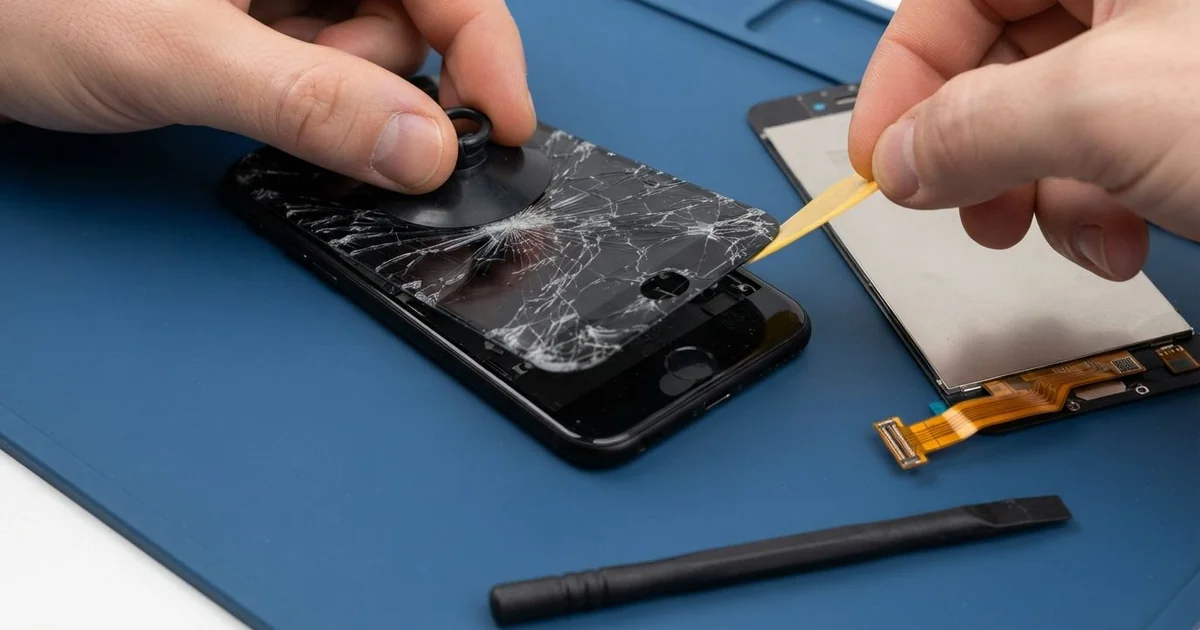
iPhone 3G LCD Display Replacement in Al Khobar fixes cracked glass, dead touch or a dark picture. We check the phone free and find which layer is broken. Then we replace the glass, the display or both, and test touch edge to edge before you take it home.
An iPhone 3G broken screen shows up in a few ways. A crack runs across the glass, or a dark blotch sits in the picture. Some phones look fine, but one row of letters on the keyboard won't type.
It's better not to wait. Cracked glass sheds tiny splinters that can cut your fingers. Dust and sweat get in through the cracks and slowly reach the display behind it.
Not every fault needs a new part. On this model the touch glass and the display are separate layers, joined by small cables. A cable can slip loose after a drop or a squeeze, and we fix that by seating it again firmly.
Broken glass or a damaged display needs a new part. An iPhone 3G screen replacement covers only the layer that failed, or both when both are hurt. Parts for this older phone can be harder to find, and some take time to arrive.
How Kabayan Center Replaces an iPhone 3G LCD Display
We handle these faults as part of every iPhone 3G LCD Display Replacement.
- Cracked or shattered front glass
- A dark blotch, lines or a white screen
- Touch that is dead in one strip, or a keyboard row that won't type
- Ghost taps that open apps by themselves
- A dim or flickering picture
- A front that lifts away from the plastic back after a fall
Here is how an iPhone 3G screen replacement works with us, step by step:
- We check the phone free and test touch, the picture, sound and charging.
- We tell you which layer failed, and you decide before any work starts.
- We take out the two small screws beside the dock port.
- We lift the front gently with a suction cup and unplug its cables from the board.
- We separate the glass from the display when only one of them is broken.
- We fit the new part and test touch on every corner and every keyboard row.
- We close the phone, test the Home button and let you try it yourself.
Have a newer phone? Our phone screen replacement service covers other models, with much the same steps. Customers come to our shop on King Fahd Road from Dammam and Dhahran too.
How an iPhone 3G Screen Breaks: 3 Real Cases
Sat on in a back pocket
A common case: a phone in a back pocket and a long drive. A sales rep slid into the car seat and heard a soft crack.
"There's a black patch now, and the glass is broken," the rep said. The rep had searched for iPhone Screen Replacement in Al Khobar from the same car park.
Sitting on a phone bends it in the middle. The glass cracks, and the display behind it gets a pressure mark that spreads like ink.
We opened it and found both layers damaged. So we did the iPhone 3G LCD display replacement, and the picture came back clear.
During the test, the dock plug felt loose. The plastic back had a hairline crack beside the port, and the bending had shaken the port loose inside. We did a charging port repair so the cable clicked in firmly again.
The rep now keeps the phone in a front pocket or the car's cup holder. Back pockets and car seats are a bad mix for any phone.
The hairline crack in the plastic back stayed, but it no longer moves the port.
One keyboard row stopped typing
We often see this on phones that have worked hard for years. A shop owner used the iPhone 3G for orders and messages every day. "The top row of letters just won't type," the owner said.
The owner had looked up mobile repair in Al Khobar, sure the phone needed a full new screen. Years of heat and pressure wear out the touch layer in the most used spots. The display itself was still sharp and bright.
We replaced only the touch glass and kept the original display. Every letter typed again, from corner to corner.
While testing, we found the battery dropping fast and getting warm. Old age had worn it down too. We did a phone battery replacement, so the phone lasts through a working day.
The old display has a faint yellow tint from age. A new display would have taken longer to arrive, so the owner chose to keep it for now. The picture is clear, just a little warm in colour.
We suggested a thin screen protector, so the new glass wears more slowly. A protector takes the daily scratches instead of the glass.
Dropped in a car wash bucket
This one starts with a bucket of soapy water. A driver was washing the car when the phone slipped out of a shirt pocket.
It came out in seconds and seemed fine. The driver dried it on a towel and carried on. The next day, the screen flickered and taps landed in the wrong places.
This model has no water protection. The small water marks inside the headphone socket and the dock port had both turned red.
We opened it and found soap film and white crust under the display cables. The water had reached the board, not just the screen. So we did a water damage repair first, cleaning the board and every connector.
A wet phone should never go on charge, even if it seems fine. The driver had not charged it, and that helped a lot.
Once the board was clean, we did the iPhone 3G LCD display replacement with new glass and a new display. Touch landed in the right place again, and the flicker was gone. The driver now leaves the phone inside the car while washing it.
How to Keep Your iPhone 3G Screen Safe
- Keep the phone out of back pockets, so you never sit on it.
- Use a thin screen protector to slow down wear on the touch glass.
- Use a case that covers the plastic back near the dock port.
- Keep the phone away from buckets, sinks and the pool edge.
- Keep it off the car dashboard, since heat yellows the display and weakens the battery.
- Bring it in for phone repair in Al Khobar at the first crack, before dust gets inside.
Related services
- Motherboard repair for a phone that stays dark even with a new screen
Questions about this repair
Ask us anything else on WhatsApp
we answer during shop hours.