iPhone 3GS LCD Display Replacement in Al Khobar
iPhone 3GS LCD Display Replacement in Al Khobar for a shattered front, a blotchy picture or touch that misses. We check it free and tell you which part broke. You decide before any work starts, and nothing on the phone gets wiped.
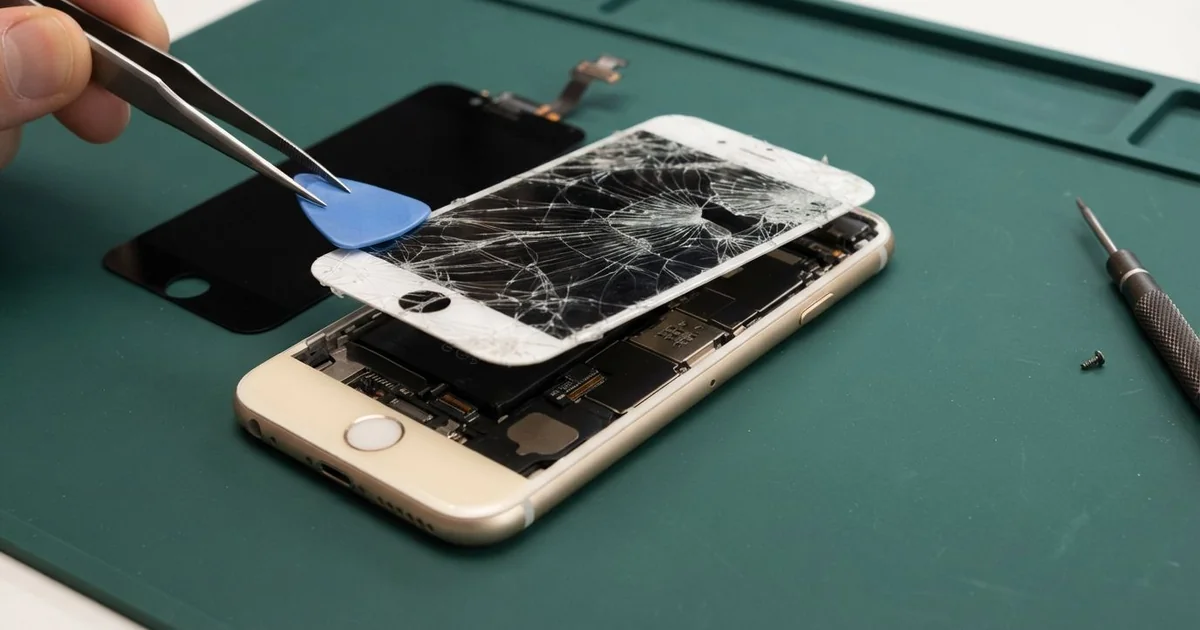
iPhone 3GS LCD Display Replacement in Al Khobar fixes cracked glass, a blotchy picture or touch that misses. We check it free and find which layer broke. Then we fit new glass, a new display or both, and test touch and calls before you take it home.
An iPhone 3GS broken screen can look different from phone to phone. Some have a web of cracks from one corner. Others look perfect but show a dark cloud in the picture, or ignore taps near the top.
It's better not to wait. Loose splinters can cut a thumb, and cracks let dust and sweat reach the display underneath. A screen that gets worse can also lock you out of the phone before you copy your photos.
Not every fault needs a new part. On this model the touch glass and the display are separate layers, and each has its own small cable. If a cable slips after a knock, we seat it again and the fault is gone.
Broken glass or a damaged display is different. An iPhone 3GS screen replacement fits only the layer that failed, or both when both are hurt. Parts for this older phone can take time to arrive, so we tell you before we order anything.
How Kabayan Center Replaces an iPhone 3GS LCD Display
We handle these faults as part of every iPhone 3GS LCD Display Replacement.
- Cracked, chipped or shattered front glass
- A dark cloud, lines or white bars in the picture
- Taps that miss, or a strip of glass that ignores your finger
- A screen that stays on against your cheek in calls
- A dim or flickering picture
- A front that sits loose in the plastic back
Here is how an iPhone 3GS screen replacement works with us, step by step:
- We check the phone free and test touch, the picture, the cameras and charging.
- We tell you which layer failed, and you decide before any work starts.
- We take out the two small screws beside the dock port.
- We lift the front with a suction cup and unplug its cables from the board.
- We separate the glass and the display, and keep the part that still works.
- We fit the new part, then test touch, brightness and the call sensor.
- We close the phone, test the Home button and let you try it yourself.
Have a newer phone? Our phone screen replacement service covers other models, with much the same care. Customers come to our shop on King Fahd Road from Dammam and Dhahran too.
How an iPhone 3GS Screen Breaks: 3 Real Cases
Slipped off a treadmill at the gym
A customer came to us after a morning run went wrong. The phone sat on the treadmill's front panel and bounced off onto the moving belt. It flew back and hit the hard floor face down, right behind the machine.
"The screen is cracked, and my photos come out black," they said. They had searched for iPhone Screen Replacement in Al Khobar on a friend's phone.
A fast belt throws a phone hard against the floor. The glass took most of the hit, and it cracked from the top edge. The impact also shook the parts inside.
We found the glass broken but the display behind it fine. So we did a smaller iPhone 3GS LCD display replacement with only the touch glass, and touch worked again.
The black photos had another cause. The back camera's small cable had jumped out of its socket in the fall, and its lens was cracked. We did a phone camera repair, fitting a new camera.
The customer left with a clear screen and sharp photos again. We suggested a running armband, so the phone stays on the body and off the machine.
Crushed in a tight handbag
This one starts with a full handbag. A teacher carried the phone loose among keys, a water bottle and a stack of books.
The teacher had looked up mobile repair in Al Khobar when a dark cloud appeared in the picture. It grew a little every day. "There's no crack, so why is it dark?" the teacher asked.
Pressure from heavy things can crush the display layer without breaking the glass. The keys had also left deep scratches across the front.
We opened it and found a pressure mark on the display and scratches on the glass. The teacher chose to replace both layers, so the screen came back clear and smooth.
While the phone was open, we checked the dock port too. It was packed with lint and crumbs from the bottom of the bag.
The plug barely reached the pins. We did a charging port repair, cleaning it until the cable clicked in firmly.
The phone now charges at once and shows an even picture. The teacher now keeps it in a padded pocket of the bag, well away from the keys.
A splash at the compound pool
We often see this in summer. A guest at a compound pool party left the phone on the edge. A big jump into the water soaked it.
It still turned on, but the picture flickered and touch went wild by the evening. This model has no water protection at all.
The owner had dried it in the sun, which made the inside warm and damp. Chlorine in pool water also eats into metal parts.
We opened it and found water marks under the display and white crust on the cables. So we did a water damage repair on the board first. Then we did the iPhone 3GS LCD display replacement with new glass and a new display.
The picture and touch came back clean and steady after a long test. Switch a wet phone off at once, and never charge it.
One part did not fully recover. The small sensor that darkens the screen in calls is now slow, so the screen sometimes wakes against the cheek. The owner chose to live with it for now and uses the speaker for long calls.
How to Keep Your iPhone 3GS Screen Safe
- Use an armband at the gym, not the treadmill panel.
- Carry the phone in its own pocket, away from keys and heavy things.
- Fit a thin screen protector to stop scratches from turning into cracks.
- Keep it well away from the pool edge and the beach towel.
- Switch a wet phone off at once, and never dry it in the sun.
- Bring it in for phone repair in Al Khobar when a dark cloud first appears, since it grows.
Related services
- Phone battery replacement for a phone that drains fast or shuts off early
Questions about this repair
Ask us anything else on WhatsApp
we answer during shop hours.