iPhone 4 Battery Replacement in Al Khobar
iPhone 4 Battery Replacement in Al Khobar for a phone that drains by midday or shuts off early. We test the battery free and tell you what it needs. You decide before any work starts, and your photos and chats stay safe.
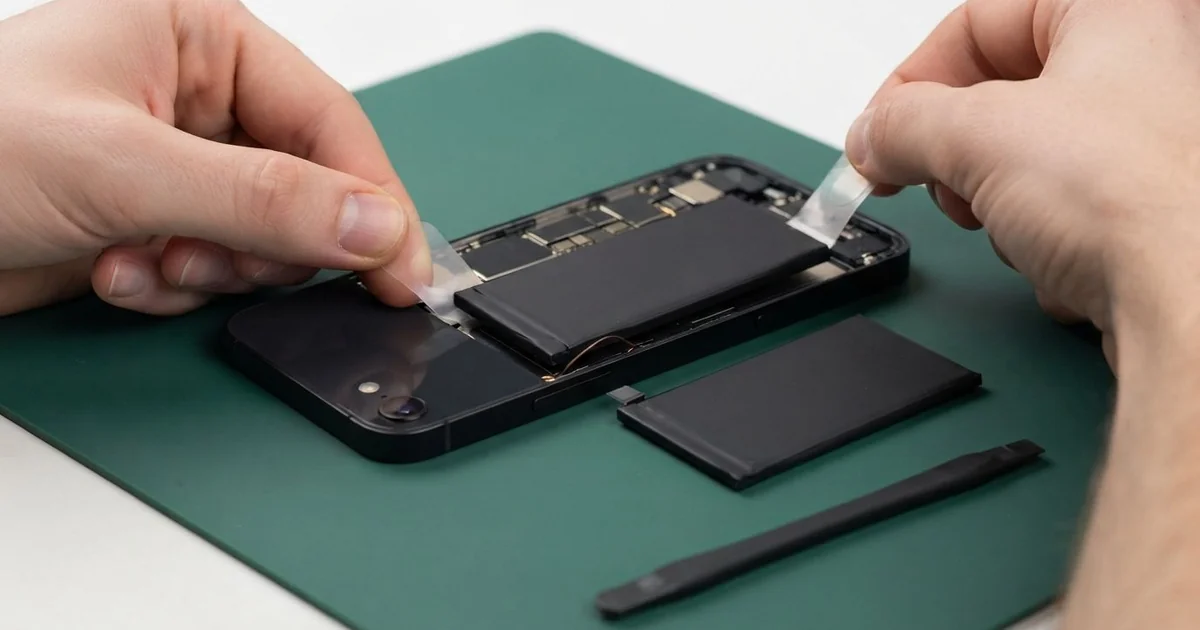
iPhone 4 Battery Replacement in Al Khobar fixes a phone that drains fast, shuts off early or swells. We test the battery free, then slide the back glass off and fit a new battery. We test charging and close the back with care, and most jobs are done the same day.
An iPhone 4 battery draining fast is the sign most owners notice first. A full charge is gone by midday, even with little use. Some phones switch off in the cold office AC or when the camera opens.
It's better not to wait. On this phone the battery sits right under the back glass. When an old battery swells, it pushes that glass up and can crack it.
Not every drain needs a new part. Apps refreshing in the background, Wi-Fi searching or a worn cable can look like a weak battery. We check those first and tell you if a setting is the real cause.
When the battery itself is worn, an iPhone 4 battery replacement is a neat job. Two tiny screws at the bottom hold the back glass, and it slides off. Batteries for this older phone can be harder to find, so we tell you before we order one.
How Kabayan Center Replaces an iPhone 4 Battery
We handle these faults as part of every iPhone 4 Battery Replacement.
- A full charge gone by midday
- Shutdowns in the cold, or when the camera opens
- A back glass lifting or cracking at one end
- A phone that gets hot while charging
- Charging that stops before full, or a level that jumps around
- A phone that won't start without the charger plugged in
Here is how an iPhone 4 battery replacement works with us, step by step:
- We test the battery free and check charging with our own dock cable.
- We tell you what the iPhone 4 Battery Replacement needs, and you decide before any work starts.
- We take out the two tiny screws at the bottom and slide the back glass up and off.
- We take out the small screw over the battery connector and unclip it.
- We lift the old battery out slowly with its pull tab, never by prying.
- We fit the new battery, connect it and test charging and power.
- We slide the back glass on, fit the screws and let you check the phone yourself.
Have a different phone? Our phone battery replacement service covers other models, with the same care. Customers come to our shop on King Fahd Road from Dammam and Dhahran too.
Why an iPhone 4 Battery Wears Out: 3 Real Cases
The back glass popped up at the bottom
A customer came to us with the back glass sitting crooked. "There's a gap at the bottom, and it's getting bigger," they said. A thin crack had already started from one screw.
They had searched for iPhone Battery Replacement in Al Khobar, worried the phone might burst. On this model, a swelling battery has only one way to go. It pushes straight up against the back glass.
A swollen battery is not safe to use, even when the phone still works. We slid the back off with care and lifted the puffy battery out first.
We fitted a new battery, and it sat flat in the frame. But the old back glass was cracked and slightly bent from the pressure.
So we also did an iPhone back glass replacement, fitting a new back that sits flush with the steel band. A cracked back glass cuts hands and lets dust reach the camera.
The phone went home looking whole again. We explained the early signs: a battery that drains faster than usual and a back that feels warm. Bringing it in at that point saves the glass.
Plugged in every night as an alarm clock
This one starts on a nightstand. A nurse kept the old iPhone 4 as an alarm clock, plugged in every night and most days too.
The nurse had looked up mobile repair in Al Khobar when the phone kept switching off. It only stayed on while charging. "It only works with the cable in now," the nurse said.
A battery kept full and warm all the time wears out quietly. After years like that, it could barely hold any charge at all.
We fitted a new battery and ran a long test away from the charger. The phone stayed on and held its charge well.
The dock port was another matter. Years of daily plugging had worn two pins down, and the plug sat loose. A replacement port part would take time to arrive.
The nurse chose to wait for a charging port repair and use the phone as it is for now. It still charges, but only with the cable held straight.
We suggested unplugging once it's full, and using a small stand that keeps the cable from bending.
From cold AC into a humid night
We often see this in late summer. A restaurant manager drove home in a cold car every night. Then came the walk through thick, humid air near the Corniche.
Each time, the cold phone fogged up, inside as well as out. After months of this, the battery began to drain fast, and the phone shut down at random.
Tiny drops formed on the battery connector and the board every evening. Over time, they left a green film that leaked power, even with the screen off.
We found that film around the battery connector and on the board beside it. So we did a water damage repair, cleaning the board in a special bath. Then we fitted a new battery to a clean connector and checked for leaking power again.
The phone now lasts the whole day and has stopped shutting down at random. It also charges a little faster than before.
The manager now keeps the phone in a bag for a few minutes before stepping out. That gives it time to warm up slowly, so the inside stays dry.
How to Keep Your iPhone 4 Battery Healthy
- Unplug the phone once it's full, instead of charging all night every night.
- Keep it out of the sun and off the car dashboard.
- Let a cold phone warm up in a bag before you walk into humid air.
- Charge between 20% and 80% when you can, and avoid running it flat.
- Use a good dock cable and charger that click in firmly.
- Stop using it if the back glass lifts, and bring it in for phone repair in Al Khobar.
Related services
- Motherboard repair for a phone that still won't power on with a new battery
Questions about this repair
Ask us anything else on WhatsApp
we answer during shop hours.