iPhone 4 Motherboard Repair in Al Khobar
iPhone 4 Motherboard Repair in Al Khobar for a phone that won't power on or restarts in a loop. We check the board free and tell you what it needs. You decide before any work starts, and we never delete your data without asking.
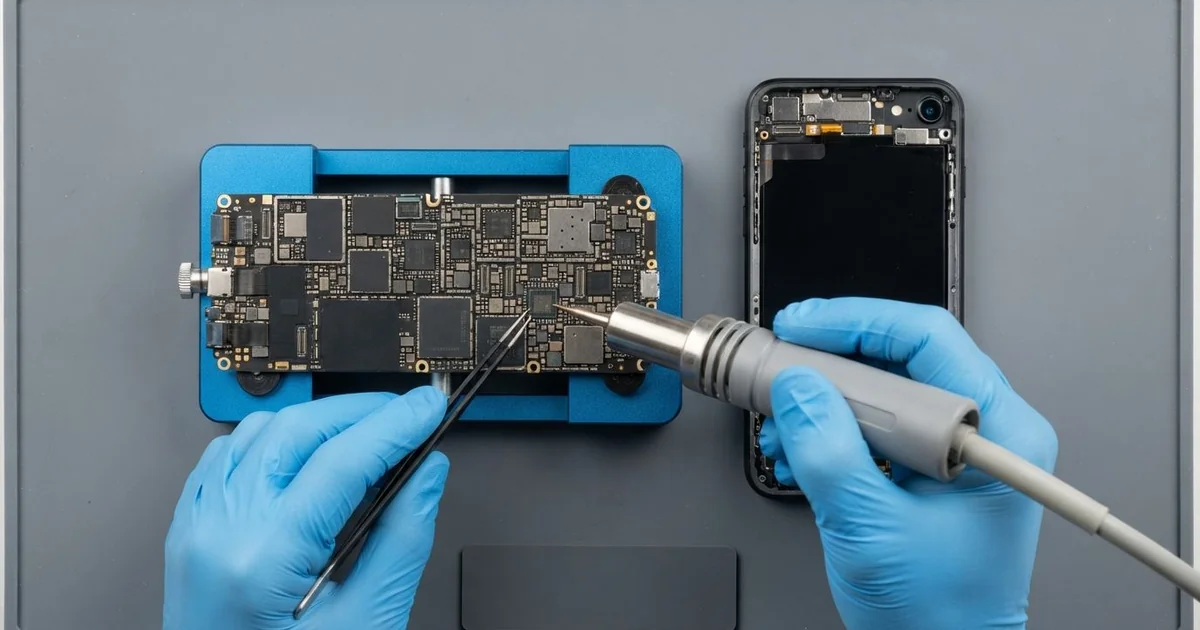
iPhone 4 Motherboard Repair in Al Khobar fixes a phone that won't power on, keeps restarting or shows no service. We check the board free and find the faulty part under a microscope. Then we replace that small part, and we save your data first if we can.
An iPhone 4 not turning on is the most common sign. The screen stays black, even after hours on the charger. Other phones restart in a loop, get stuck on the logo or keep searching for a network.
It's better not to wait. Rust from water keeps eating the board, even while the phone is off. A short can heat the parts around it and turn a small fault into a bigger one.
Not every dead phone has a board fault. A worn battery, a dirty dock port or a loose screen cable can look the same. We test those first, so you never pay for board work you don't need.
The iPhone 4 motherboard sits under the back glass, packed with tiny parts under metal shields. Often only one small part has failed, and we replace just that. Parts for this older phone can be harder to find, so we tell you before any order.
How Kabayan Center Repairs an iPhone 4 Motherboard
We handle these faults as part of every iPhone 4 Motherboard Repair.
- No power at all, even on the charger
- Stuck on the logo, or restarting in a loop
- No service, or a network search that never ends
- Wi-Fi that is weak or won't switch on
- A phone that gets warm while switched off
- Faults that start days or weeks after water
Here is how an iPhone 4 motherboard repair works with us, step by step.
- We check the phone free and test the battery, screen and dock port to rule them out.
- We connect a power meter that shows how much power the board draws.
- We tell you what we found in the iPhone 4 Motherboard Repair, and you decide before any work starts.
- We slide off the back glass, disconnect the battery and take out the board.
- We lift the metal shields and find the faulty part under a microscope.
- We replace that part with a fine hot-air tool and a soldering tip.
- We rebuild the phone, test power, signal, Wi-Fi and charging, then let you check it.
Have a different phone or a laptop? Our motherboard repair service covers other devices too. Customers come to our shop on King Fahd Road from Dammam and Dhahran as well.
Why an iPhone 4 Board Fails: 3 Real Cases
Slipped into the water at the ablution area
One afternoon a phone came in still damp around the edges. It had slipped from a shirt pocket into the water at a mosque ablution area.
The owner had searched for iPhone Motherboard Repair in Al Khobar after the phone died that evening. "I dried it with a hair dryer, but it won't start," he said.
A hair dryer warms the outside but pushes damp deeper inside. This model has no water protection, so the water ran straight onto the board.
We found white crust and green spots under the metal shields. We did a water damage repair, cleaning the board in a special bath. Several tiny lines near the main chip had already been eaten away.
The phone started for a few minutes at a time, but never stayed on. We saved the photos and contacts first, before any more board work. We did that through our data recovery service.
The board could not be made reliable again. But every photo and contact moved safely to the owner's new phone. Switching it off at once and bringing it in that day would have given the board a better chance.
A market-stall battery that was not right
This one starts with a quick battery swap at a market stall. The new battery was unbranded, with no maker's name at all. Within a month, the phone died on the charger.
"It got hot, then nothing," the owner told us. The owner had looked up mobile repair in Al Khobar, afraid the board was finished.
A poor battery may lack the small safety parts that stop it overloading. When it fails, it can send a spike of power into the board. The power part beside the battery connector takes the hit first.
We took out the battery and found it slightly puffy. Under the microscope, the power part near the connector had a burnt mark. We replaced it with a fine hot-air tool.
Then we did a proper phone battery replacement with a good battery. The phone started at once and charged normally.
We ran it on the bench through a long test, and it stayed cool. Every chat and photo was still in place. The owner now knows to ask what battery goes in before any repair, wherever it's done.
Next to the oven every working day
We often see this with phones used in kitchens. A baker kept the old iPhone 4 on a shelf beside a hot oven, playing music all day.
"It restarts in the afternoon, but it's fine in the morning," the baker said. A restore on the computer had changed nothing. Neither had a new charging cable.
Heat makes a board grow a little, and cooling shrinks it back. After months of this, a tiny joint under a chip had cracked. Once the board warmed up, that joint lost contact, and the phone restarted.
On the bench, we warmed the board gently until it restarted. Under the microscope, we found the cracked joint beside the main power chip. We cleaned the area and joined it again with fresh solder.
The phone then ran a long warm test without a single restart. Music, Wi-Fi and calls all worked well, even with the bench lamp warming it.
The baker now keeps the phone on the far side of the kitchen. It sits well away from the oven and the steam. A small speaker on the shelf plays the music instead.
How to Keep Your iPhone 4 Board Safe
- Keep the phone away from ovens, stoves and car dashboards.
- Ask what battery goes in before any repair, and avoid unbranded ones.
- Never charge a wet phone, and skip the hair dryer and the rice.
- Use a case with raised edges, since this phone has glass on both sides.
- Copy your photos and contacts to a computer every few weeks.
- Get phone repair in Al Khobar as soon as the phone restarts by itself or runs warm while off.
Related services
- Charging port repair for a dock plug that is loose or won't charge
Questions about this repair
Ask us anything else on WhatsApp
we answer during shop hours.