iPhone 4S Charging Port Repair in Al Khobar
iPhone 4S Charging Port Repair in Al Khobar for a loose plug, slow charging or no charging at all. We check the dock port free and tell you what it needs. You decide before any work starts, and nothing on the phone is wiped.
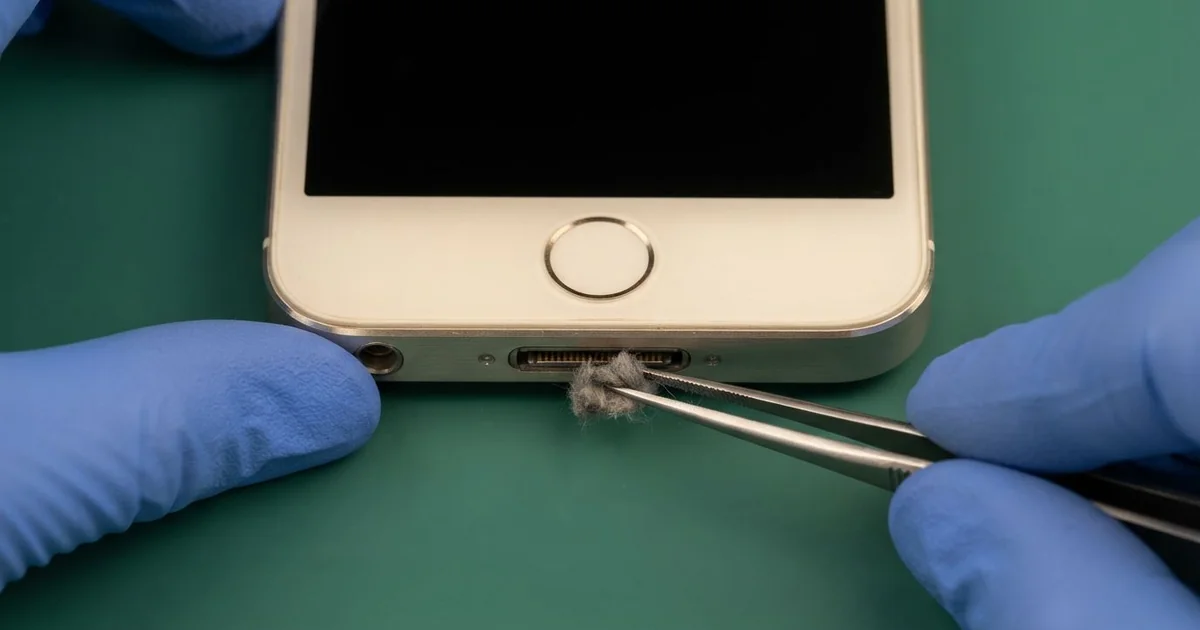
iPhone 4S Charging Port Repair in Al Khobar fixes a phone that charges loosely, slowly or not at all. We check the 30-pin dock port free, then clean it or fit a new port. We test charging on several cables, so you know it's fixed before you leave.
An iPhone 4S not charging shows up in a few ways. The wide plug sits loose and drops out. The phone charges only when the cable rests at an angle, or it charges very slowly.
Holding the plug in place works for a while, but it strains the port even more. A loose plug sparks on the tiny pins and slowly burns them. The battery also runs flat again and again, and that wears it out.
Not every fault needs a new part. The iPhone 4S charging port is wide, so lint, sand and grime build up inside it. Most of the time a careful clean with plastic tools is all it takes.
Bent, burnt or rusted pins need a new port. On this model the port sits on its own cable, and we reach it from the back. Port parts for this older phone can be harder to find, and some take time to arrive.
How Kabayan Center Repairs an iPhone 4S Charging Port
These are the charging faults we fix on the iPhone 4S.
- A wide plug that sits loose or drops out
- Charging only at an angle, or only when held
- Very slow charging, even with a good charger
- A message that the accessory is not supported
- A computer that doesn't see the phone over the cable
- Greasy, green or burnt pins inside the port
Here is how an iPhone 4S charging port repair works with us, step by step:
- We look into the port under a bright light and test it with our own dock cable.
- We tell you what it needs, and you decide before any work starts.
- We clean out grime and lint with fine plastic tools and a soft brush.
- If pins are damaged, we take out the two tiny screws at the bottom and slide the back glass off.
- We disconnect the battery, then lift out the battery and the board to reach the port.
- We fit the new port cable and rebuild the phone, part by part.
- We test charging, syncing and the plug fit with several cables.
Have a different phone? Our charging port repair service covers other models too. Customers come to our shop on King Fahd Road from Dammam and Dhahran as well.
Why an iPhone 4S Stops Charging: 3 Real Cases
An old radio adapter in the car
A customer came to us after a long drive with music playing. An old radio adapter was plugged into the phone's dock port, sending songs to the car stereo.
"The adapter got hot, and now the phone won't charge at all," they said. They had searched for iPhone Charging Port Repair in Al Khobar from a petrol station.
Old dock adapters like this were never made for hours in a hot car. This one had a faulty power line inside. It pushed the wrong power back into the phone through the port.
Under our light, two pins were dark and the plastic between them had softened. We did the iPhone 4S charging port repair, but the phone still would not charge.
The bad power had burnt the small charging part on the board. So we did a motherboard repair, replacing that part under a microscope.
After that, the phone charged normally and started with all its songs and photos. We suggested playing music over a simple cable instead, and leaving old adapters in the drawer.
The customer threw the hot adapter away on the way out.
Sunscreen packed into the port
This one starts with a beach bag. A lifeguard carried the phone loose in a bag with sunscreen, towels and sandy shoes.
The lifeguard had looked up mobile repair in Al Khobar when the plug would only go in halfway. "It's greasy in there," the lifeguard said.
Sunscreen is oily. It catches sand and lint, then hardens into a paste in the heat. Each time the plug goes in, it pushes that paste deeper.
Under our light, the port was filled with a pale, sticky layer full of sand. We softened it and picked it out slowly with plastic tools. The pins underneath were dull but straight.
The plug clicked in firmly after the clean, and charging came back. The battery, though, was in poor shape. Weeks of patchy charging and hot days had worn it right down.
The lifeguard chose a phone battery replacement at the same visit. Now the phone charges well and lasts a full shift by the water. We suggested a zip pouch inside the beach bag.
Sunscreen and sand now stay well away from the port.
Charged on a steamy bathroom shelf
We often see this in small flats. A tenant charged the phone on the bathroom shelf every morning, because that was the free socket.
Hot showers fill a small bathroom with steam. The steam settled in the open port and on the pins while the power was flowing. "It stopped charging, and the pins look green," the tenant said.
This model has no water protection. Damp plus power turns pins into rust much faster than damp alone. The small water marks inside the dock port had turned red.
We found green crust on the pins and white marks along the board's bottom edge. So we did a water damage repair first, cleaning the board in a special bath.
The pins were too far gone, so we did the iPhone 4S charging port repair with a new port cable. Charging came back firm and steady with every cable we tried.
The Home button, close to the port, stayed a little sticky from the damp. The tenant chose to live with it for now, since it still clicks.
The charger now sits on a bedroom shelf. Never charge a phone in a steamy bathroom.
How to Keep Your iPhone 4S Charging Port Working
- Unplug old dock adapters from the phone, and never leave them in a hot car.
- Keep the phone in a zip pouch away from sunscreen and sand.
- Charge it in a dry room, never in the bathroom.
- Look into the port with a torch now and then for grime or lint.
- Never clean the port with a metal pin, a needle or a toothpick.
- Get phone repair in Al Khobar as soon as the plug won't go all the way in.
Related services
- Phone screen replacement for cracked glass or a dark display
Questions about this repair
Ask us anything else on WhatsApp
we answer during shop hours.